In short: a spy tool, in advertising, is a service that collects other advertisers' ads into a searchable archive. It shows what competitors run, how long they keep paying for each ad and where the click lands. Tools differ by channel, archive depth and how well they tell one owner from many.
What a spy tool is
"Spy tool" is trade slang for software that researches competitors' ads, and the job is less dramatic than the name. Such a tool keeps public ads after the advertiser moves on and lets you filter them by country, category, format and date.
Type "online spy tools" into a search engine and half the results are phone monitoring apps. This page doesn't cover them. Here a spy tool means an ad spy tool: software for studying other advertisers' ads, on Facebook and elsewhere.
Three groups buy them: media buyers and affiliates checking which offers, angles and countries already work; e-commerce sellers looking for products that several stores keep advertising; and agencies showing a client the market. All three want to know what's working for someone else, and how sure they can be about it.
What a spy tool shows about one ad
Open any ad in a decent tool and you get a card. It keeps the creative, text and button after the ad is switched off, plus the dates it was first and last seen and the days it ran.
Run length is the most useful number on the card. A live ad costs its advertiser money every day, so one still running after a month was worth paying for thirty times in a row.
Better tools add two more things. The first is the creative's reach: how many times the same image or video was launched, and by how many pages. Two hundred launches from forty pages look like a working idea. One launch is probably still a test.
The second is the owner: the page name, the domain behind the click and, if the tool groups them, the operator behind several pages and domains. The destination page matters too, because a reviewer can be shown a harmless page while a buyer lands on the real offer.
How a spy tool works
Under every interface sit three layers: how ads are collected, how they're processed, and what the search lets you ask.
Collection: where the ads come from
Some ads come straight from the platforms. Meta publishes Facebook and Instagram ads in the Meta Ad Library. Google has the Ads Transparency Center. TikTok discloses ads shown in Europe in its Commercial Content Library. A tool that reads them can keep ads that later vanish from the library.
Other tools browse like a person, from different countries and profiles, and record the ads they're served. A third method relies on a browser extension that records the ads its users see, so coverage depends on who installed it.
Collection speed is a number worth asking any vendor for. Spytrend states about 280 million new ads a month across Facebook and TikTok, more than 170 million of them on Facebook.
Processing: turning ads into data
Raw ads are messy: one video gets uploaded hundreds of times, texts arrive in dozens of languages, and pages rename themselves.
Four steps turn that into data. Deduplication folds repeat uploads into one creative with a launch count. Classification sorts ads into business categories, which turns "pet products in Canada" into a filter. Grouping by owner joins the pages, domains and tracking pixels of one operator. Landing capture follows the click and stores the page behind it.
Search: how you get answers out
The interface decides which questions are cheap to ask. Search by ad text and you learn who used the words you typed. Filter by category, sort by run length and open owner cards, and you learn what has lasted in your niche and who's behind it.
How to spy on ads step by step
The walk-through below uses Spytrend.
- In the Ads section, set the target market and a business category, and raise the days-active floor to 30.
- Switch the order to "most re-uploaded", so relaunched creatives rise to the top.
- Click through to the creative behind the first strong ad and note six numbers: uploads, live ads, pages, domains, owners and the longest run.
- From the creative, go to its owner and count the storefronts and page IDs under one name.
- Check the store and the offer page a shopper in your target market reaches. If the real page sits behind a redirect, Spytrend opens it for $1 per run, refunded if the run fails.
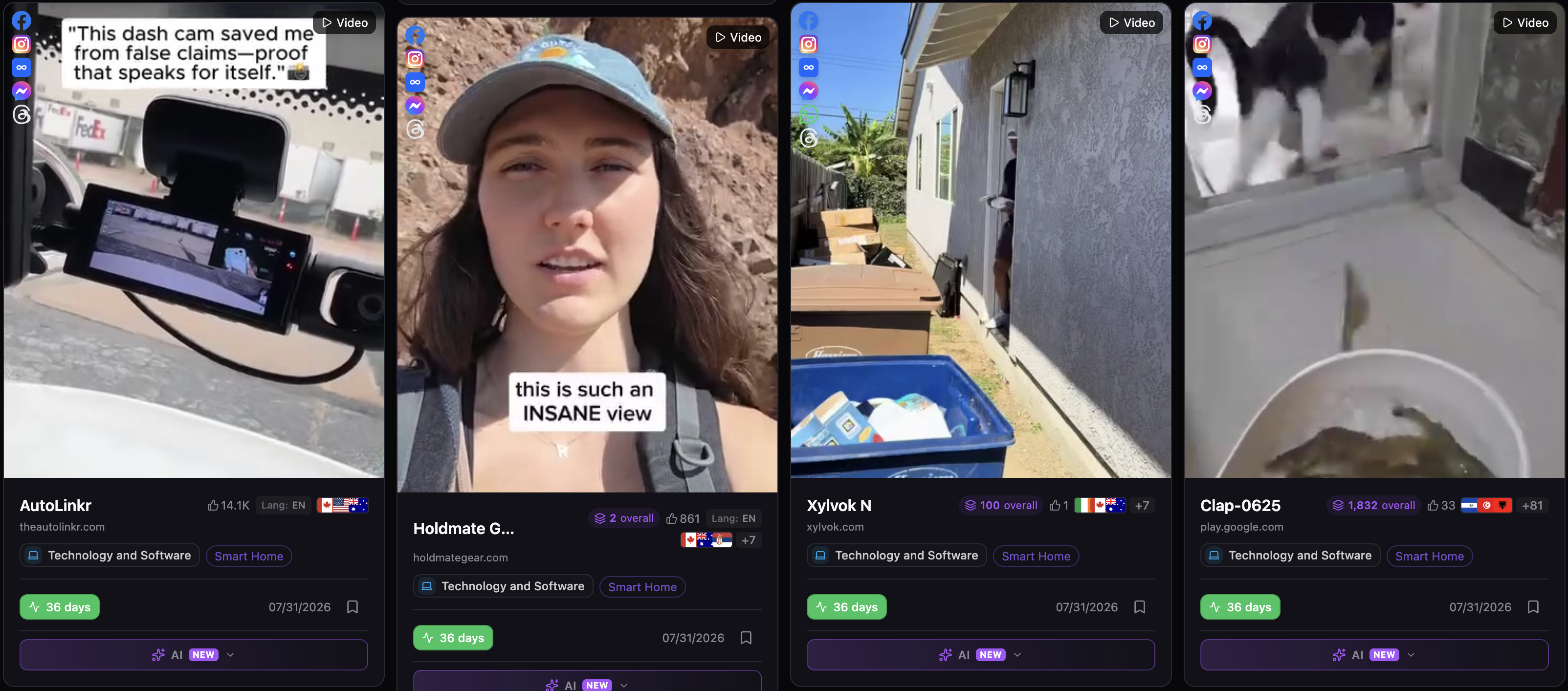
All four launched on the same day and each shows 36 days live, so the cards compare cleanly. The dash cam ad on the left has 14.1K likes. The ad on the far right has 33 likes, yet its creative has been uploaded 1,832 times. The one next to it shows 100 uploads.
Rank by likes and you study the dash cam first. Rank by re-uploads and it's the video launched 1,832 times. Relaunching costs money each time, so re-uploads make the better sort order. Each counter opens a creative card, explained in the Creatives write-up.
Step five moves from the ad to the business: the offer page shows the price and what a shopper actually buys.
Types of ad spy tools
"Ad spy tool" covers several kinds of product, each built around one channel. A tool that's excellent on Facebook can be useless for search, and the other way round.
| Type | What it watches | Typical question | What it misses |
|---|---|---|---|
| Social ads spy tools | Facebook, Instagram, TikTok and other social ads | Which creatives and offers lasted in my niche, and who runs them | Search and display |
| PPC and keyword spy tools | Paid search ads and the keywords domains bid on | Which search terms a competitor buys | Creatives and social formats |
| YouTube spy tools | Video ads on YouTube and the channels running them | Which video ads run before content in my niche | Other platforms |
| Affiliate and native spy tools | Native ad networks, push and pop traffic, affiliate landers | Which offers and landers affiliates push | Mainstream brand advertising |
| E-commerce spy tools | Product ads plus the online stores behind them | Which products sell and in which stores | Service and lead-generation ads |
A PPC spy tool is the odd one out. Search ads are short texts matched to keywords, so the useful data is the keyword list, the copy and positions over time. PPC spy tools often come inside SEO suites. A good keyword spy tool shows which search terms a domain pays for and won't help you test a TikTok video.
A YouTube spy tool sits closer to the social tools, with one platform and mostly video. Affiliate spy tools follow native networks and push traffic, and track the pre-landers between the ad and the offer.
If your budget goes to Facebook and TikTok, the first row does most of the work.
How to choose a spy tool: eight checks
Most ad spy tools have a free plan or a cheap trial. Run it on a market you've worked before, where you can tell whether the data is right.
- Channels. Every platform you buy on should be covered. If you only buy on Facebook, one channel may be enough.
- Countries. Each market you run in should be its own filter.
- Stopped ads. Last season's winners have mostly stopped. An archive that drops them hides the best examples.
- Days live and relaunch count. Both should be sortable across the whole list.
- Categories. Text search can't find an offer that's printed on the image. A category filter can.
- Owner grouping. Five storefronts of one seller should read as one competitor.
- Landing pages. Ask what the tool shows when the real page sits behind a redirect.
- Price logic. Find out what grows with the price: searches, credits, seats or networks.
Two free tests can save a month's fee. Look up an advertiser you know in the tool and in the free official library, and compare. Then pick a product that sold well last season and check whether the tool dates its earliest ad and shows its longest run.
Spy tool pricing: what you actually pay for
Two tools with the same monthly price can cost very different amounts, because they meter different things.
Flat access is one price for the whole archive: easy to budget, harder to try. Daily limits suit occasional checks and feel tight on a research day.
Credits make light use cheap and heavy use expensive, and a monthly pool can run out in the first week of a new niche. Other tools charge by seats or by the networks included.
Some features cost extra per use, often the real landing page behind a redirect, and some data sits only on the top tier. The price that matters is the tier that includes what you need.
The fairest comparison is one real research session in each trial: one niche, one country, fifty ads and five owners. Note where each tool stopped you.
The spy tool market: six ad spy tools and what they cost
All six tools below read Facebook ads. They differ in what else they cover and in how they charge. Prices and free terms come from each tool's pricing page or a live account.
| Tool | Channels named on its pages | Free way in | Paid from |
|---|---|---|---|
| AdSpy | Facebook, Instagram | One-time coupon for 1,000 ad views on sign-up; advertiser names masked until you pay (Sep 22, 2026) | $149/mo, one plan (Sep 22, 2026) |
| BigSpy | Facebook on the free plan; Instagram and AppLovin from $69; TikTok, YouTube, Google Ads and more from $159 | Free plan with 5 queries a day and 20 ads saved, Facebook only; its FAQ mentions a $1 Pro trial for 3 days, while the account's paid plans are Starter, Growth, Scale and Ultimate (Sep 14–24, 2026) | $69/mo (Sep 14, 2026) |
| Minea | Meta and TikTok ads | Free account: browse ads with search and filters (Sep 10, 2026) | $49/mo, or $39/mo paid quarterly; shops from Premium at $99/mo (Sep 10, 2026) |
| Pipiads | TikTok and Facebook | Free level: 500 credits, data from 90 days ago (Sep 9, 2026) | $49/mo on a timed discount, list price $69 (Sep 23, 2026) |
| PowerAdSpy | 11 networks on the top plan | $1 for the first 3 days of Basic (Sep 24, 2026) | $69/mo; $27/mo billed annually (Sep 24, 2026) |
| Dropispy | Facebook ads plus the stores behind them | Free plan with search and basic filters (Sep 24, 2026) | $29.90/mo; $14.90/mo billed annually (Sep 24, 2026) |
AdSpy sells one plan with one search box over Facebook and Instagram ads. BigSpy lists 11 networks on its top plan, and its free plan has no end date but covers Facebook only. Minea and Pipiads start from the product. PowerAdSpy's top plan names eleven networks. Dropispy ties ads to online stores through its Shop Spy tool on paid plans.
Deeper comparisons live on their own pages: Facebook tools side by side, what seven free tiers include, and which tool suits dropshipping.
Spytrend isn't in the table, because this page was written with it. In its own words: Spytrend is an ad intelligence platform for Facebook and TikTok advertising: an archive of ads going back to 2018, AI-classified into 33 business categories, with every advertiser assembled into a single card — all ads, pages, domains and countries in one place.
Against the eight checks, it covers Facebook and TikTok and nothing beyond them, which is its main limit. It has 193 countries, and run length and re-uploads work as sort orders. The 33 categories split into 342 subcategories. Ads are grouped by owner, and spend comes as a from–to estimate. The real landing page costs $1 per run, refunded if the run fails. Starter is free, asks for no card and opens ads that are over three months old. Live ads come with a paid plan, listed on the pricing page.
What the Webmasters section adds
A page costs almost nothing to create, so one seller can push a product through dozens of pages and several shop domains. Count pages and the market looks crowded. Count owners and you see how many real competitors you face.
In Spytrend, the Webmasters section groups ads by the webmaster behind them: pixel, domains and pages, plus a breakdown by country. Here's one e-commerce owner.
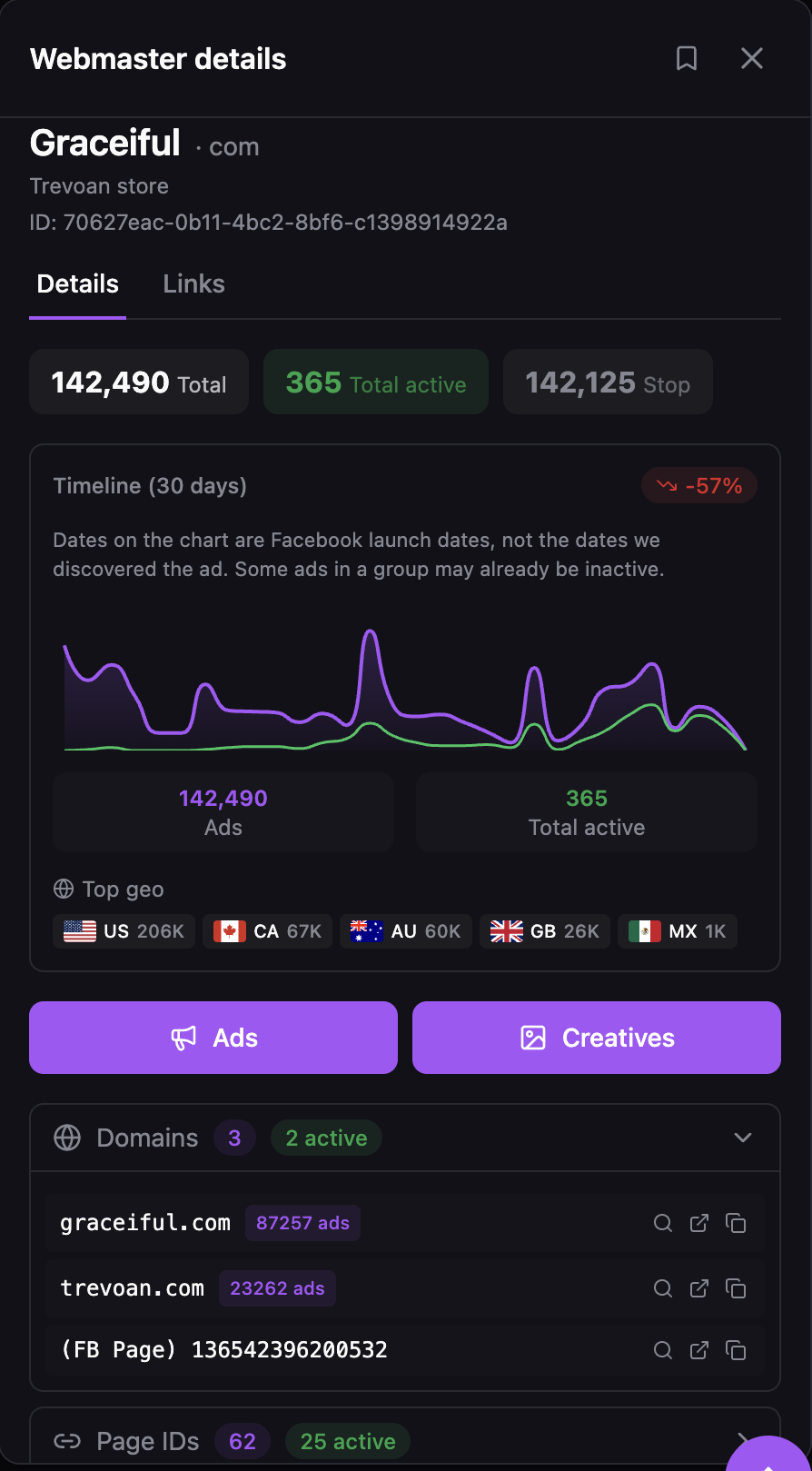
Graceiful looks like one store. Behind the name sit two shop domains, graceiful.com and trevoan.com, plus a Facebook page and 62 Page IDs. Together they've launched 142,490 ads, and 365 are still running. Of that total, 87,257 ads point to graceiful.com and 23,262 to trevoan.com.
Without grouping, those pages would show up as dozens of separate advertisers, each one more false sign that the product sells. How the owner card is built is covered in a separate write-up on Webmasters.
What no spy tool shows
Every number above comes from outside the advertiser's account, and that sets limits.
Profit stays private. Days live prove that an ad kept its budget, not that it made money. A spend estimate shows the scale of a rival's budget, which is useful context but a poor template for your own.
A creative card's best run belongs to one ad, and the others may have stopped within days. And social tools don't see search ads.
Treat what you find as market research: the problem, format, market and price point carry over, while the creative should be your own. The research method step by step is in Spytrend's guide to competitor ad research. A wider survey is in Spytrend's guide to ad spy tools.
Five mistakes that waste a spy tool subscription
A lot of disappointment with ad spy tools comes from how they're used.
The first mistake is browsing without a question. A session that starts with "let's see what's out there" can end an hour later with forty saved ads and no decision. "Which beauty creatives lasted a month in the US" gives it an end point.
The second is trusting engagement over runtime. Thousands of reactions on an ad that ran four days often mean a loud test that didn't pay. A plain ad that ran for six weeks is the one to study.
The third is counting pages as competitors, and it's the most expensive. It makes a saturated niche look open and an open niche look saturated. The fourth is reading one country into another.
The fifth is stopping at the ad. The landing page, the price and the offer decide whether you can compete.
Where to go next by channel and task
Facebook and Instagram buyers can compare tools with dated prices on the Facebook ad spy tools page, and see what Meta's free library leaves out on the Meta Ad Library alternatives page. Dropshipping sellers have a guide ranked by how each tool catches a winning product. On a tight budget, see what seven free plans open. Creative teams can study Instagram, campaign and real estate ads that stayed live 30 days or more.
FAQ
Is it legal to spy on ads?
Studying competitors' public ads is ordinary market research, and platforms publish many ads themselves in official libraries. The risk lies in what you do next. Using another brand's creative, trademark or copy as your own is a separate matter, and it can break the law.
Spy tool vs ad library: what does each one keep?
A spy tool comes from a third party, while an ad library comes from the platform itself; the Meta Ad Library is the best known. Libraries are official and free, but each covers one platform and mostly ads that are live now. A spy tool keeps stopped ads, can span several platforms and lets you sort by runtime, relaunches, category and owner.
Is there a free ad spy tool?
A few. BigSpy's free plan gives 5 queries a day on Facebook, Pipiads starts free accounts with 500 credits, and AdSpy hands out a one-time coupon of 1,000 views. Spytrend's free Starter plan shows ads older than three months. For one known advertiser, Meta's own library is free and may be enough.
How much does an ad spy tool cost?
An ad spy tool costs $29.90 to $149 a month among the six on this page: paid access starts with Dropispy and tops out at AdSpy's single plan. Annual billing lowers several of them. Compare what each tier includes, because credits, seats and networks change the real cost.
What is a PPC spy tool?
A PPC spy tool, sometimes called a keyword spy tool, shows the paid search ads a domain runs and the keywords it bids on. It tells you which search terms a competitor pays for. It says nothing about social media creatives, so Facebook and TikTok buyers need a social ad spy tool.
Is Spytrend a spy tool?
Buyers search for it as one. It covers Facebook and TikTok with an archive going back to 2018 and 33 business categories. It has 193 countries, sorts by run length and re-uploads, and gives each advertiser an owner card. Its own name for the category is ad intelligence platform.
