Search arbitrage: ads, keywords, landing pages and networks
Trace Facebook and Meta ads to RSOC, AFS and search-feed pages. See keyword templates, redirects, monetization types and accounts behind each ad.
Up to 20 free rows per section after sign-up. No card needed.

Spytrend database snapshot, 16 Oct 2026, 07:22 UTC
From an ad to its monetization account
See whether arbitrage is confirmed or likely. Follow the link to the landing, then identify the network and account that monetize it.
Ad
The Facebook or Meta ad that sends traffic to a search-arbitrage page.
Tracker link
See whether the ad link goes through a tracker or directly to the landing.
Redirect chain
Follow every redirect to the final page. Copy the URL of any hop.
Landing
Final URL, domain, full-page mobile screenshot, search block, first seen and ad count.
Network + account
See the network, monetization type and account, including its owner and pub-id.


See the template and the phrase it produced
Inspect the tracker’s keyword template, the phrase our check received and all other keywords in the link as clickable chips.
- Tracker template with highlighted macros: “impounded cars for sale {city}”.
- See the actual phrase received when we checked the link.
- Click a phrase to see every ad with it.
Find ads, compare phrases and track changes
Filter the ad feed, analyze any selection and open the ads behind the numbers.
See exact ad counts before you filter
Filter by landing site, topic, network, monetization, search block, link type, check status or country. Every option shows its exact ad count.


Why manual search-arbitrage research takes hours
An ad is only part of the setup: the landing page and network or feed matter too.
3–4 hours a day finding creatives
Checking competitors across tools and public ad libraries takes up half your workday. You still need to connect the ad, landing page and network or feed.
Ad tools show clutter, not campaigns
50,000 results. 90% noise. Half are duplicates. It is hard to see who runs the ads or which ad, landing page and feed combinations pay off.
Pay for 2–3 tools, still miss data
Multiple subscriptions leave ads, landing pages and feeds scattered across tools. Each tool has one data source, so the picture stays incomplete.
Explore competitors’ setups site by site
Choose a site to see its phrases, networks, monetization types and daily counts. Open the ads behind any count.
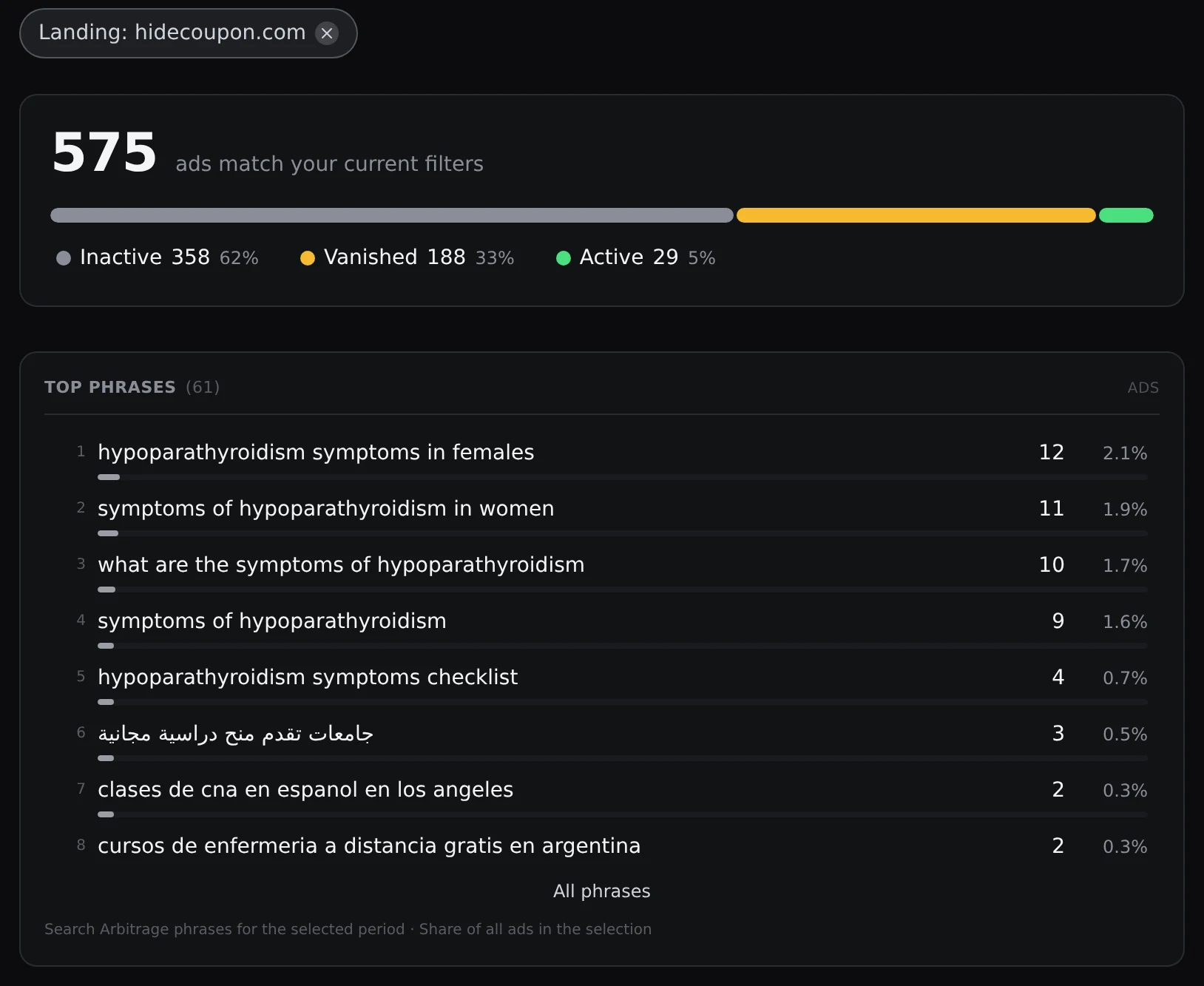
Phrases
Search suggestions include exact ad counts. Open matching ads and compare the tracker’s keyword template with the phrase received during the link check.
Networks and monetization
Identify the network, monetization type — RSOC, AFS or search feed — and account owner. See whether search arbitrage is confirmed or likely.
Daily counts
Follow daily ad counts by phrase, topic, country, advertiser, site, landing, network, monetization type or account. Each cell opens the matching ads.
Search Arbitrage features
Start with a phrase or site, narrow your selection and open the matching ads.
Phrases
Search suggestions include exact ad counts. Open matching ads and compare the tracker’s keyword template with the phrase received during the link check.
Networks and monetization
Identify the network, monetization type — RSOC, AFS or search feed — and account owner. See whether search arbitrage is confirmed or likely.
Daily counts
Follow daily ad counts by phrase, topic, country, advertiser, site, landing, network, monetization type or account. Each cell opens the matching ads.
Keyword trends
Compare phrases with the previous period. See new and growing phrases with their advertisers, sites and 14-day charts.
Sites and landings
See where ads lead and how many ads link to each site. Inspect the landing’s final URL, domain, full-page mobile screenshot, search block and first appearance.
Search Arbitrage filters
Filter by landing site, topic, network, monetization type, search block, link type, check status or country. Each option shows its exact ad count.
Explore real data before you buy
Sign up or sign in to Spytrend to explore Search Arbitrage without the add-on. No card needed.
- Up to 20 real rows in every section
- Working filters
- Permanent preview, not a trial
Choose your Search Arbitrage access
$249/month for Section, $499/month with MCP or $4,500/year with MCP (25% off). Add-on to any Spytrend plan, billed separately.
- Search-arbitrage ads with a confirmed or probable verdict
- Landings followed to the final domain
- Keyword templates with topic and language
- Analytics and daily dynamics of networks, countries and topics
- Search-arbitrage ads with a confirmed or probable verdict
- Landings followed to the final domain
- Keyword templates with topic and language
- Analytics and daily dynamics of networks, countries and topics
- Search Arbitrage data via MCP for AI agents
- Search-arbitrage ads with a confirmed or probable verdict
- Landings followed to the final domain
- Keyword templates with topic and language
- Analytics and daily dynamics of networks, countries and topics
- Search Arbitrage data via MCP for AI agents
An add-on for any Spytrend plan, billed separately. MCP is included in “Section + MCP” and “Year with MCP”. Cancel anytime; access stays until the paid period ends.
Frequently asked questions
Facebook and Meta ads leading to RSOC, AFS and search-feed pages. For each ad, see the network, monetization type, account, arbitrage verdict and link type, plus keyword templates, phrases and landing details.
Any signed-in Spytrend user without the add-on can see up to 20 real rows in each Search Arbitrage section, with working filters. Sign up first if you do not have an account. No card needed. This is a permanent preview, not a trial.
We show the landing and phrases received when we checked the link. Trackers may substitute different phrases for different visitors. Some links are still queued for checking or the check failed.
A pub-id identifies the monetization account used on the page. It does not identify the media buyer running the ad.
New ads arrive continuously. Daily dynamics history starts on 25 September 2026.
Search Arbitrage is an add-on to any Spytrend plan, billed separately. MCP gives AI agents access to its data and is included in Section + MCP and Year with MCP. Cancel anytime; access stays until the paid period ends.
See what is behind a search-arbitrage ad
Explore real ads, phrases, landings and networks. Sign up to see up to 20 free rows in each Search Arbitrage section.
Ads, creatives, advertisers, webmasters
Free planContent AIViral Reels, TikTok and Shorts: analysis, scripts, carousels
from $32/mo billed yearlyInfluencersYouTube and Instagram creators, outreach
from $47/mo billed yearlyShops & ProductsStores, products, competition, market
from $34/mo billed yearlyAbout Spytrend Search Arbitrage: research of search-arbitrage ads
Search Arbitrage finds Facebook and Meta ads that send traffic to RSOC, AFS and feed landings, follows every link to the final domain and names the network: 12 networks plus Google AFS. It groups keyword phrases into templates and shows networks, countries and topics with their daily dynamics. It is a paid add-on that works with any Spytrend plan.