In short: a product finder is any tool that locates a product: from a photo, from a quiz on a store's site or, for sellers, from data on what others sell. Media buyers need the third kind; its ad-based version shows which products other sellers are paying to promote.
Three things people mean by "product finder"
The same two words cover tools that have almost nothing in common.
The first kind is visual search. You upload a photo of a lamp or a pair of shoes, and the tool shows matching items and where they're sold. Google Lens is the best-known example. Google's own page pitches it as a way to shop what you see: point the camera or use a screenshot to look up who makes an item, what it costs and where to buy it. A group of smaller apps does the same job for shoppers.
The second kind lives on retailers' websites. A short quiz asks about your budget, skin type or room size and narrows a large catalog to a few items. Retailers call it guided selling, and it only ever recommends that store's own stock.
The third kind is for people on the other side of the checkout: store owners, dropshippers and media buyers deciding what to sell next. Here the question is which products sellers are backing right now, and how many of them. This guide is about that third kind, and mostly about the version that works from advertising data.
Product finder tools by where their data comes from
Seller-side tools look alike on their home pages. The data underneath decides which questions they can answer.
| Data source | Examples | What it shows well | Where it stops |
|---|---|---|---|
| Marketplace rankings | Amazon Best Sellers, Movers & Shakers | Which items rank highest on that marketplace by sales, and which are climbing | Little about selling through your own ads and store |
| Search interest | Google Trends | How interest in a term changes over time and by location | Interest isn't a purchase |
| Store trackers | Shopify store trackers | What stores list and recently added | Listing a product isn't selling it |
| Official ad libraries | Meta Ad Library, TikTok Commercial Content Library | Ads of one advertiser, straight from the platform | Outside the EU, Meta's commercial ads leave public view once they stop; each page is shown on its own |
| Ad research tools | Spytrend, Minea, Pipiads and others | Which products sellers keep paying to promote, for how long and how many sellers do it | Paid social only; no sales figures |
The first two rows cost nothing and take a minute to open. Amazon's Best Sellers page says its ranking is built on sales and splits it by department. Its sister page, Movers & Shakers, tracks the items whose sales rank jumped the most since the day before. Both describe Amazon shoppers buying on Amazon. That's useful context and also their limit, because a media buyer sells through a feed and a standalone store.
Google Trends works from searches instead of sales. You type a term and see how interest in it rises and falls over time and where people look for it most. I use it for one thing in product research: telling a seasonal item from one people search for all year. It can't say whether any of those searchers bought.
In practice, product finder tools work best in pairs. An ad-based tool shows what sellers are paying for. A marketplace list or a search trend shows whether buyers care outside social feeds too. A product that turns up in both is a stronger candidate than one that turns up in either alone.
Ad research tools also differ from each other. Minea links each ad to the store and the product it sells. Pipiads focuses on product ads on TikTok and Facebook. The walk-through below uses Spytrend, which groups ads by owner and keeps stopped ads.
How to find products with a product finder tool
- Open Creatives, choose a category and a country, and sort by New in period for the last few weeks.
- Run the same sort for the weeks before and compare the two lists.
- Open the creative card of a product that shows up and read who runs it and for how long.
- Check how many owners stand behind the pages in the Webmasters section.
- Visit the actual landing page of a product worth testing to see its price, bundle and offer.
Step 1. Sort a category by what's being launched now
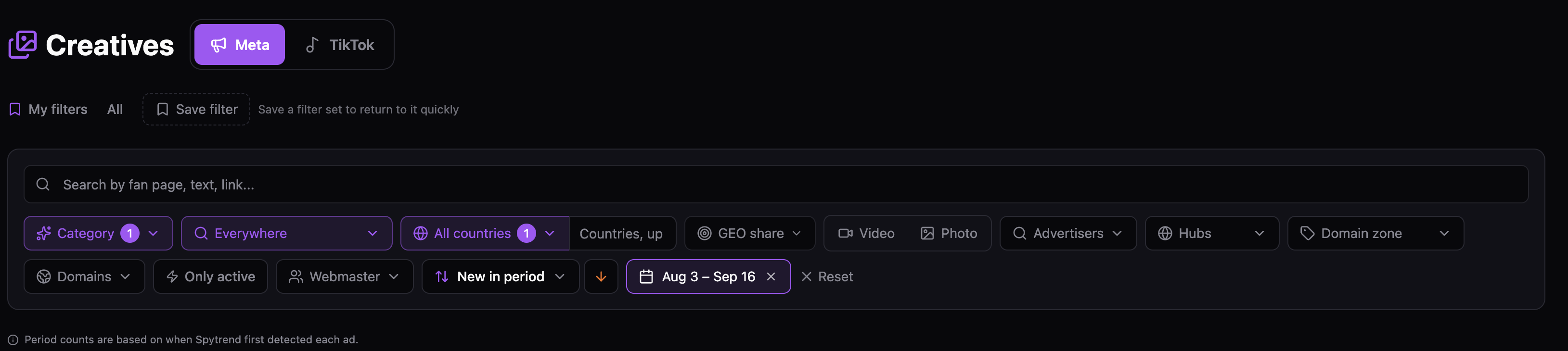
Start narrow. Pick the category you actually sell in and one country. A view of every category puts clothing next to kitchen gadgets, and the counts stop meaning much. One country keeps launches comparable, because a product that's new in the US may be old news in Canada.
Sorting by New in period turns the creative library into a product finder. You stop seeing the ads with the longest history. Instead you see the creatives that sellers launched most often in the weeks you picked. The counts follow the date Spytrend first detected each ad, so a fresh position means fresh launches.
A high position means effort. Someone launched this creative many times in those weeks, and whether that effort paid off shows up on the card in step 3. I save the filter set at this point, since step 2 reuses it with only the dates changed.
Step 2. Compare two periods
Run the same sort again for the six weeks before. Then put the two top lists side by side.
Products in both lists are being relaunched steadily. Products only in the recent list are new arrivals, and the next few weeks decide whether they stay. Products only in the earlier list have probably been dropped. Amazon's Movers & Shakers applies a similar idea to sales rank, one day against the previous one; here the unit is ad launches, and the window is yours to set.
Step 3. Read the product's card
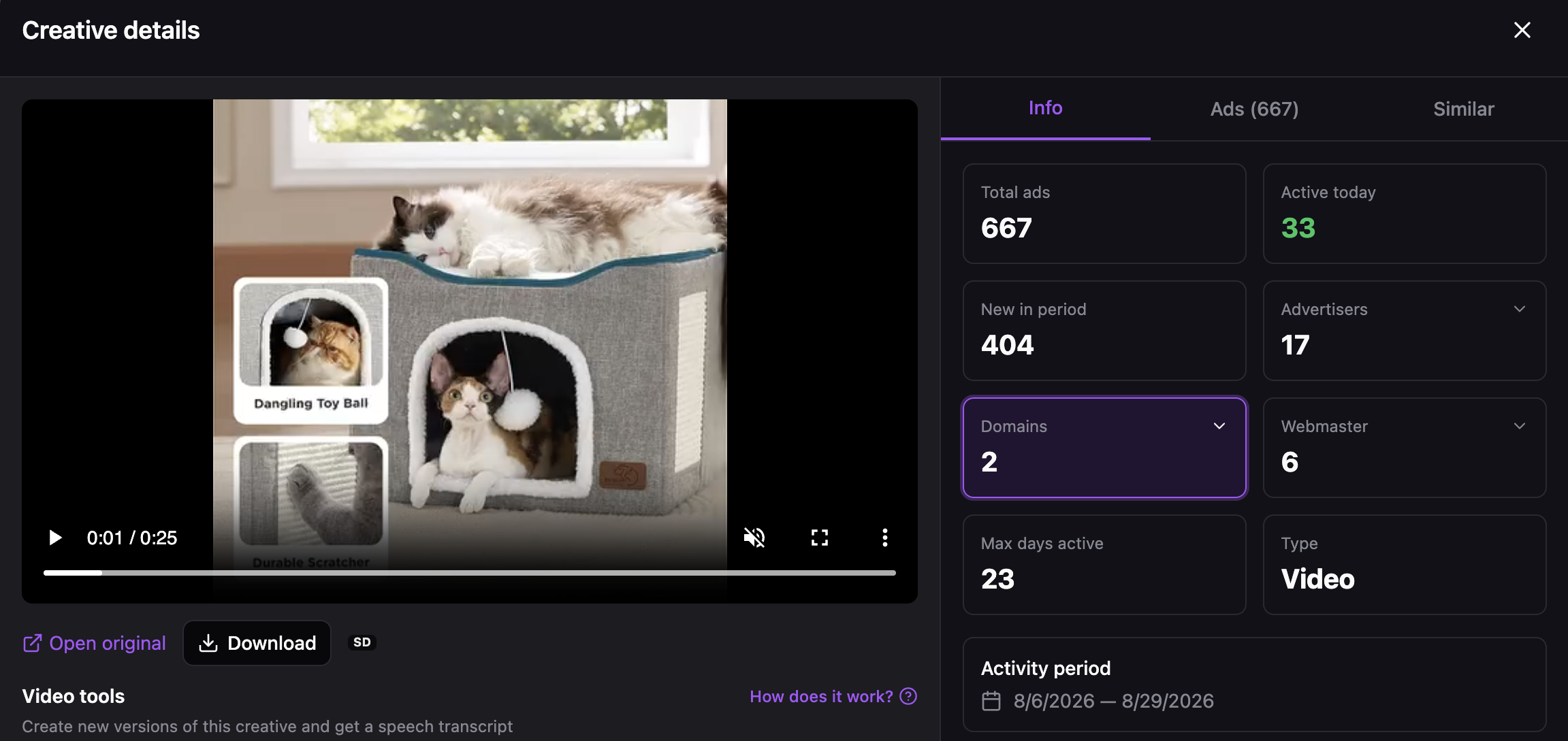
Here the product is a cat house with a built-in toy ball and a scratcher. The 25-second video labels each feature on screen, which is common for pet products sold on a single feature.
The product is young: its longest-running ad lasted 23 days. It's spreading: 404 of its 667 launches are new in the period, and 17 advertisers ran it. And it isn't one seller's product. Those 17 advertisers belong to 6 webmasters, and all of them send traffic to just 2 domains.
So several owners are pushing the product, but none has kept it running for a month yet. I'd treat it as a lead to recheck in a few weeks. If the card later shows a longer run and more webmasters, sellers are sticking with it. If active ads fall to zero, they tested it and moved on. Every field on the card is explained in the Creatives write-up.
Step 4 and step 5. Owners, then the page
The owner check gets its own section further down, on Webmasters. It tells you whether you'd compete with a brand, with resellers or with one operator.
The last step is the page a buyer lands on. The price, the bundle and the delivery time on that page show whether you can build a competing offer. For a page hidden behind a redirect, Spytrend fetches the real one at $1 per run; if the run fails, the dollar comes back. A photo search in Google Lens is a cheap extra check here, since it can show which shops already list the same item.
Where a product finder stops
No tool on the list above sees another seller's profit. An ad-based finder shows that money was spent, and for how long. A marketplace shows rank. It doesn't show margin. Treat the numbers as signals to test against.
Three limits are specific to finding products through ads. Max days active belongs to a single ad, so one lucky version can make a product look durable. Spend is shown as a range, never as one figure. And a product that sells mostly through search or marketplaces will look quiet in social ad data even when it's doing well.
Timing is the other trap. Once a product is visible everywhere, the first sellers have already bought traffic cheaply. The routine above starts with fresh launches and a growing number of owners for that reason.
What the Webmasters section adds
Before you commit to a product, you want to know who you'd compete with. Ten pages running the same video can be ten resellers, one brand and its partners, or one operator with ten shops. Each of those is a different market.
In Spytrend, each owner panel in Webmasters joins the pages, domains and pixel that belong to one webmaster, and breaks the ads down by country. Here's the simplest case, a single brand.

GoSun runs its ads from one page and, in practice, one domain: gosun.co carries 98 of its 99 ads, and 42 are still live. That's what a brand selling its own product looks like: one owner, one site, steady testing. A reseller network looks different on the same panel, with many domains opening and closing.
If a product you found is sold mainly by its maker, you'd compete with the brand on price. If many small owners sell it, you'd compete on creative and offer. How the grouping works is covered in the Webmasters write-up.
The filter panel, the cat house card and the GoSun panel all come from one tool, and its official positioning sentence is worth quoting whole: Spytrend is an ad intelligence platform for Facebook and TikTok advertising: an archive of ads going back to 2018, AI-classified into 33 business categories, with every advertiser assembled into a single card — all ads, pages, domains and countries in one place.
Around 280 million fresh ads land in it each month from Facebook and TikTok, over 170 million of those from Facebook. The 33 categories split into 342 subcategories, and 193 countries can be filtered one at a time. Its Websites section starts from a domain and lists who advertises on it. On the free Starter plan, with no card, you work with ads older than three months, enough to practice this routine on a category you know. Recent weeks, which steps 1 and 2 depend on, open on paid plans; the pricing page shows what each includes. Judging whether a product has demand, as opposed to being merely new, is the subject of the guide to high demand products to sell.
FAQ
Product finder: what does the term mean for a seller?
A product finder means three different tools, depending on who's asking. Shoppers use one to find where to buy something, often from a photo. Online stores run a quiz that narrows their catalog. For sellers and media buyers it's research software showing which products other sellers are actively promoting.
Product finder tool for dropshipping: what should it show first?
A product finder tool for dropshipping should first show how long a product has been advertised and by how many independent sellers. What's new today matters less. Pair it with a marketplace list or a search trend to confirm interest outside social feeds, and try it on a niche you already know before paying.
How can I find a product from a picture?
Upload the photo to a visual search tool such as Google Lens, and it returns matching items and shops. That tells you where an item is sold. Whether it sells well is a separate question, so for a seller it's only the first step.
How often should I rerun a product search?
Once a week is a practical rhythm. Rerun the same saved filters for the latest weeks and compare them with the previous list. Products that keep showing up are being relaunched, and new ones are leads. Recheck the card of each lead after two or three weeks before you spend on a test.
Are free product finders good enough?
For a first look, often yes. Marketplace best-seller lists, Google Trends and official ad libraries are free and accurate for what they cover. They stop at run history, owner grouping and stopped ads, which is where many bad product decisions come from.
Does Spytrend find products on Amazon or AliExpress?
No. It works from Facebook and TikTok ads and the sites they lead to. A product sold only on a marketplace won't appear unless someone advertises it on social platforms. For marketplace demand, use the marketplace's own rankings alongside ad data.