In short: competitors ads are easiest to study as a weekly routine. List who advertises in your niche, filter their ads by country and run length, read the creatives that lasted, check what launched this week, and group the pages by owner. Five steps, in the same order, every week.
Competitor advertising monitoring: why one look is not enough
Most people check a rival's ads once, usually right before their own launch. That look shows what the competitor ran on one day. It doesn't show which ads were tests that died a week later. It doesn't show which one has been paid for since spring. And it won't tell you that last month's "new" competitor is the same seller behind a fresh storefront.
A store keeps its website for years, but its ads come and go much faster. So the useful question changes: what have they kept running, and what did they just add? Answering it once a week, in the same order, is quicker than a fresh deep dive every quarter. The changes also become visible, because last week's notes sit next to this week's. That's all competitor advertising monitoring really is.
Where you can see competitor ads for free
The platforms publish part of this themselves. The Meta Ad Library lists the Facebook and Instagram ads a page is running now. The Google Ads Transparency Center does the same for Google. TikTok's Commercial Content Library covers ads shown in Europe. For one competitor you can already name, that's often enough, and it costs nothing.
A weekly routine needs three things the free libraries don't give you. First, memory: outside the EU, a regular commercial ad drops out of the Meta library once it stops, so next week there's nothing to compare against. Second, discovery: a search matches a page name or the ad's wording, so a rival you haven't heard of stays hidden. Third, ownership: every page is a separate search, and nothing links three pages to one seller. The Meta ads library search guide in this series goes through its limits one by one.
The workflow below covers those gaps with Spytrend. The screenshots come from US searches in a Spytrend account.
How to find competitor ads in five steps
- List the competitors you already know and check which of them are running ads now.
- Filter ads by country, category, platform and a minimum of 30 days live.
- Read the creatives that lasted: launches, advertisers and the longest run.
- Check what launched this week in the same niche.
- Group the pages by owner, then open the real landing page of an offer worth testing.
Step 1. Start from the sites you already know
Most people can name three or four rivals without opening anything. Start with them. In Spytrend's Websites section you type a site's address to see which advertisers send traffic to it. Then put the same domain into the Domain filter of the Ads section, and the competitor's ads come up in one list. The output of this step is a short list of names. Step 2 widens it to the whole niche.
Step 2. Filter by country, category and run length
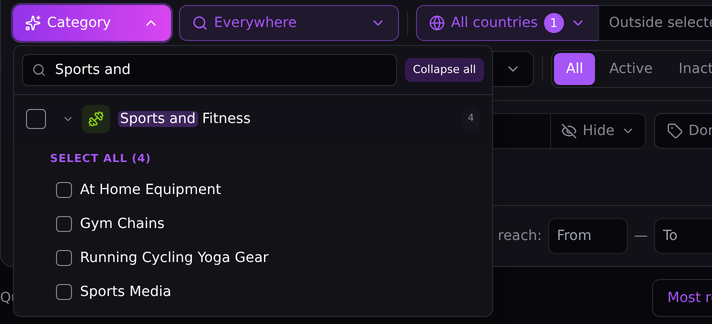
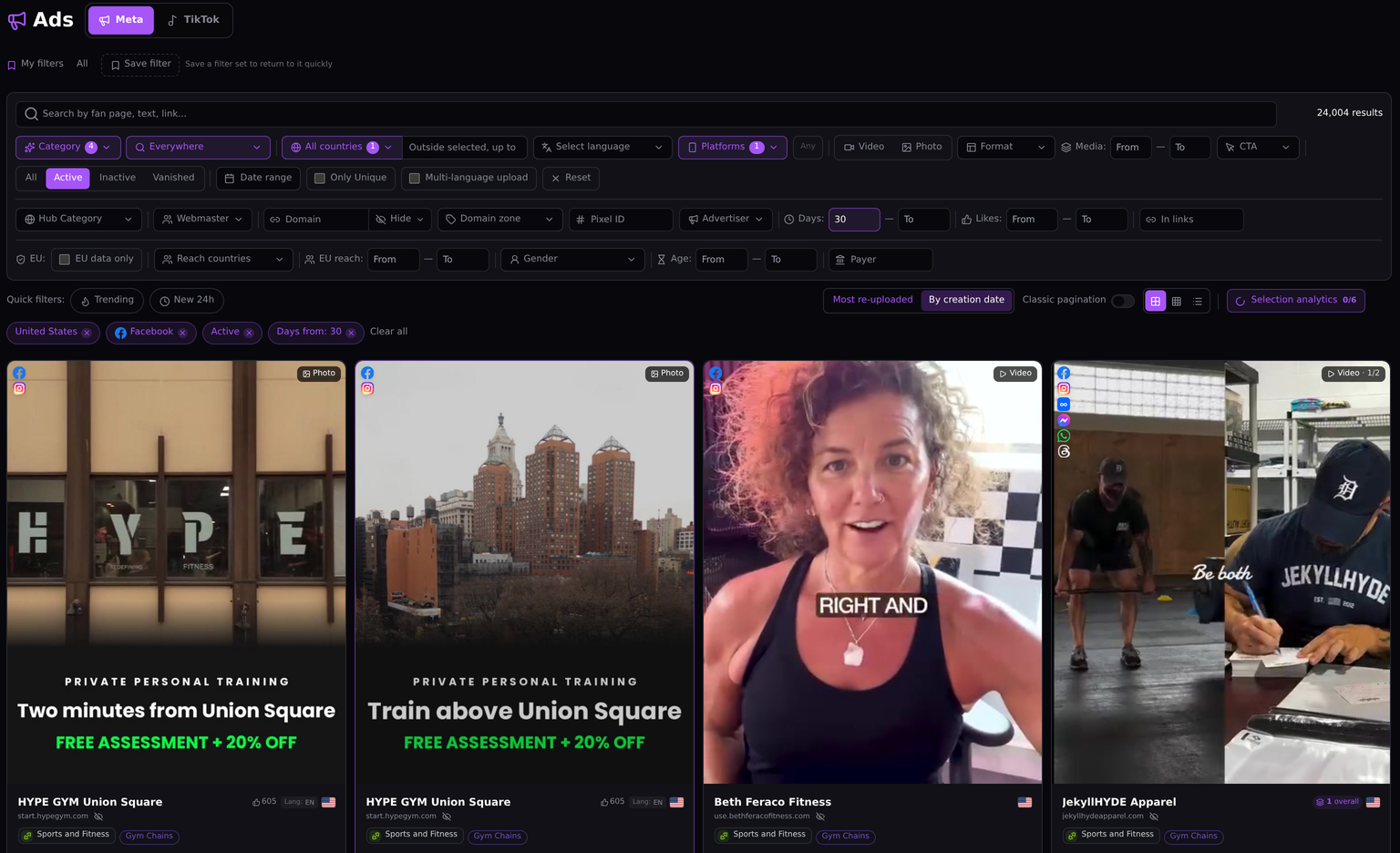
Filters save most of the time here. The category filter works from the business behind an ad, so an ad counts as fitness even if its caption is three emoji. Subcategories go one level deeper. Sports and Fitness splits into four, and Gym Chains is a different market from Running Cycling Yoga Gear. Add the country you buy in, the platform and a floor of 30 days, keep only active ads, and the list drops every test someone switched off after three days. For US fitness on Facebook that left 24,004 ads.
The first two came from the same local gym. HYPE GYM Union Square runs one offer, a free assessment plus 20% off personal training, under two headlines: “Two minutes from Union Square” and “Train above Union Square”. Both are still paid for after 30 days, so nobody has picked a winner yet. That's a note for the log. When you want one competitor instead of a category, the same panel filters by domain, pixel, advertiser or webmaster.
Step 3. Read the creatives that lasted
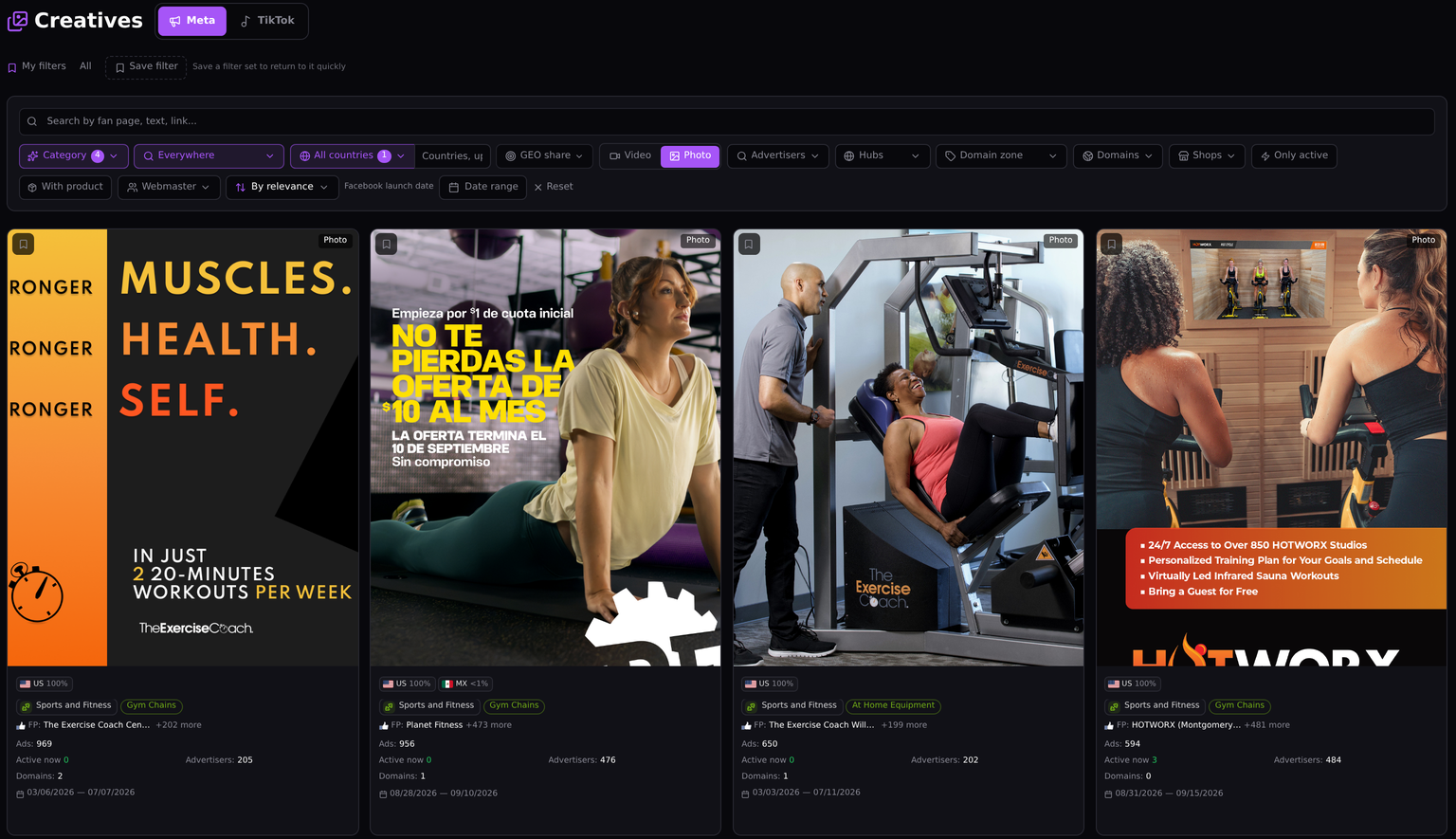
A creative card counts every ad that used the same image or video, and the Advertisers line counts the pages that ran it. In US fitness the top photo creatives all belong to franchise gyms, and that changes how you read them. The Planet Fitness image, a Spanish-language offer of $10 a month with a $1 joining fee, ran as 956 ads from 476 advertisers inside two weeks. HOTWORX put one image on 484 advertisers' pages, and 3 of those ads are still live. The Exercise Coach appears twice, with 969 and 650 ads and about 200 advertisers each, none of them running now.
Hundreds of advertisers on one creative don't mean hundreds of competitors. Here it's one brand handing the same artwork to its local studios. So which one won? None of them by default. Launches show effort, active ads show what's still paid for, and advertisers show how widely one idea was spread.
The Creatives write-up explains the card in more detail.
Step 4. Check what launched this week
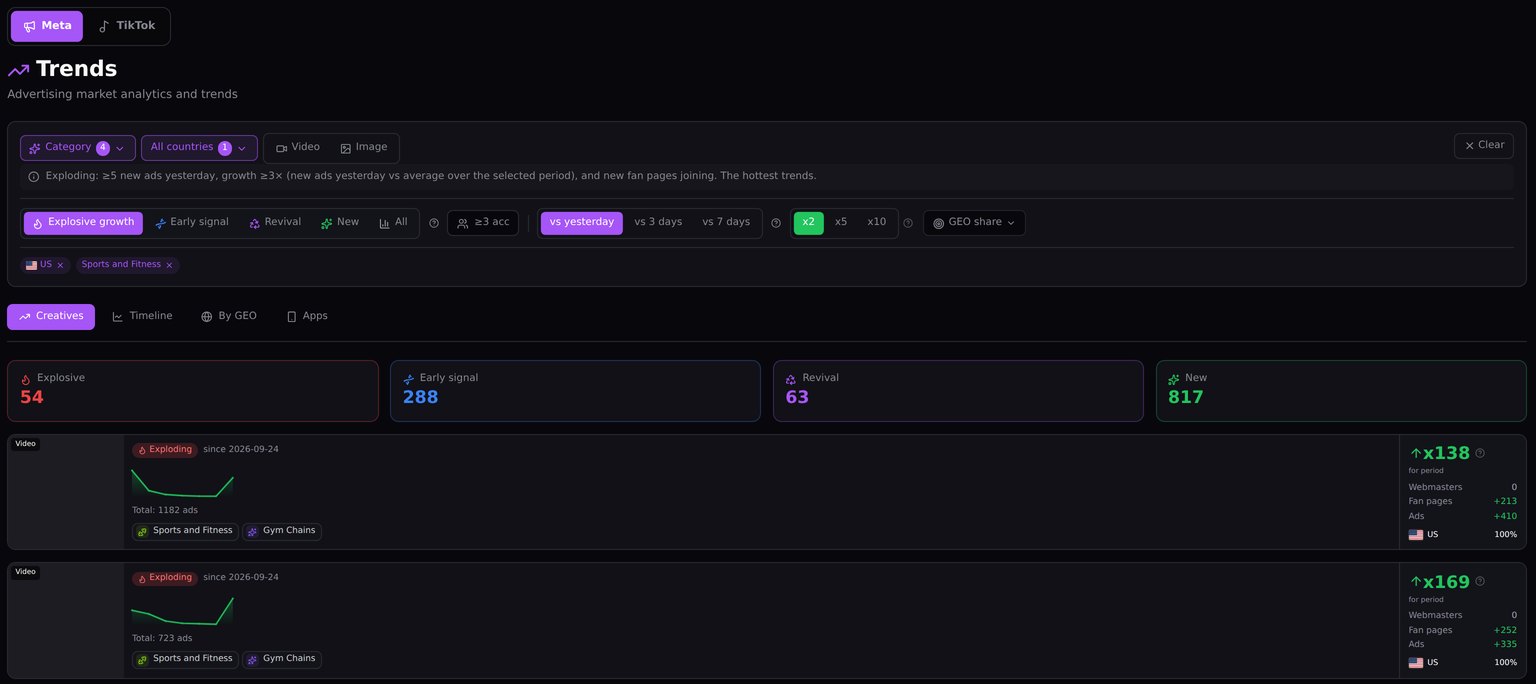
Steps 2 and 3 show what has already proven itself. This step catches what hasn't had time to. Trends compares recent launches with the days before and sorts creatives into explosive growth, early signals, revivals and brand-new ones. Against the previous day, US fitness had 54 explosive creatives, 288 early signals and 817 new ones. The top one, a gym-chain video, grew x138 over the period: 410 new ads from 213 new fan pages. That's the franchise pattern from step 3 again, one video pushed to many local pages at once. Will it last? Nobody knows yet. But a rival scaling that fast belongs in this week's log. How Trends works is covered separately.
Step 5. Group pages by owner and open the landing page
Grouping by owner changes how you count competitors, so it gets its own section below. Before you test an offer, open the page a buyer in the country you target actually lands on. The link in the ad and the page a real visitor sees don't always match. Spytrend opens the real landing page behind the redirect. Each run costs $1, and you get the dollar back when a run fails.
How to view competitor ads without fooling yourself
Once you have a list, reading it well matters more than making it longer. A few habits separate useful competitor ad analysis from scrolling.
Trust run length over reactions. Thousands of likes on an ad that lived four days usually point to a noisy test that lost. A plain image that ran for ten weeks is the one somebody kept paying for. Relaunches say the same thing. When a creative has been uploaded hundreds of times, someone chose to pay for it again and again.
Read one country at a time. Facebook competitor ads that lasted two months in the United States say little about Germany or Brazil. A global list mixes all three.
Keep a simple log. It's the core of competitor ad tracking: date, competitor, creative, days live and what changed since last week. After a month, the log is worth more than any single search. It shows which ads survived four of your check-ins.
Study the idea and make your own ad. The angle, the format, the price point and the market are fair things to learn from. The creative you run should come from you.
Where the workflow hits a ceiling
This routine reads competitor advertising from the outside. The ad account itself stays closed. You see how long an ad stayed funded. You don't see whether it made money, or whether a brand kept it on for reasons that have nothing to do with sales.
Spend is only an estimate. Spytrend shows it as a from–to range, which gives a sense of scale. It won't do as a budget plan.
The routine also covers only Facebook and TikTok advertising. A competitor who spends mainly on search or display will look quieter here than they really are. For those channels, the Google Ads Transparency Center is the free place to start.
What the Webmasters section adds
Pages are the wrong unit for counting rivals. Five storefronts pushing one item look like a crowded niche with proven demand. If one seller owns all five, you face one competitor, and the niche is emptier than it looked.
In Spytrend, the Webmasters section puts one owner's pixels, domains and Facebook pages on a single card, split by country. The example below is one of the fitness franchises from step 3.
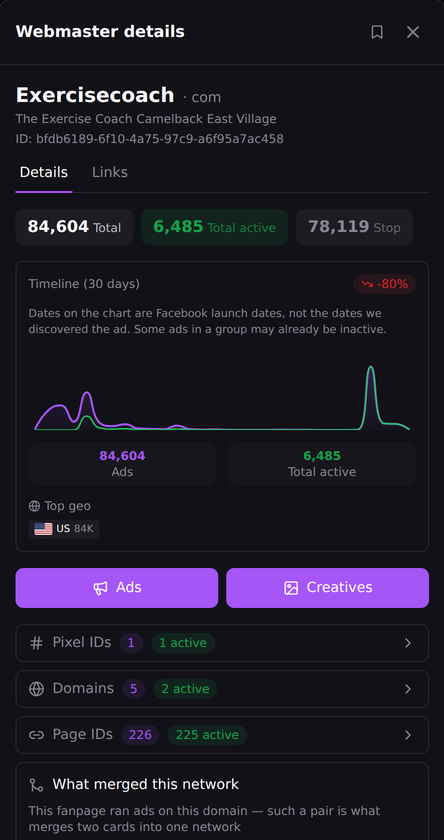
The Exercise Coach has launched 84,604 ads, nearly all of them in the United States, from 226 Facebook pages. 225 of those pages are still active. Ad by ad, that looks like two hundred small studios, each with its own page and its own budget. On one card it's a single brand with one pixel and five domains, two of them live. The 30-day timeline is down 80%, so the network is quieter now than it was a month ago. For a local studio owner that's one competitor under two hundred names, and the card is where you'll recognize it. How owners get grouped is described in the Webmasters write-up.
What the routine needs from a tool
The five steps rely on things a free library doesn't keep: stopped ads, run length, categories, owners and real landing pages. For the record, the company's positioning reads as follows: Spytrend is an ad intelligence platform for Facebook and TikTok advertising: an archive of ads going back to 2018, AI-classified into 33 business categories, with every advertiser assembled into a single card — all ads, pages, domains and countries in one place.
The filters go down to 342 subcategories and 193 countries, and ads stay in the archive after they stop. Starter costs nothing and needs no card; it opens ads older than three months. For live ads, including this week's launches, you need a paid plan; the pricing page lists them.
Want to see whether the routine works for you? Pick a niche you know and run the steps on the Starter archive; this week's launches in step 4 need live data. Write the first page of your log, repeat the run a week later and compare the two pages. The guide to studying competitor ads covers the same ground from a different angle.
FAQ
See competitor ads: how do I do it on Facebook?
To see competitor ads on Facebook, start with the free Meta Ad Library. Search the competitor's page name, and it lists the Facebook and Instagram ads that page runs today, each with its start date. Outside the EU, a regular ad drops out of the library once it stops. For history and past run lengths, you need a research tool that keeps an archive.
Competitor advertising monitoring: how often is often enough?
Competitor advertising monitoring works best once a week for most niches. A monthly check can miss a launch that started and stopped in between. A daily one mostly shows noise. A short session each week, in the same order every time, shows both what held on and what's new, and a simple log makes the weeks comparable.
Competitor ad analysis: what belongs in it?
A competitor ad analysis needs, at minimum, the creatives that are running, how long each has been live, how many times a creative was relaunched, which country it targets and where the click goes. Grouping pages by owner turns that list into a real count of competitors. If you include spend, mark it as an estimate and give it as a range.
Competitor ad tracking: can a tool do it on its own?
Competitor ad tracking can be partly automatic. Trends shows new and fast-growing creatives in a category without rebuilding the search each time. An owner card keeps a competitor's pages and domains together as new ones appear. Deciding which of those ads matter is still a human job, and it's the part of the routine worth protecting.
Competitors ads: is looking at them legal?
Looking at competitors ads is legal: these ads were shown to the public, and platforms keep official libraries so that anyone can inspect them. The legal line sits further along. Reusing a rival's creative, trademark or wording as your own can infringe their rights. Study what their ads do, then make your own.
Facebook competitor ads: does Spytrend also show Google or YouTube?
Facebook competitor ads are covered, and so are TikTok ones, but Google and YouTube are outside Spytrend. For paid search, the Google Ads Transparency Center is free, and keyword research tools show which terms a domain bids on. A competitor who spends mostly on search will look quieter in Spytrend than they really are, so check both.