How to Spy on Competitor Facebook Ad Campaigns: A Webmaster-Level Playbook (2026)
Updated: 2026-06-17
Spytrend's webmaster grouping collapses an entire competitor operation — every ad, every landing page, every pixel — into one profile. The fastest path to value starts at the Quick Win widget, jumps into a webmaster profile, and reads the whole competitor network in one view. This page is a repeatable daily workflow for media buyers and affiliates who already know what ad spying is and want to extract winning creatives systematically.
Quick Answer
Spytrend lets you map a competitor's full ad operation — not just individual creatives — by grouping ads under a single webmaster profile built from four identifiers: pixel, domain, Page ID, and IP. Open the Quick Win widget, click the top webmaster, and you have their entire Facebook and Instagram ad network in front of you in under a minute. That single workflow separates Spytrend from tools like BigSpy or AdSpy, which show individual ads with a 3-7 day data delay and no network-level grouping.
The database covers 612M+ searchable ads with 114M+ currently active, growing by approximately ~6M per day. A free trial is available with no credit card required, and a 7-day money-back guarantee applies to first-time payments.
Getting Started
Sign up without a credit card and land on the main dashboard. The first action that delivers immediate value is the Quick Win widget — a ranked list of the five most active webmasters over the last seven days. Click any entry and Spytrend surfaces every ad that webmaster ran, their landing pages, the pixels they fired, and the domains they own. You have not searched for anything yet; the platform has already done the triage.
For a targeted approach, use the search bar to query by fan page name, ad text, or destination URL. Apply filters for country, language, platform, call-to-action type, ad format, date range, and engagement metrics. The Only Unique toggle activates pHash deduplication — Spytrend's perceptual hash algorithm collapses visually identical banners into a single record, so fifty copies of one image appear as one creative with aggregated usage data. This is the mechanical reason results stay clean rather than duplicated.
Once you find a relevant webmaster, bookmark their profile. Spytrend tracks it daily and surfaces new creatives, status changes, and growth signals in your feed. That bookmark loop is the foundation of the repeatable daily routine described in the sections below.
How It Works
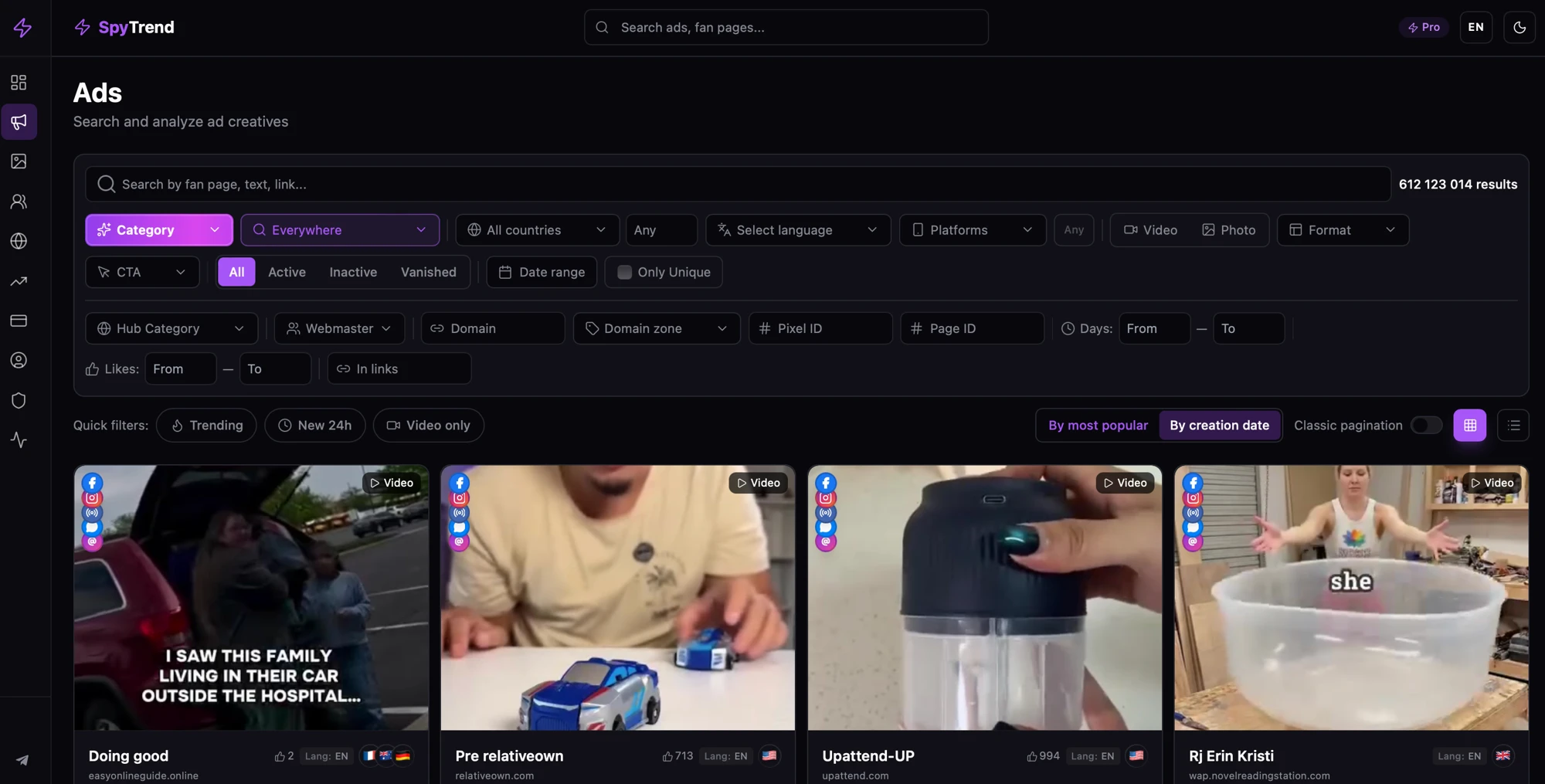
Spytrend's core mechanic is webmaster identity resolution. Every ad in the 612M+ database is cross-referenced against four identifiers — Facebook Pixel ID, root domain, Fan Page ID, and server IP address. When two or more identifiers match across separate ad accounts or pages, Spytrend merges those accounts into one webmaster profile. The result: a single view of a competitor's entire ad network, even when they run it across multiple brand pages or agencies.
Pixel intelligence is the deepest layer of this chain. Spytrend traces the full sequence from ad creative to landing page to the pixel fired on that page to the server hosting it. Hidden connections between campaigns — same pixel across different domains, same IP behind different brand names — surface automatically. A competitor who runs five "unrelated" campaigns may share one pixel across all five; Spytrend surfaces that link.
Live ad status reporting updates each creative as Active, Inactive, or Vanished with fresh data, eliminating the 3-7 day stale window common in competing tools. The Sticky Ads metric flags creatives that have been running for five or more consecutive days — longevity is a direct proxy for profitability, since advertisers pull losing ads quickly. Webmaster profiles can be filtered by Min Total Ads, Min Active Ads, and Min Sticky Ads to surface only operators with proven track records.
AI-powered category classification assigns every ad to one of Spytrend's eleven classified verticals — Gambling & Betting, Ecommerce & Retail, Fashion & Apparel, Beauty & Personal Care, Technology & Software, Adult & Restricted, and five others — so vertical-specific searches return categorically relevant results without manual tagging. Custom keyword and geo tracking allows users to define their own surveillance parameters; Spytrend then collects every matching ad daily against those parameters.
Use Cases
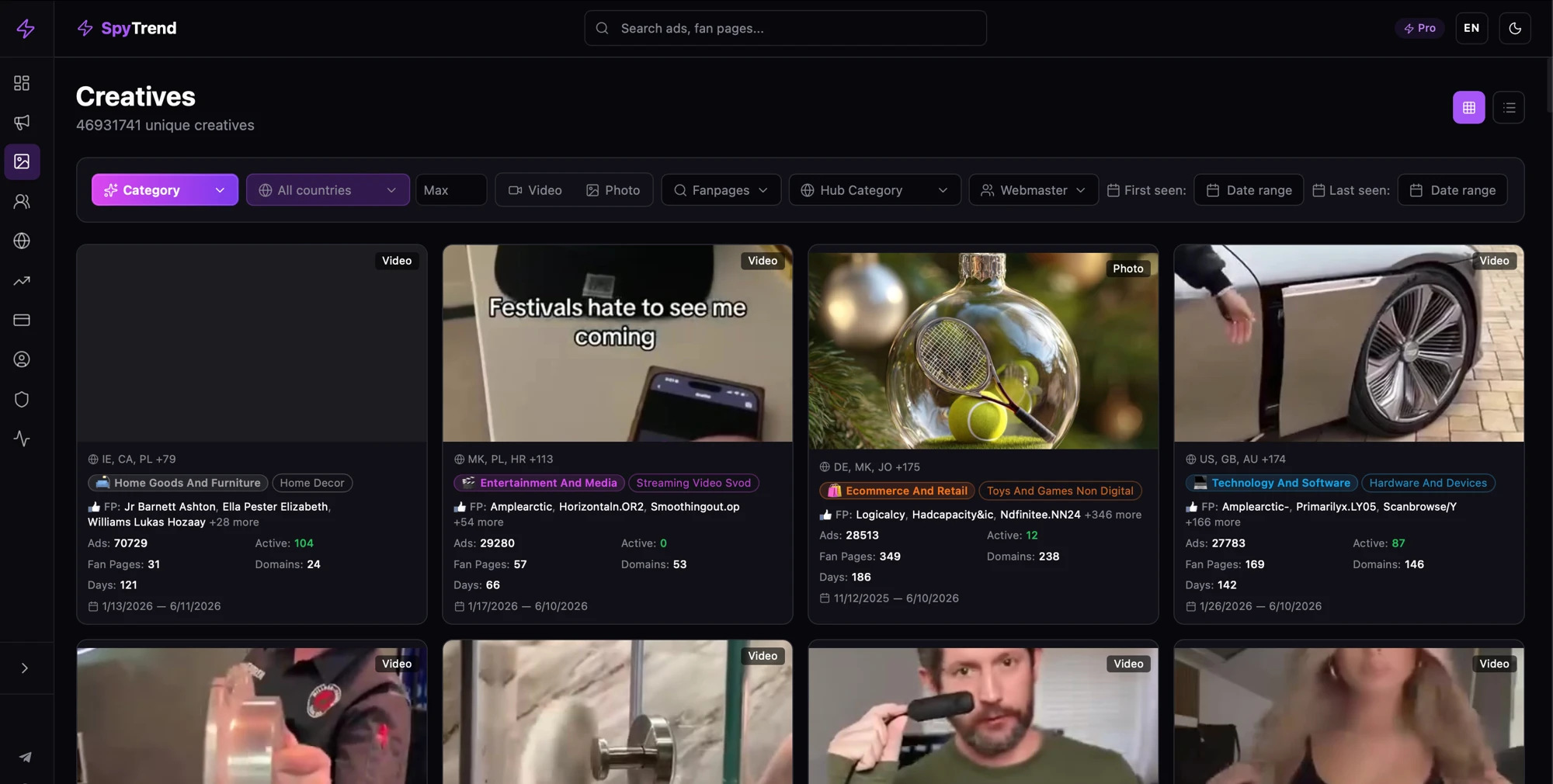
Mapping a Competitor's Full Network Before Entering a Market
A media buyer entering a new vertical searches for the top spend domain in that space. They open the matching webmaster profile and see every ad that operator has run — active and historical — across all their pages. The Sticky Ads filter immediately surfaces creatives that have survived five or more days, identifying the hooks and formats the market has rewarded. The buyer does not need to guess which angle works; the competitor's durability data answers the question directly.
Daily Monitoring via the Quick Win Routine
Each morning, open the Quick Win widget. The five most active webmasters from the last seven days are listed. Scan for any new entrants — a webmaster who was not in yesterday's list but appears today signals a scaling campaign worth investigating. Click through, check their Trends view for Explosive Growth flags (three times more ads today versus the three-day average, with five or more total ads), and add them to your tracking list. The entire routine takes under ten minutes and surfaces early signals before competitors scale spend to a level where entering the market becomes expensive.
Creative Analysis Before Launching a Campaign
Before writing new ad copy, search 612M+ ads by keyword within your vertical. Apply the Only Unique filter to remove duplicate creative noise. Sort by likes or date range to separate evergreen performers from recent tests. Export the surviving set — these are the creatives the market has validated. Use them as a brief for your own creative team, not as direct copy. This workflow replaces manual scrolling through the Facebook Ad Library, which lacks engagement data, live status, and webmaster-level attribution.
Who This Is Not For
Spytrend's coverage is built around Facebook and Instagram ad creatives. Teams whose primary acquisition channels are Google Search, YouTube pre-roll, or Pinterest will not find the network-level intelligence here relevant to those channels. Likewise, brand-safety teams looking for a compliance audit tool — rather than a competitive intelligence workflow — will find the webmaster-grouping mechanic oriented toward performance buying, not regulatory reporting.
Reading Trend Signals to Catch Scaling Campaigns Early
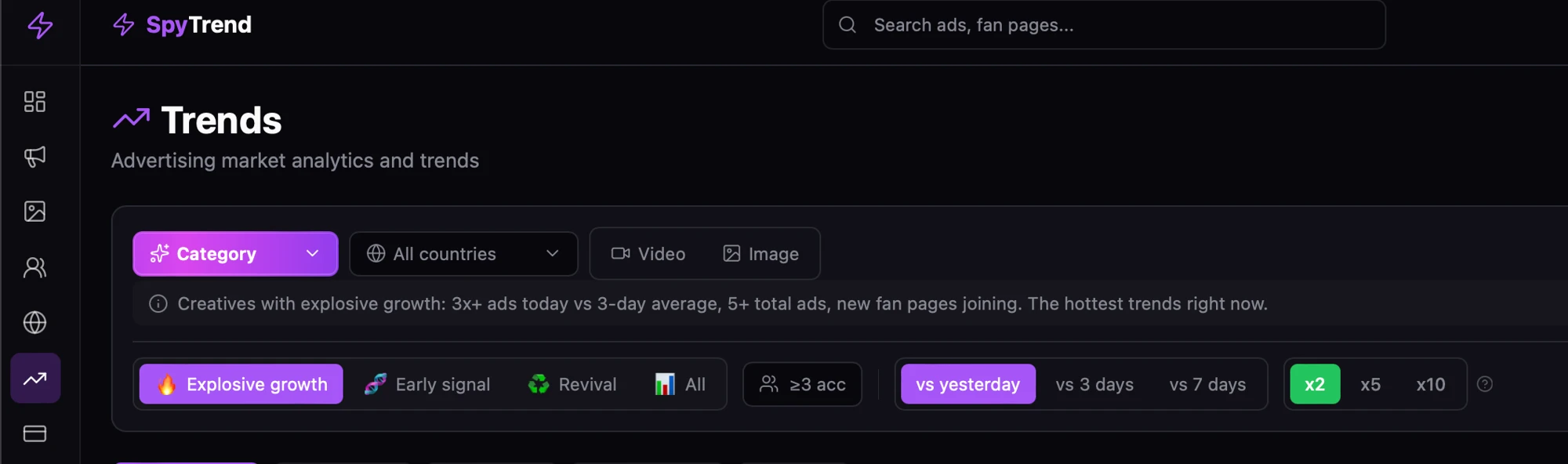
The Trends view is Spytrend's early-warning system. It surfaces three signal types: Explosive Growth (a webmaster's ad count is three times higher today than their three-day average, with a minimum of five total ads), Early Signal (a new webmaster showing first activity), and Revival (a previously inactive webmaster resuming spend). Each signal can be compared against yesterday, the last three days, or the last seven days.
The mechanical significance of Explosive Growth is that it identifies budget acceleration, not just presence. A competitor who ran two ads yesterday and runs six today has tripled spend — a signal that a creative test has converted and they are pushing budget behind it. At the 3x threshold with a five-ad floor, the signal filters out single-ad noise and focuses on operators with proven volume behind the surge.
Revival detection catches a pattern that manual monitoring misses entirely: a webmaster who went dark for weeks and then reactivates. In direct-response markets, reactivation correlates with a new offer, a new geo push, or a seasonal rotation. Catching it on day one — rather than after the campaign has saturated — gives the reader a head start on modeling the offer before the market prices it in.
The practical daily routine: open Trends, filter by Explosive Growth versus the seven-day baseline, scan the top five profiles, check their Sticky Ads count, and add any net-new webmaster to your tracking list. Repeat daily. The three signal types together — Explosive Growth, Early Signal, Revival — cover the full lifecycle of a competitor's campaign: launch, scale, and restart. Monitoring all three means no phase of a competitor's operation goes undetected.
FAQ
How does webmaster grouping actually identify a competitor's full network?
Spytrend matches ads across four identifiers — Facebook Pixel ID, root domain, Fan Page ID, and server IP address. When any two match across separate accounts or pages, those accounts are merged into one webmaster profile. A competitor running five brand pages behind one pixel appears as a single operator, not five unrelated advertisers.
What does the Sticky Ads metric measure and why does it matter?
Sticky Ads flags creatives that have been running continuously for five or more days. Advertisers pull losing ads quickly; a creative that survives past five days has passed the operator's own profitability threshold. Filtering webmaster profiles by Min Sticky Ads surfaces only the operators whose ads consistently convert — a reliable proxy for offer viability.
How large is the ad database and how current is the data?
The searchable database contains 612M+ ads, with 114M+ currently active. Approximately ~6M new ads are added daily. Live status (Active, Inactive, Vanished) is updated with fresh data — not the 3-7 day lag common in competing tools.
Can I monitor specific keywords or geos on an ongoing basis?
Yes. Spytrend's custom tracking feature lets users define their own keywords and geographic targets. The platform then collects every ad matching those parameters daily, so new entries surface in your feed automatically without requiring a manual search each session.
What ad networks and platforms does Spytrend cover?
Spytrend's database covers Facebook and Instagram ad creatives. Teams whose primary channels fall outside Meta's ecosystem should factor that scope into their evaluation.
Is there a free trial and what is the refund policy?
A free trial is available with no credit card required. Spytrend also offers a 7-day money-back guarantee on first-time payments, with monthly or annual subscription options and the ability to cancel at any time.