Short answer: behind every ad and visual there is a live media buyer who launches all of it. The Webmasters section glues his domains, fan pages and pixels back into one entity, so you look at a specific buyer as a whole rather than at scattered ads.
Webmasters: from ads to the people behind them
Webmasters is another signature feature of Spytrend. Ads and Creatives show you individual ads and visuals, but behind them there is always a live person, the media buyer who launches all of it. The problem is that you will not see him just like that: he runs traffic from a dozen domains, keeps 5-10 fan pages going, swaps pixels. From the outside it looks like a crowd of different affiliates, while in fact it is one buyer or one team.
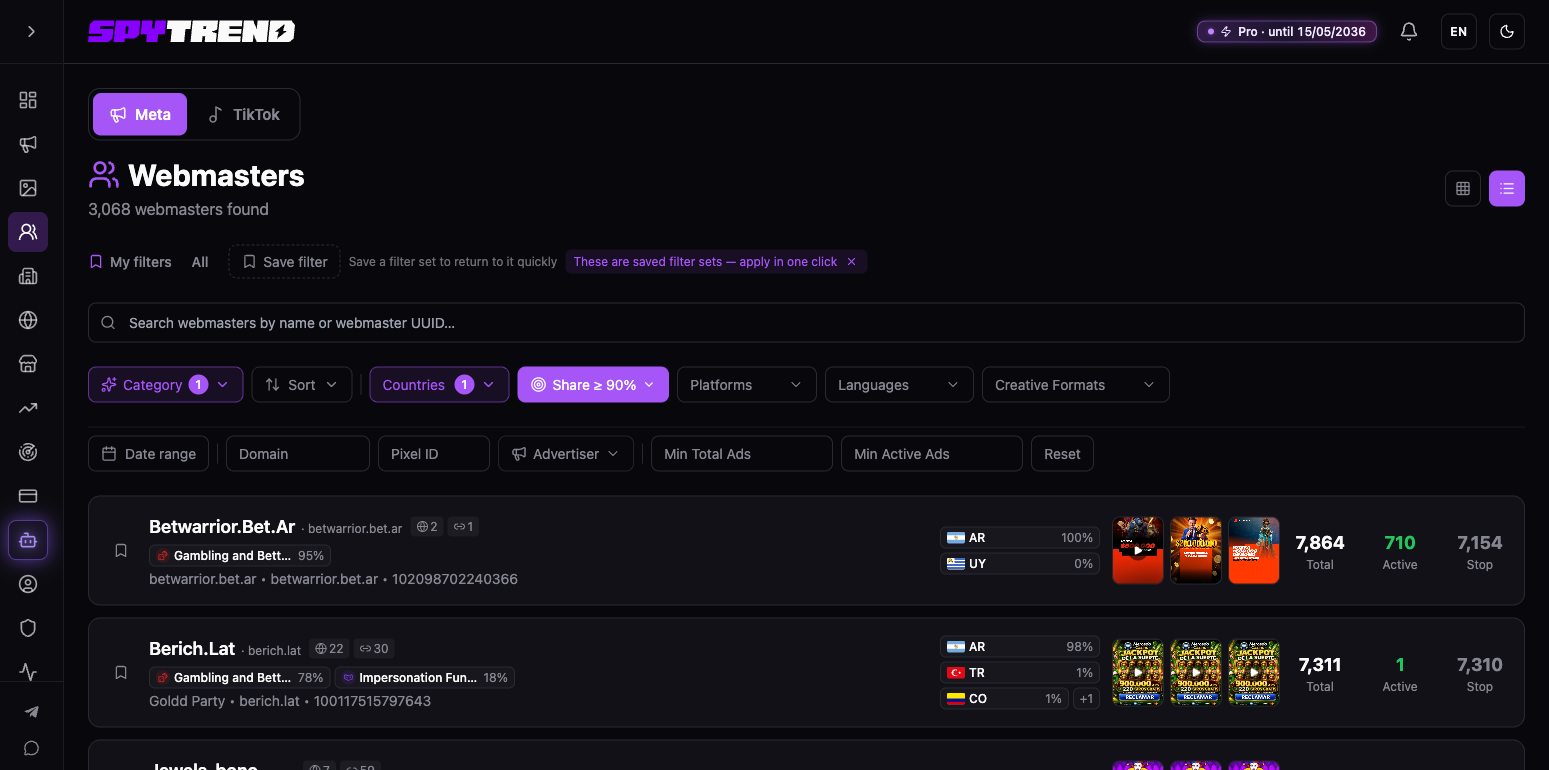
The Webmasters section glues all of that back into a single entity. Following a chain of links (shared pixels, domains, page_id) the system works out that one source stands behind this motley mass, and assembles it into a single profile. Plans and limits are on the pricing page.
The point is simple: you look at a specific buyer as a whole, not at scattered ads. With all of his bundles, domains and creatives. And he has already tested them with his own money. All that is left for you is to walk in, see what worked for him and work out why it works.
Filters: built for finding people, not pictures
The filters are built specifically for finding people rather than pictures:

- Search by webmaster name or UUID, while pixel, domain and fan page go through the filters below. You type in any identifier you know and find which webmaster it belongs to.
- Category, the vertical (Gambling in my case).
- Sort, by volume, activity and so on.
- Countries, the geo the traffic goes to.
- GEO share (Share ≥ 90% in my case), and this one is subtle. A filter on how "clean" a webmaster is: show only those whose selected countries make up at least the chosen share of their volume, 30, 50, 70, 90% or a value of your own. It cuts off the scattered ones and leaves those who hammer one market. I set Argentina and see who in that pool runs more than 90% of their traffic there.
- Platforms, Languages, Creative Formats, the standard set.
- At the bottom, Date range, Domain, Pixel ID, Advertiser and two useful thresholds: Min Total Ads and Min Active Ads. So you can cut off the small fry right away and keep only the big players with hundreds of active creatives.
What a row in the results holds
Let us go through what the results give you once the criteria are set. Every row of the list is already a summary of a buyer or a team. Here it is on a real example, the webmaster Agente365 (the name comes from one of his domains, agente365.net here). The numbers below are a snapshot as of September 2026:

- Nickname and tag, Agente365 · net, with the fan page name under it (Aria Tumble), the advertiser ID marked [ADV] and a page_id.
- Icons with numbers, how many domains and Page IDs he has: 30 and 26.
- Category with a percentage, Gambling and Betting 44%, followed by Finance and Banking 17%. What he mostly does and how tightly.
- Geo with a share, AR 100%. Runs entirely to Argentina.
- Creative previews, thumbnails of his ads right there, so you see the style at a glance.
- The numbers on the right, and this is the core:
- Total, 1,744. That is how many ads he has run overall.
- Active, 53. Running right now.
- Stop, 1,691. Already stopped.
How to read those numbers
Those numbers tell you the buyer's character straight away. A high Total with a low Active means he tests aggressively and cuts the failures fast. A high share of Active means he knows how to hit. A huge Stop against a small active count is the classic affiliate meat grinder, where a handful out of a hundred tests survive.
The detailed webmaster card
Click a row and the "Webmaster details" panel slides out on the right.
Agente365 · net (Aria Tumble, ID 956f7660…):
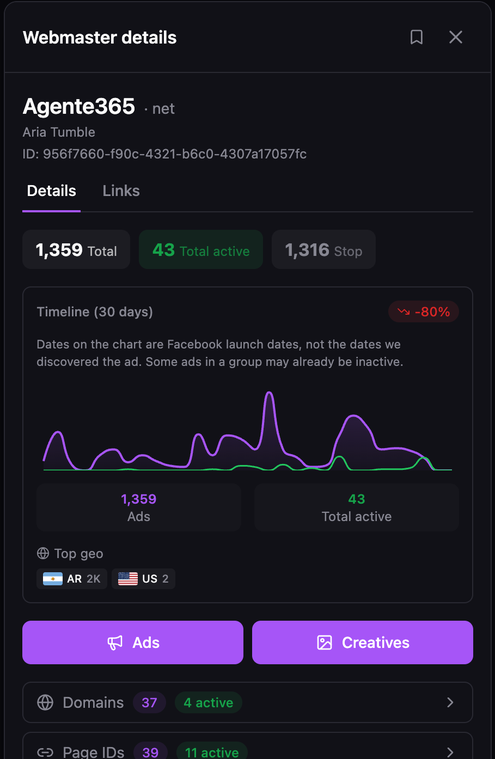
- 1,359 Total, 43 Total active, 1,316 Stop;
- Timeline over 30 days, a chart of launches, his sits at -80% (over the last few days he has launched far less than just before). You can see several sharp spikes, he pushed a batch, killed it, then did it again;
- Top geo, AR 2K and US 2, almost everything goes to Argentina;
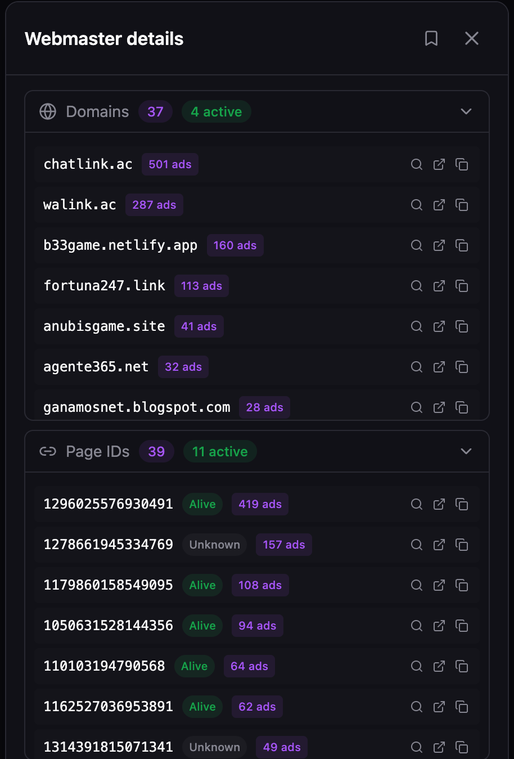
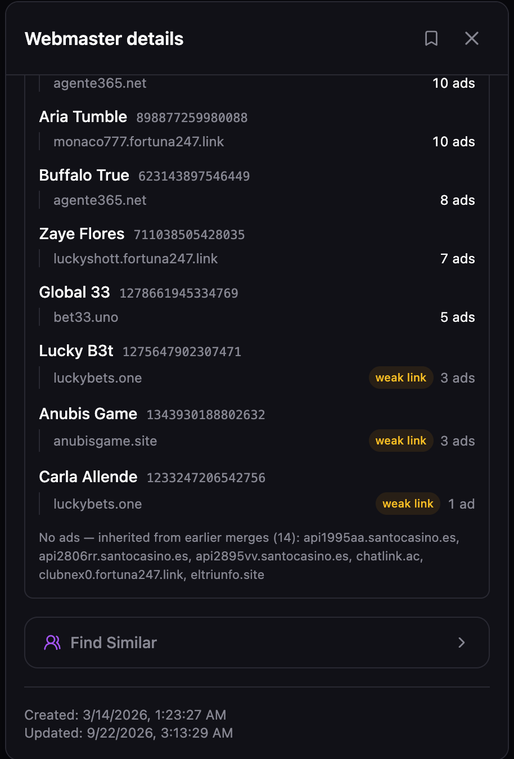
- Domains, 37 (4 active), Page IDs, 39 (11 active). There it is, the glue-together: 37 different domains and 39 fan pages gathered into one profile. The card itself flags some of the links as a weak link-up, so check those by eye.
The card's numbers differ from the row in the results (1,744 / 53 / 1,691 and icons 30 and 26 there): the row shows a saved snapshot of the statistics, while the card recounts when you open it.
A second example for comparison
Another one, Argrush · lol (Play and Win, ID ae1cbd7e…):

- 2,837 Total, 0 Active, 2,837 Stop;
- Geo, AR 100%;
- Domains, 4, Page IDs, 6 (from the icons in the row).
Compare the two and you already see two different handwritings. Agente365 has little active (53 out of 1,744), he runs a little at a time, but through a wide network of 30 domains and 26 Page IDs. Argrush has a compact network (4 domains, 6 Page IDs) and 0 active out of 2,837: at the time of the snapshot everything he has is stopped.
The Creatives button: the buyer's whole set
The Creatives button opens the entire set of that webmaster's creatives at once, and the Ads button next to it opens his ads. Not separate ads from across the database, but exactly what this particular person launched.
The logic from there is elementary. You are looking at a buyer who has already burned thousands of dollars on tests, found the visuals and bundles that work for his geo. You go into his creatives and look at what sits in his active ones. He verified with his own money what works in Argentina. All that is left is to work out why it works.
Under the buttons there are also expandable lists of Domains and Page IDs (you can drill into each one). Below them sits the What merged this network block: which fan page ran ads to which domain, with doubtful links flagged weak link. And at the very bottom of the card, Find Similar. So from one good buyer you can jump straight to others with the same tracker parameters in their links and widen your pool of sources.
What the section is for
The Webmasters section is the shift from "what is being advertised" to "who is advertising". The system de-anonymises a buyer scattered across domains, fan pages and pixels, and assembles him into one profile with full statistics: how much he launched, how much is alive, how much is stopped, where he runs traffic. And the Creatives button hands over his entire tested set.
In effect it is a ready-made map of competitor ads sorted by the people who run them, not by the placements. You find the one who has been hammering your niche and geo hard and for a long time, and you take apart what already works for him before burning budget on your own tests from scratch.
FAQ
What does the Webmasters section show?
Not individual ads but a specific buyer as a whole: his bundles, domains and creatives. The system glues a person scattered across domains, fan pages and pixels into one profile.
How does the system know that one person is behind different domains?
Through a chain of links: shared pixels, domains and page_id. They are what reveals that a single source stands behind a motley mass of ads.
What do the numbers in a webmaster row mean?
Total, how many ads he has run overall; Active, how many are running now; Stop, the ones already stopped.
What is the GEO share filter for?
It filters on how "clean" a webmaster is: show only those whose selected countries make up at least the chosen share of their volume, 90% for example. It cuts off the scattered ones and leaves those who hammer one market.
How do I find a webmaster by pixel or domain?
Through the section's Domain, Pixel ID and Advertiser filters: type in a known domain, pixel or fan page and you find which webmaster it belongs to.
What does the Creatives button do?
It opens the entire set of that webmaster's creatives at once, exactly what he launched, rather than ads from across the whole database.
Parts of the Spytrend walkthrough
- Part 1. Dashboard and Ads
- Part 2. Creatives
- Part 3. Webmasters — this page
- Part 4. Advertisers
- Part 5. Hubs
- Part 6. Websites
- Part 7. Trends