Short answer: an ad spy for Facebook starts with two sections. Dashboard shows how much advertising there is in total, what is active, and where demand is shifting across niches, geos and formats. Ads is the section where the placements are gathered one by one: every fan page, every domain, every separate launch gets its own card. A single creative can spawn hundreds of those cards, and they are all here, one at a time.
Dashboard: the storefront of the whole database
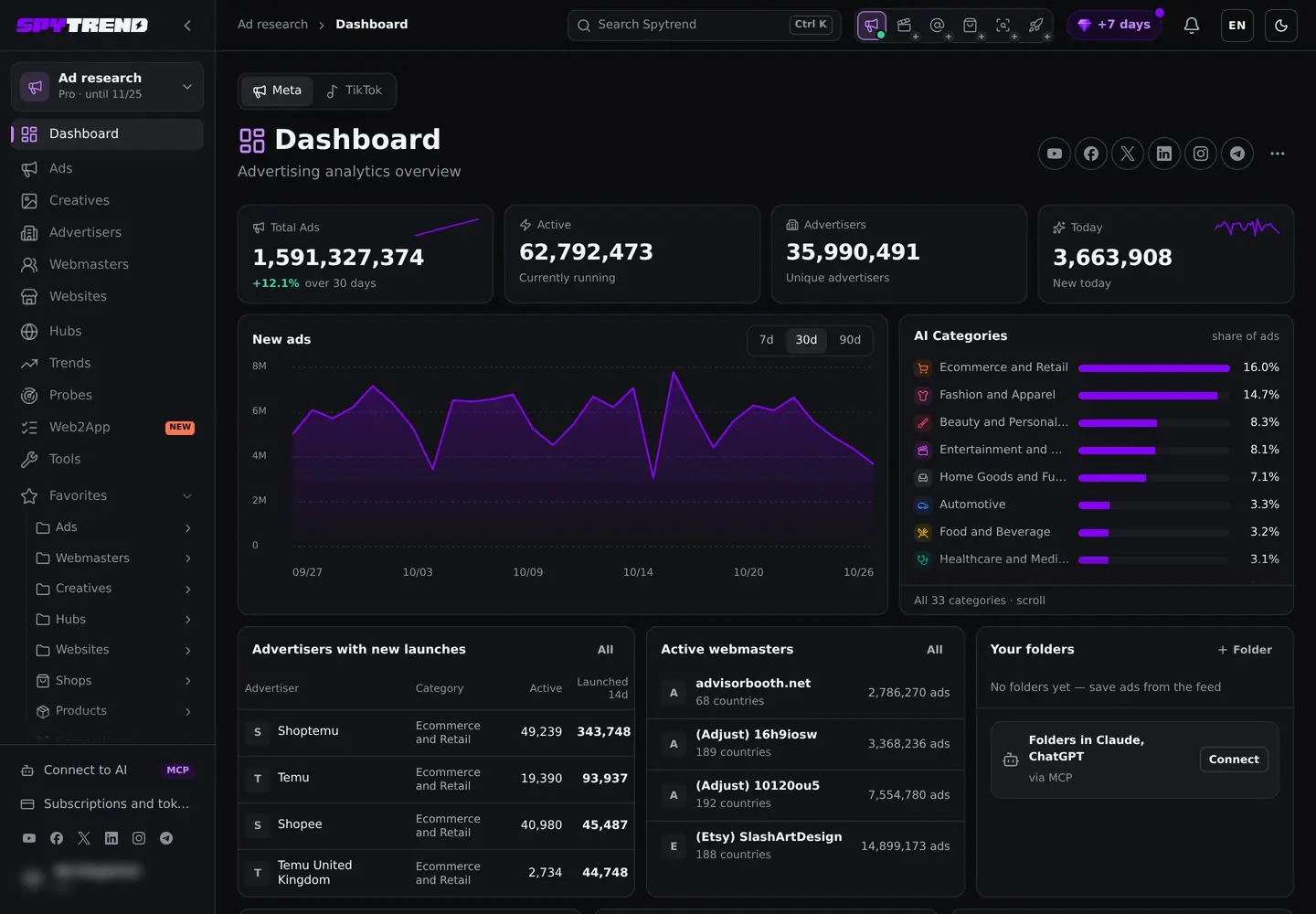
Dashboard shows how much advertising there is in total, what is active, and where demand is shifting across niches, geos and formats. You open it in the morning, read the weather in a minute, then go dig into the other sections. You can see what this view looks like in the demo.
It is the storefront of the whole database: how many ads are in the system, what is running right now, where the market is heading. You will not dig into a single offer here, that is what Ads and Creatives are for. Getting the general picture, though, takes a minute.
Across the top run the counters. On October 26, 2026, the Meta tab showed 1,591,327,374 ads in total (+12.1% over 30 days), 62,792,473 currently running, 35,990,491 unique advertisers and 3,663,908 new today. A Meta / TikTok switch above them flips the whole page to TikTok.
30-day trend
The New ads chart switches between 7, 30 and 90 days. Over the 30 days to October 26, 2026, daily launches on Meta moved between roughly 3 and 8 million. The practical meaning is simple: you see whether the market is breathing or has gone quiet.
If the line slides down for a week, competitors are cutting back, which is a window to test your own bundles. If it climbs, everyone is pushing at once and the auction gets more expensive.
AI Categories: where competition is densest
To the right of the chart sits the ranking of niches, sorted out by the model. Spytrend determines the topic of ads on its own and stacks them into bars.
Ecommerce and Retail leads with 16.0% of ads, Fashion and Apparel follows with 14.7%, then Beauty and Personal Care (8.3%) and Entertainment and Media (8.1%) (October 26, 2026), then the narrower verticals. The list makes it easy to estimate where competition is densest and where a niche is not crowded yet.
Geo: top 10 countries by ad volume
Scroll the dashboard further down and geo sits on the left, the top 10 countries by ad volume.
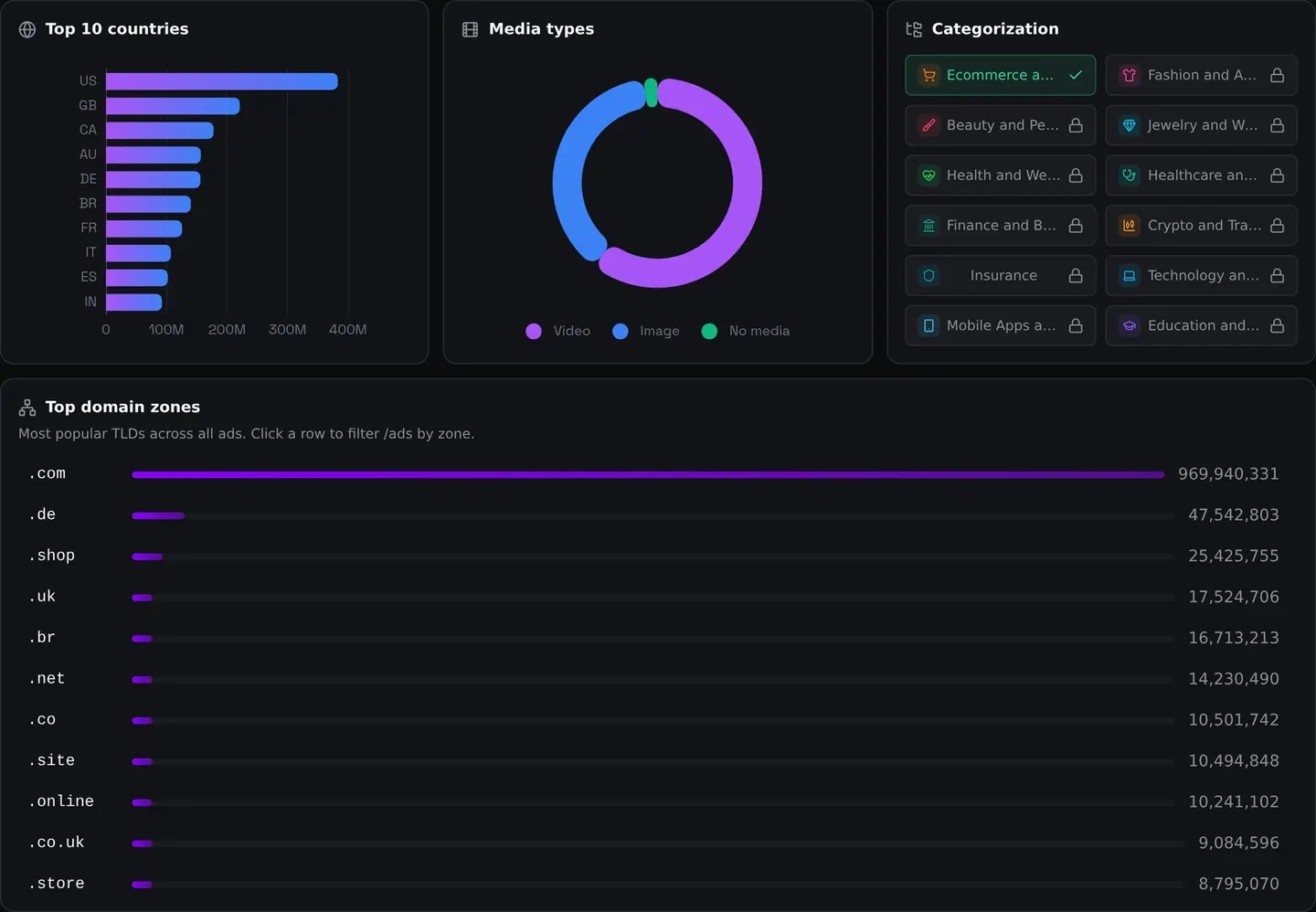
The US is out of competition here at roughly 380 million ads, well ahead of the UK in second place at a little over 200 million. Then Canada, Australia and Germany, a dense English- and Euro-tier group, followed by Brazil, France, Italy, Spain and India (October 26, 2026).
The takeaway for buying: the bulk of the creatives is built for Tier-1 English-speaking markets. If you want references for US or UK, there is plenty of material. For some rare geo you will have to dig deeper through the filters in Ads.
Formats: video and static
Video and images split the database roughly in half, with video slightly ahead. "No media" is a very thin sliver, those are text ads with no visual.
The conclusion is obvious but it matters: if you only make static, you are playing on half the field. Half the market has already moved to video.
Categorization: the 33 categories
Next to the formats sits the Categorization block: all 33 AI categories as toggles, from Ecommerce and Retail and Fashion and Apparel to Finance and Banking, Crypto and Trading and Insurance. These are the categories the whole service is built on. On the account used for the screenshots only Ecommerce and Retail is open, and the other tiles carry a lock icon.
Inside a user account they are not statistics, they are visibility toggles. On a paid plan, the open categories decide which creatives you see by default, while a search by keyword, domain, pixel or page runs across the whole database.
Domain zones
At the very bottom, the most popular domain zones across all ads.
The familiar .com leads by far, with 969,940,331 ads on October 26, 2026. Second comes .de with 47,542,803, then .shop, .uk and .br; the cheap landing-page zones .site, .online and .store follow lower down. Classic affiliate and ecommerce practice, you take a throwaway domain for a bundle and run it. The country zones show which markets run through local domains rather than international ones.
Click any row and you are already in Ads with that zone filtered. A fast way to drop from the big picture into specific ads.
New launches, active webmasters and your folders
Between the chart and the geo block, two newer tables give a way in without any search. Advertisers with new launches lists who launched the most ads in the last 14 days: on October 26, 2026 it was Shoptemu with 343,748, Temu with 93,937 and Shopee with 45,487. Active webmasters lists operator profiles with their ad count and number of countries. Saved ads go to the Favorites folders in the sidebar, and the same folders can be opened from Claude or ChatGPT through the MCP connection.
The logic of the Spytrend sections, briefly
- Dashboard, the weather of the market: volumes, top niches, geo, formats, domain zones.
- Ads, the same ads one by one. Fine-grained filters (Pixel ID, Advertiser, language separately from geo, lifespan, likes) plus a detailed card with the real destination link and the caption the user sees.
- Creatives, the unique visuals. The feature is the Date range with the "Ads in period" field: it shows activity within the selected window, meaning what is being scaled right now rather than at some point.
- Webmasters, de-anonymising a buyer into one profile with his push statistics and a "Webmaster creatives" button.
- Advertisers, the fan page level: age, followers, push speed, domains.
- Hubs, the breakdown by destination platform (where the traffic leads): which channel, profile or app collects the traffic. A click on a row gives every creative leading to that profile.
- Websites, the sites, their traffic and the link between traffic growth and Facebook advertising.
- Trends, a constructor for explosive growth: you set the multiplier (x2/x5/x10), the window and the minimum number of accounts, and catch creatives on the way up. Plus slices by country and by application.
Ads: placements one by one
This part also covers Ads, where the placements are gathered one by one. Every fan page, every domain, every separate launch gets its own card. A single creative can spawn hundreds of those cards, and they are all here, one at a time.
You come here when you need specifics rather than a general picture of the visuals: which domain the traffic runs from, whether the ad is active right now.
Meta and TikTok
Right next to the Ads title sits the source switch: Meta and TikTok. The database is split by platform, so you pick straight away whose ad library you are digging through.
Meta is the default and covers both Facebook and Instagram ads; each card shows the placement icons. TikTok sits next to it on a separate tab. Convenient that they are not mixed together but kept apart.
Filters and Save filter
Filters are where all the value is. The filter panel here is noticeably heavier than in Creatives. On top of the usual categories, geo and format, it adds what you need for precise work: status (Active, Inactive, Vanished), days active, likes, webmaster, domain, domain zone, pixel ID and advertiser. A newer EU row filters ads shown in the EU by reach countries, EU reach, gender, age and payer. Quick filters for Trending and New 24h sit above the feed, with sorting by most re-uploaded or by creation date.
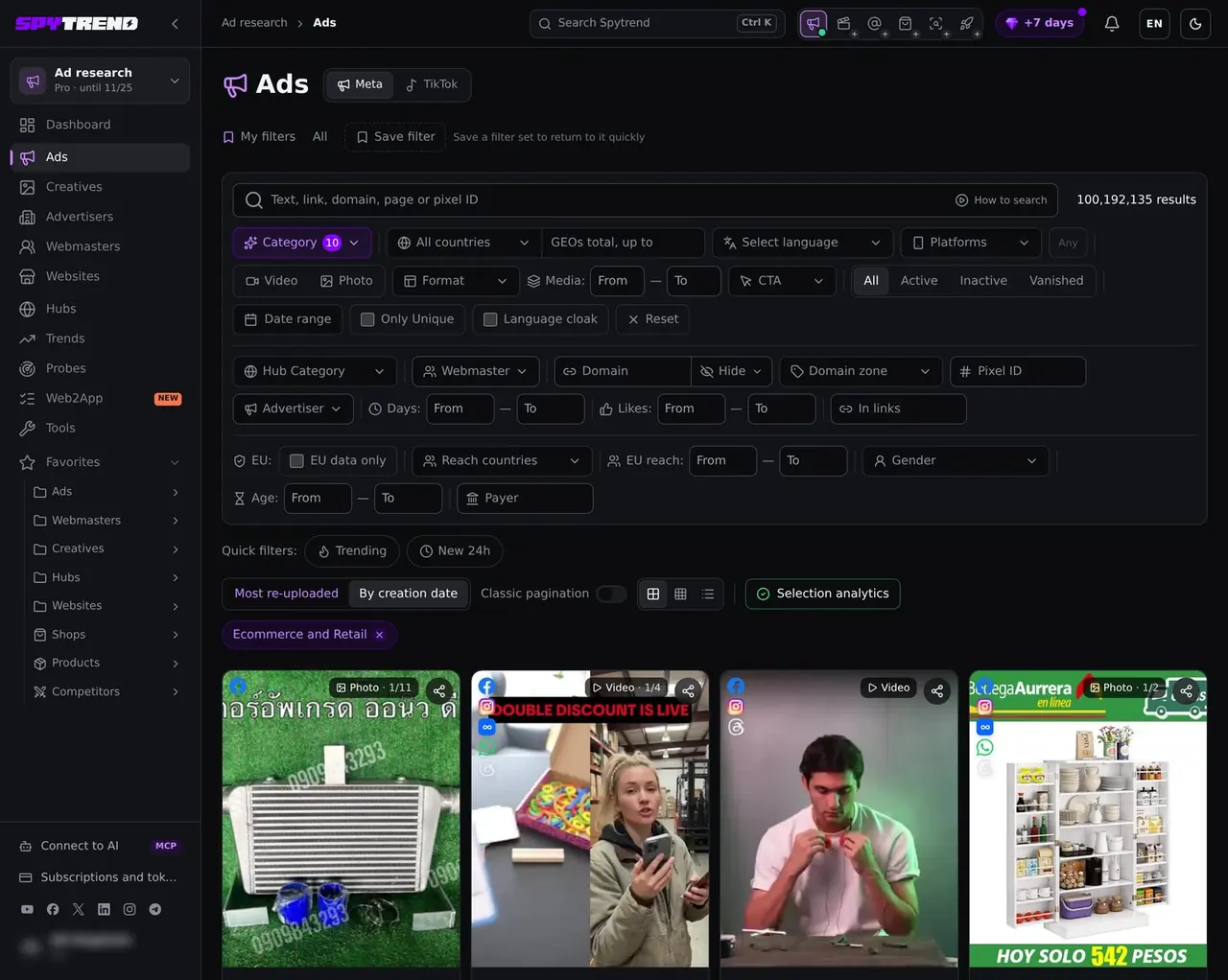
You set up that combination, save it with Save filter, and after that you enter your vertical in one click.
Tagging quality
What really impressed me is the tagging quality. I left the category on Ecommerce and Retail and scrolled through the results by eye: stores, product demos and offers, nearly all of them on topic.
The category is not a single blanket label either: under every card there is Ecommerce and Retail plus a subniche, such as Hardware and Tools, Toys and Games Non Digital or General Merchandise. The labels come from a model, so a borderline ad turns up now and then, a trade-fair registration page filed under General Merchandise for example, but the feed stays on topic. That is worth a lot: you do not spend time manually clearing out what is off-topic.
The detailed ad card
Click any ad and a detailed panel slides out on the right. I opened a battery-charger video ad from the Foihletpath.HE28 page and everything is laid out there:
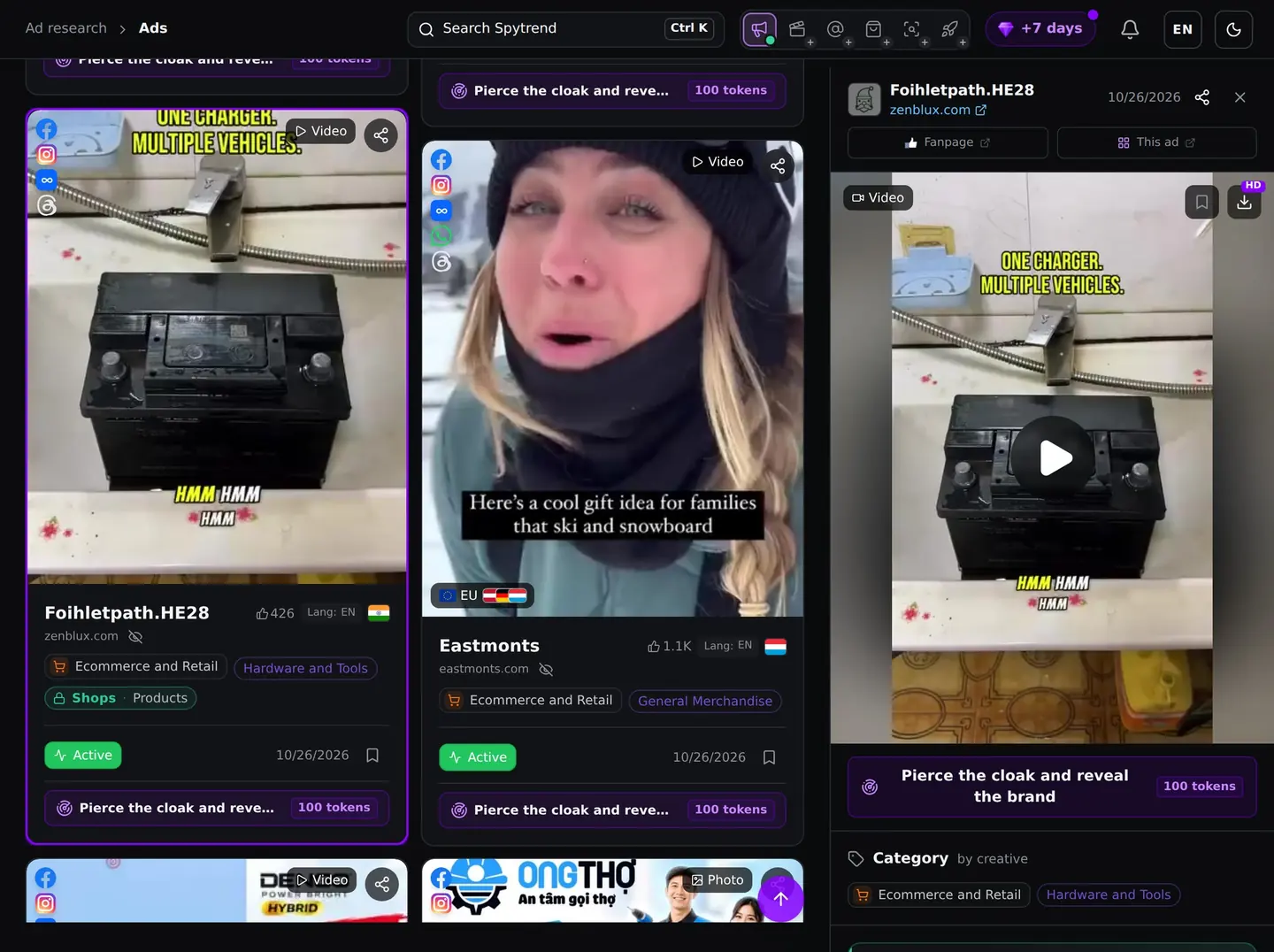
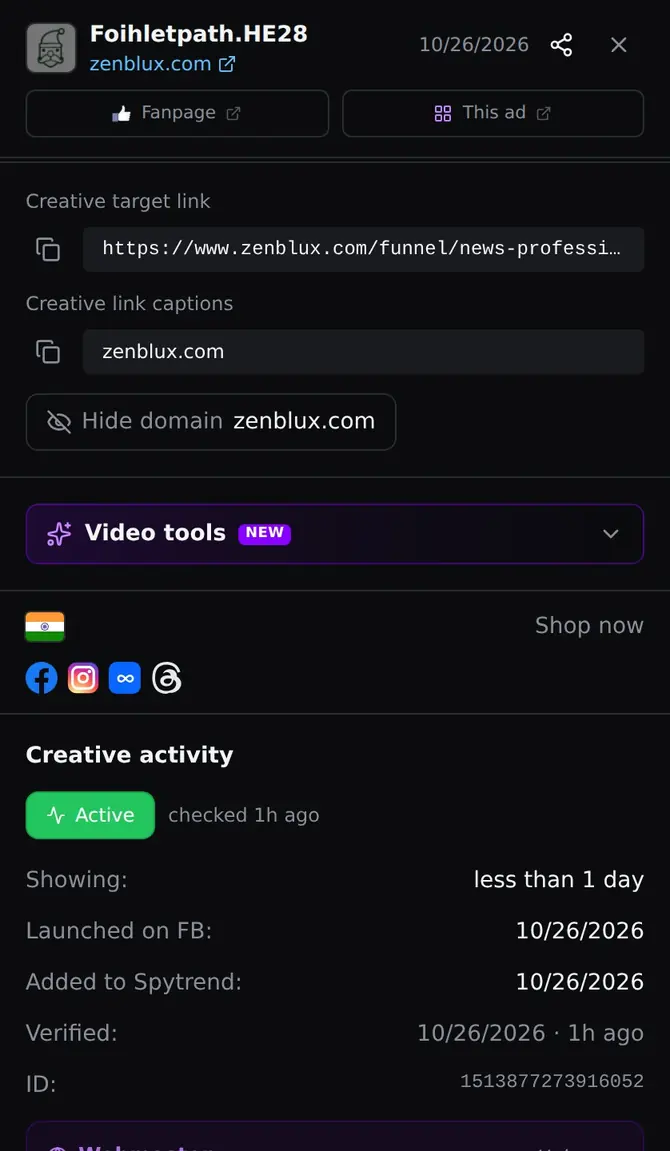
- Media preview on top, with the save-to-favourites and download buttons right there.
- Two jump buttons, Fanpage (open the page the traffic runs from) and This ad (open the placement itself in the ad library);
- Creative target link, this is the most important field. The real link the creative leads to: www.zenblux.com/funnel/news-professional-12v-6a-smart-lead-acid-charger-m-20, a product page built as a news-style funnel. So you see the actual destination page, not only the domain shown in the ad;
- Creative link captions, the caption domain the user sees in the ad itself (zenblux.com);
- Geo and platforms, the IN flag, the Shop now call-to-action label and the icons for where it runs (Facebook, Instagram, Audience Network, Threads);
- Category, Ecommerce and Retail / Hardware and Tools.
Creative activity: the lifespan of an ad
A separate Creative activity block, a file on lifespan:
- Status Active;
- Showing: less than 1 day, running for under twenty-four hours, fresh;
- Launched on FB: 10/26/2026, when it was launched on Facebook;
- Added to Spytrend / Verified: 10/26/2026, when it entered the database and when it was verified;
- The ad ID.
Those dates show immediately how fresh a bundle is. This creative was launched today and is already in the database, so you are looking at what is entering the auction right now, not at an archive.
Similar ads: by FB page and by domain
And at the bottom, Similar ads with two tabs: by FB page (other ads from the same page) and by domain (other ads leading to the same domain or app).
One click takes you from a single winning creative to the whole batch around it. With Foihletpath.HE28, for example, the by FB page tab immediately pulled up the page's other creatives: Box Brightening & Clearing Eye Masks, Phosphating Rust Remover Spray, Cabinet Door Hinge Repair Plates and a High-Speed RC Off-Road Car, so you see how one page rotates unrelated products. The by domain tab lists ads from other pages tied to the same domain (Creclockdit, Blanceresem.RE04, Bamaxisboon_hhh, Braioncalit): one store, several page names.
That is the layout for every ad: the real destination link, the caption the user sees, the full lifespan and the related creatives. No guessing where the traffic goes and how, it is all laid out. That is what an ad spy comes down to: not a feed of someone else's ads, but a breakdown of who stands behind them.
When the destination is hidden behind a cloak, you can run a Probes check on the ad: it requests the page a real visitor would see. It costs 100 tokens (tokens are bought in packs inside your account), and the result lands in the Probes section.
FAQ
How is Dashboard different from Ads?
Dashboard shows how much advertising there is in total, what is active and where demand is shifting across niches, geos and formats. Ads holds the placements one by one, every fan page and every launch on its own card.
Can I dig into a single offer in Dashboard?
No, you will not dig into a single offer there, that is what Ads and Creatives are for. Dashboard is for reading the general picture.
Which platforms are covered in Ads?
Meta, meaning Facebook and Instagram, and TikTok. The database is split by platform, Meta opens by default and TikTok sits on a separate tab.
Where do I see the real destination of an ad?
In the detailed card there is the Creative target link field, the real link the creative leads to. Next to it, Creative link captions, the caption domain the user sees in the ad itself.
How do I tell whether a bundle is fresh?
From the Creative activity block: status, Showing, Launched on FB and the date it was added to the database. If a creative was launched yesterday and is already in the database, you are looking at what is entering the auction now, not at an archive.
How do I get from the big picture to specific ads?
Click a row in the domain zones block and Ads opens with that zone filtered. Your own filter combination can be stored with Save filter, so you enter your vertical in one click.
Parts of the Spytrend walkthrough
- Part 1. Dashboard and Ads — this page
- Part 2. Creatives
- Part 3. Webmasters
- Part 4. Advertisers
- Part 5. Hubs
- Part 6. Websites
- Part 7. Trends