Short answer: Websites looks at the end point, the site itself. It shows competitor website traffic next to the volume of advertising that was run to it. Where those two numbers meet you get a correlation between the ads launched on Facebook and the site's traffic: you see whether a particular project's traffic growth lines up with its FB advertising. You can check your own domain in the demo.
Websites: a look at the end point
The angle changes once again here. Every previous section revolved around advertising: who runs traffic, what they run, where it leads. Websites looks at the end point, the site itself. It shows competitor website traffic next to the volume of advertising that was run to it. And where those two numbers meet, the section's main feature grows.
You can build a correlation between the ads launched on Facebook and the site's traffic. That is, see whether a particular project's traffic growth lines up with a wave of FB ads. You notice that a site's traffic jumped sharply exactly alongside a wave of ads, and there is a live case of a project growing on traffic right now. That is how people find not just bundles but whole startups, approaches and directions. The tool is for inspiration and insight.
Filters
The panel here is the densest in the whole service, because there is a lot of data on a site:
- Category / Site industry (traffic), Spytrend's own tagging plus the site's industry from the traffic estimate.
- All countries, the geo (AR in my case).
- Search domain, search for a specific domain.
- Visits/mo, a filter on monthly traffic.
- Growth, on the rate of traffic growth.
- Bounce, on the bounce rate.
- Revenue, on the site's estimated revenue.
- Backlinks, on the backlink profile.
- Registrable-domain WHOIS date, on the age of the domain.
- Has active ads / Has products / AI traffic / Platform / Rating / Min ads / Visitors/ad / Traffic breakout, a set of thresholds and flags to filter out the empty ones.
And ready-made presets at the top, one click each: Top by visits, Has ads, Fast growing, and the main one, FB ↔ traffic, which immediately builds the list around the relationship between Facebook ads and traffic.
What a row holds
Every row is a site and its full layout. The columns run left to right: site and category, the AI categories of its ads, geo, creatives, monthly traffic, the FB/traffic relation, new ads per month, visits, visitors per ad and the number of ads. Here it is on a real example:
betwarrior.bet.ar (yes, the same one from the Advertisers section):
- Ad categories, Gambling 92%
- Geo, AR 98% with a bit of MX;
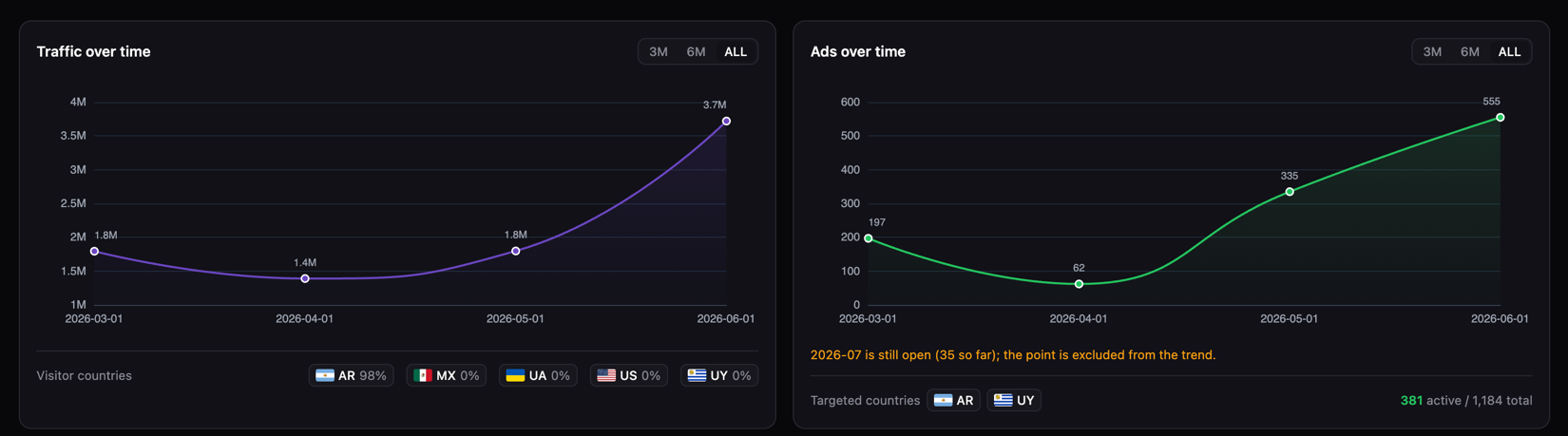
- Visits/mo, 3.7M. Almost four million visits a month. That is already a serious site, not a landing page built for one bundle;
- Growth ~+106.9% (Jun 2026), traffic doubled over the month;
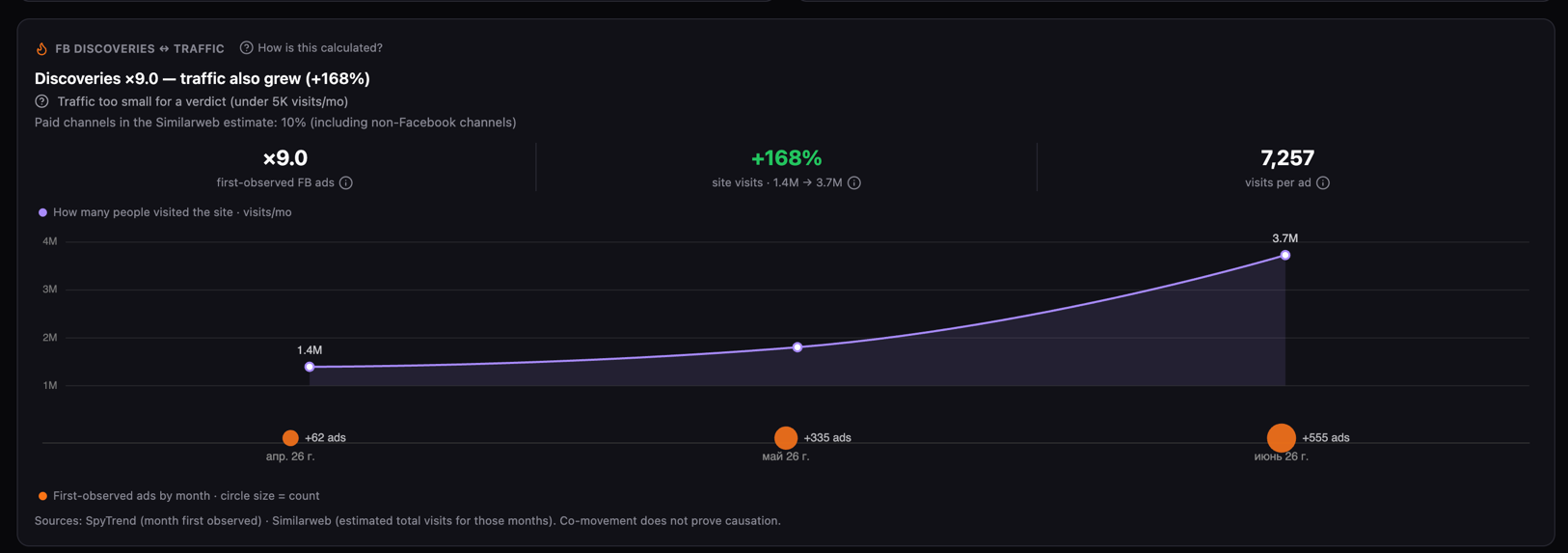
- Visitors/ad, 7,257, how many visitors there are per single ad;
- Ads, 381 active / 1,184, active ads and the total.
That single row already reads as a direct correlation: the operator is actively running Facebook ads (381 live ones) and at the same time its site has grown several times over in traffic. The advertising works, the project is on the rise:
The key metrics
The key metrics read like this:
- Visits/mo, the site's real monthly traffic;
- Growth (%), how it changed, green for growth and red for decline;
- FB/traffic relation, that very correlation, with mini charts of ads and traffic side by side so you can see whether the spikes line up;
- Visitors/ad, the return from a single ad;
- Ads (active / total), how much advertising is being run to this site.
Plus live trend charts in the row, creative thumbnails and geo with flags. All in one line, without opening a card.
How to read it for insights
The main thing is to compare the volume of advertising against the traffic dynamics:
- A lot of active advertising plus a sharp rise in visits means the project is taking off on paid traffic right now, the approach works;
- Huge traffic with a small number of ads means the site lives on organic or on its brand and is barely fed by advertising;
- A pile of advertising with tiny traffic (like convertixapp.com early on) means an early stage, and you can catch a bundle or a direction before the market does;
- The Fast growing and FB ↔ traffic filters quickly pick out exactly those whose traffic growth coincided with an advertising wave.
That is how you can stumble onto a fresh startup that advertises hard and lives on traffic, take its approach apart and understand what works for it. Your imagination is not limited here: category, geo, growth rate, domain age, you turn the filters to your task and look for inspiration.
What the section is for
Websites closes the funnel from the other end. If Hubs shows where traffic leads, Websites shows what became of that traffic: how many visits a site has, how they are growing and how much of that growth is tied to Facebook advertising. In effect it is a tool for seeing the direct "ads → traffic" link and through it catching growing projects, fresh approaches and new directions before everyone else.
FAQ
What does the Websites section show?
Domains, their real traffic and the amount of advertising that was run to them. Where those numbers meet you get the link between Facebook ads and the site's traffic.
How do I tell that a site is growing on advertising specifically?
Compare the volume of advertising against the traffic dynamics. A lot of active advertising plus a sharp rise in visits means the project is taking off on paid traffic. Huge traffic with few ads means the site lives on organic or on its brand.
What is the FB ↔ traffic preset?
A ready-made filter at the top of the panel that immediately builds the list around the relationship between Facebook ads and traffic. Top by visits, Has ads and Fast growing sit next to it.
Which metrics are available per site?
Visits/mo, the monthly traffic; Growth (%), how it changed; FB/traffic relation, the correlation between ads and traffic; Visitors/ad, the return from a single ad; Ads (active / total), how much advertising is run to the site.
Which parameters can I filter sites by?
By Spytrend's category and the site industry from the traffic estimate, geo, domain, monthly traffic, growth rate, bounce rate, estimated revenue, backlinks, domain age from WHOIS, plus flags such as having active ads or products and other thresholds.
How much traffic does a website get?
The Websites section shows a domain's monthly visits next to the volume of advertising run to it. You get both the traffic figure and whether its growth lines up with the Facebook buying.
Parts of the Spytrend walkthrough
- Part 1. Dashboard and Ads
- Part 2. Creatives
- Part 3. Webmasters
- Part 4. Advertisers
- Part 5. Hubs
- Part 6. Websites — this page
- Part 7. Trends