Short answer: the Hubs section unfolds the database by where the traffic goes rather than by who is advertising. Inside a hub you see every profile traffic is being driven to and exactly how much advertising points at it: which Telegram channel is collecting the most traffic right now, which Instagram profile, which App Store app is being pushed hardest.
What a hub is
Hubs looks confusing at first, but the idea behind it is elegant. Let us start from the basics.
There are platforms where anyone can create their own profile or space. Telegram is a platform, but a channel inside it belongs to whoever made it. Instagram is a platform, and the profile is yours. App Store, Amazon, Kickstarter, same story: one place, thousands of pages inside it, and every page is run and advertised by somebody. A place like that, where you are not the platform itself but simply built your own link on top of it, is what Spytrend calls a hub.
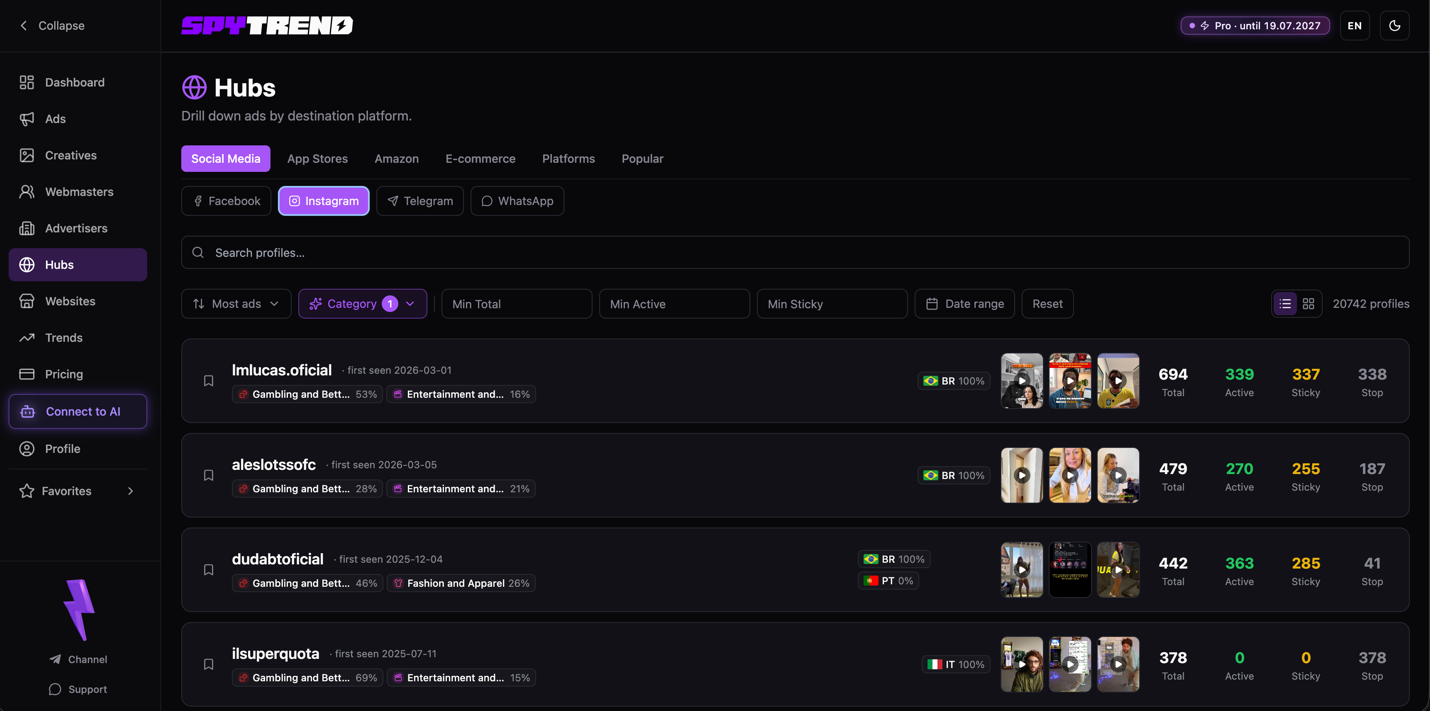
And here is the main part. Advertising always leads somewhere. The Hubs section unfolds the database by where the traffic goes rather than by who is advertising. The subtitle says exactly that: "Drill down ads by destination platform". Plans and limits are on the pricing page.
So inside a hub you see every profile traffic is being driven to and exactly how much advertising points at it. Which Telegram channel is collecting the most traffic right now. Which Instagram profile. Which App Store app is being pushed hardest. All of it is tracked and sorted out.
How the navigation works
There are two levels of tabs at the top:
- The first row is the hub type: Social Media, App Stores, Amazon, E-commerce, Platforms, Popular. You choose where you are looking at all, into social networks, into app stores, into Amazon or somewhere else.
- The second row (inside Social Media) is the specific platform: Facebook, Instagram, Telegram, WhatsApp. I have the results for Instagram on screen, and the database shows 20742 profiles that traffic is currently being driven to inside that platform.
Below sits the standard filter: profile search, Most ads sorting, Category, the Min Total / Min Active / Min Sticky thresholds and a date range.
What a row holds
Every row is a profile receiving traffic plus the statistics on the advertising that leads to it. Take the Facebook tab with a gambling filter as an example:
Slot Mate - Free Slot Casino (first seen 2024-12-16):
- Gambling 92%;
- the geo is spread thin: CA 3%, ES 3%, QA 3% and +111 more countries. Traffic reaches this profile from almost everywhere;
- 868 Total · 0 Active · 0 Sticky · 865 Stop. In total 868 ads led here, but right now there are zero active ones, the wave has passed and the push was wound down.
Legendary Hero Slots (2025-05-14):
- Gambling 76%; FR 17%, US 17%, DE 16%;
- 671 Total · 13 Active · 13 Sticky · 658 Stop. Here there is something alive: 13 active ones and all 13 sticky.
Rock N' Cash Casino Lite (2025-04-02):
- Gambling 87%; CA/US/FR at 8% each, +26;
- 367 Total · 17 Active · 17 Sticky · 346 Stop. The liveliest of the three right now.
What the four numbers mean
The numbers mean the same as the ones we already saw on webmasters:
- Total, how many ads in total led to this profile;
- Active, how many lead to it right now;
- Sticky, the ones that caught on and run steadily;
- Stop, already stopped.
Plus thumbnails of the latest creatives and a geo breakdown with flags. You immediately see where the traffic to this profile is pumped from.
What it is really for
Now for what the section was built for. It is a tool for finding bundles that are not visible when you look at individual ads.
You look at a route rather than at an ad: from where → to where. How gambling is being driven to Telegram channels right now. How the same vertical goes to Instagram profiles. Which App Store app suddenly picked up advertising over the last week. You catch the direction of the traffic in the moment, not a single creative.
And from there your imagination is not limited. You switch tabs, walk through platforms and categories, and at some point you catch an insight. Say, you notice that dating has suddenly moved en masse from Facebook to Instagram profiles rather than to landing pages. Or that everyone in gambling started driving traffic into Telegram at once. That is no longer "found a good creative", that is "I saw where the market moved before everyone else". Sometimes that is how a whole new direction gets found, one you had not even considered.
You can also come with a narrow task: open Telegram, set your category, sort by Most ads, and there it is, the most heavily pushed channel in your niche right now. The same layout works for Instagram, for the app stores, for Amazon.
What the section is for
Hubs is a view from the other side of the funnel. Every previous section answered "who advertises what", and Hubs answers "where does all of it lead". You break the market down by destination platform and see which profiles, channels and apps are pulling in the most traffic right now, in which niche and from which countries.
Its main value is finding bundles and directions by the route of the traffic. You are not looking at a ready creative, you are catching where the market has taken its traffic and drawing your own conclusion from that.
FAQ
What is a hub in Spytrend?
A place where you are not the platform itself but simply built your own link on top of it: a Telegram channel, an Instagram profile, a page in the App Store or on Amazon. One platform, thousands of pages inside it, each run and advertised by somebody.
How is Hubs different from the other sections?
Every previous section answered "who advertises what", and Hubs answers "where does all of it lead". The database unfolds by destination platform rather than by advertiser.
Which hub types are there?
The first row of tabs: Social Media, App Stores, Amazon, E-commerce, Platforms, Popular. Inside Social Media come the specific platforms: Facebook, Instagram, Telegram, WhatsApp.
What do Total, Active, Sticky and Stop mean in a row?
Total, how many ads in total led to this profile; Active, how many lead to it right now; Sticky, the ones that caught on and run steadily; Stop, the ones already stopped.
How do I find the most heavily pushed Telegram channel in a niche?
Open Telegram, set your category and sort by Most ads. The same approach works for Instagram, the app stores and Amazon.
Parts of the Spytrend walkthrough
- Part 1. Dashboard and Ads
- Part 2. Creatives
- Part 3. Webmasters
- Part 4. Advertisers
- Part 5. Hubs — this page
- Part 6. Websites
- Part 7. Trends