Short answer: Trends is the section for catching winning ads while they scale, rather than what worked yesterday. It is a constructor: you define what counts as explosive growth yourself, and the service hands you the bundles that are scaling against your criteria in the moment.
Trends: a constructor for explosive growth
Trends is the section for catching winning ads while they scale, rather than what worked yesterday. "Trends" is a constructor: you define what counts as explosive growth yourself, and the service hands you the bundles that are scaling against your criteria in the moment.
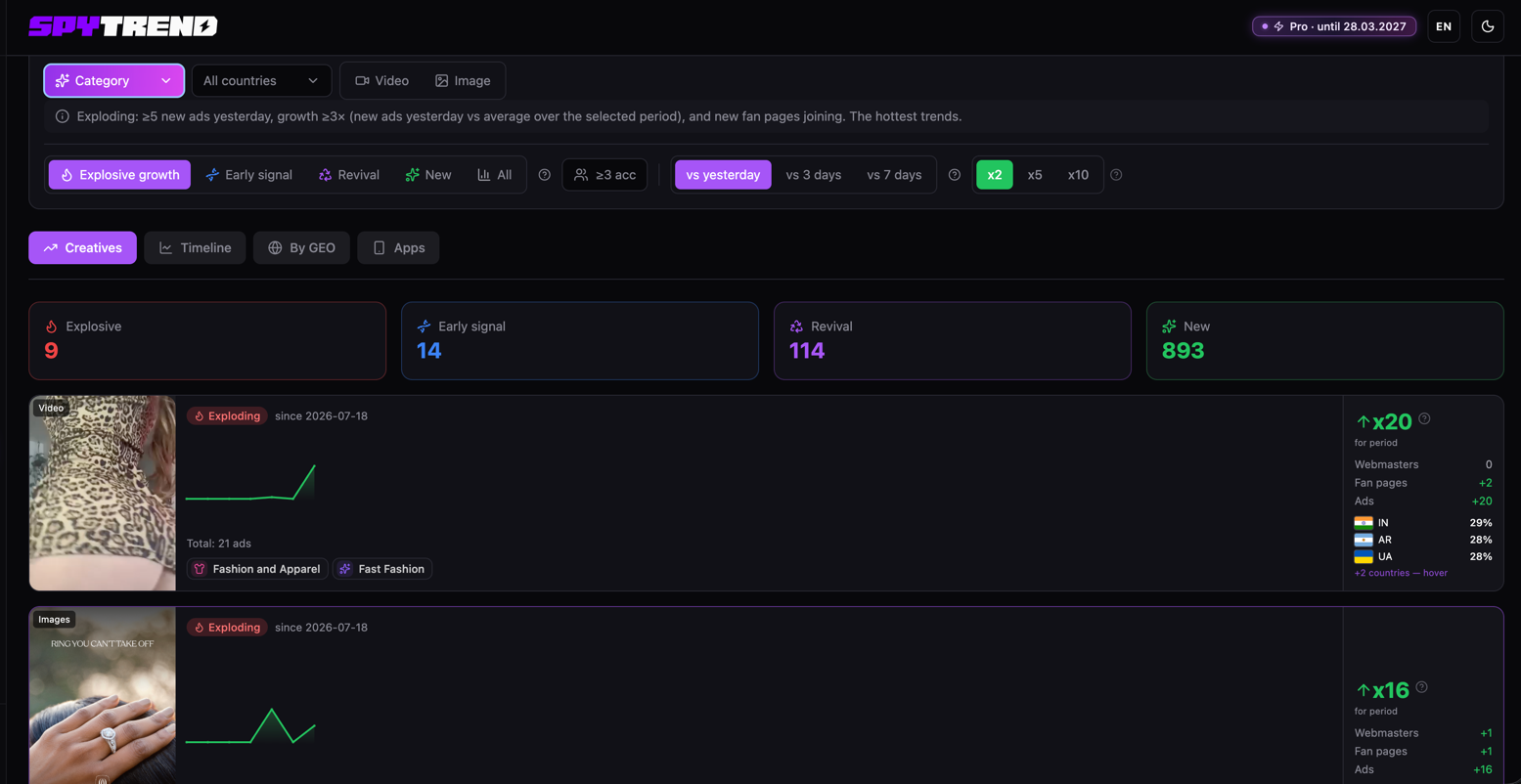
The logic is simple. If a creative usually ran at the level of 2-3 ads and then jumped ×2, the bundle caught on and someone started scaling it. You set exactly that threshold and see only what grows by your rules, not by somebody's averaged top list. Either take the ready presets or turn every knob by hand. Complete freedom.
Creatives: the tab this was all built for
Creatives is the tab this was all built for. The settings come together from several blocks on top of the usual ones (category, all countries, video/Image):
- Growth type, presets in one click: Explosive growth, Early signal (only starting to pick up), Revival (an old creative came back to life), New and All.
- ≥3 acc, a filter to show creatives picked up yesterday by at least three new fan pages.
- The comparison window, vs yesterday / vs 3 days / vs 7 days. What the growth is measured against (growth = new ads over the last day ÷ the average number of new ads over the selected period).
- The multiplier, x2 / x5 / x10. This is your threshold for "explosive growth". If you only want what grew fivefold in 3 days, you set vs 3 days + x5.
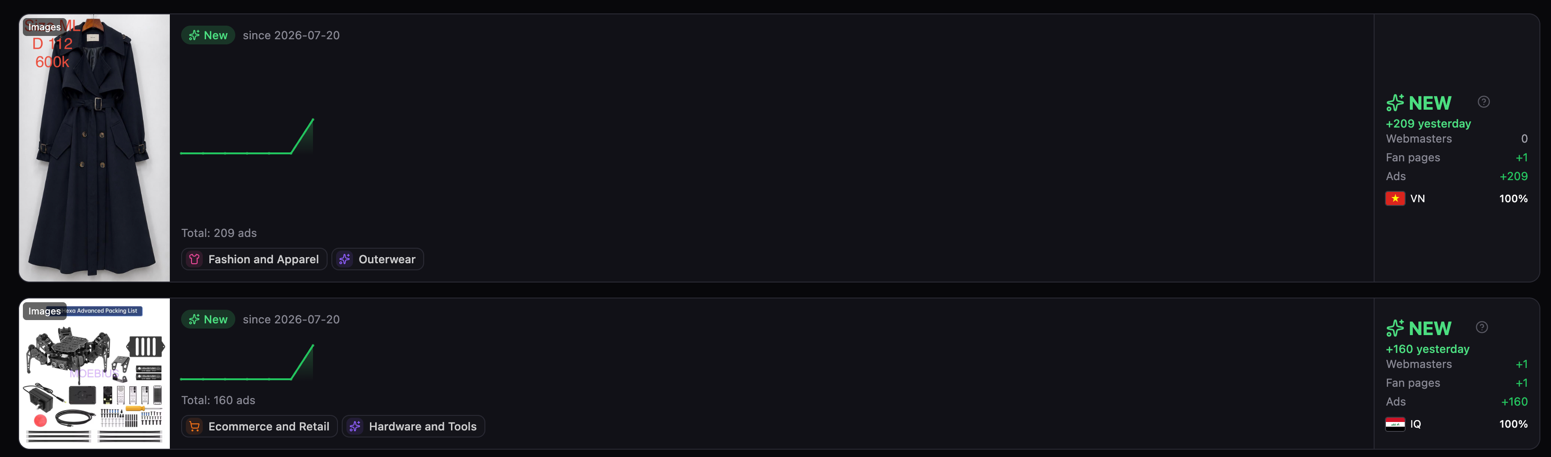
An example from the options on screen: a trench coat, total: 209 ads, and the NEW block on the right: +209 yesterday, Webmasters 0, Fan pages +1, Ads +209, geo VN 100%. So in a single day one fan page ran 209 ads with that visual to Vietnam, and there it is, the start of the ramp-up caught in the moment. A second similar case sits next to it: +160 yesterday. Plans and limits are on the pricing page.
The point is that you see the bundle while it is on the way up, not after it has already burned out. Spot it in time and you can still take apart what works in it.
Timeline: the pulse of the whole market
Timeline is the tab with a time breakdown of the whole market over a selected period. At the top you set the window (Jun 22 – Jul 21 in my case) and the counting method, FB creation date or Added to Spytrend (when it entered the database), plus you can add the Active for ≥ filter (7/14/30/90 days) and cut off short-lived creatives.
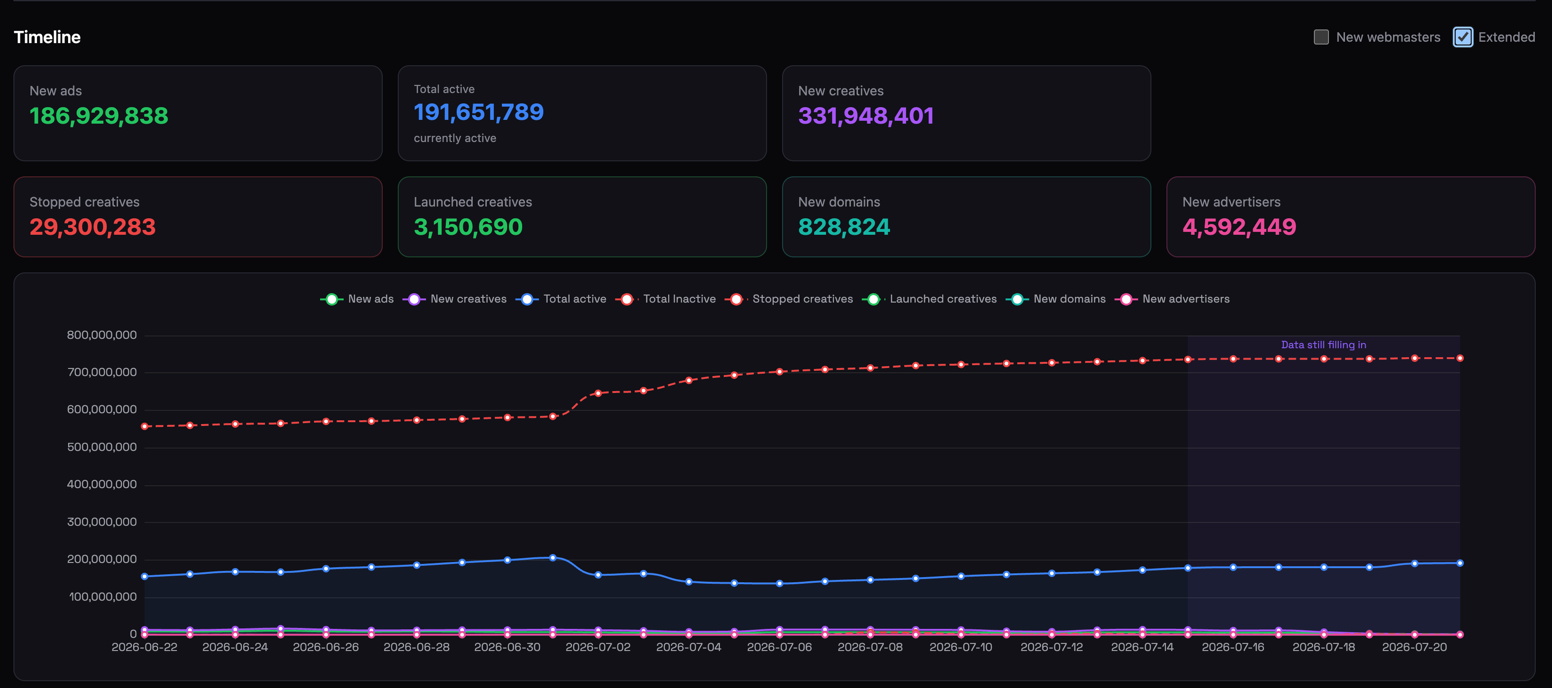
Three counters for the period: New ads, 186,929,838; Total active, 191,651,789 (running right now); New creatives, 331,948,401. So in one month almost 187 million new ads and 331.9 million new creatives by the New creatives counter landed in the database.
The point of the tab is not to look for a specific creative but to see the pulse of the market as a whole: whether the overall active count is growing or deflating, when there was a wave of mass shutdowns, how fast the database fills with fresh material. Set your category and geo and you get the same pulse for your own vertical.
By GEO: the market broken down by country
By GEO is the tab that shows a close-up of the whole market by country. The Countries breakdown table (All-time) with the columns: Total, Active, Today, Fanpages, Avg fanpage lifetime, Webmasters.
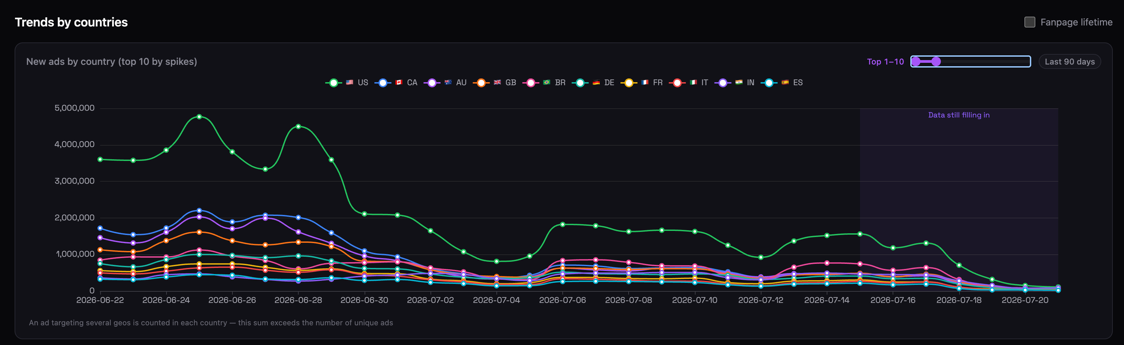
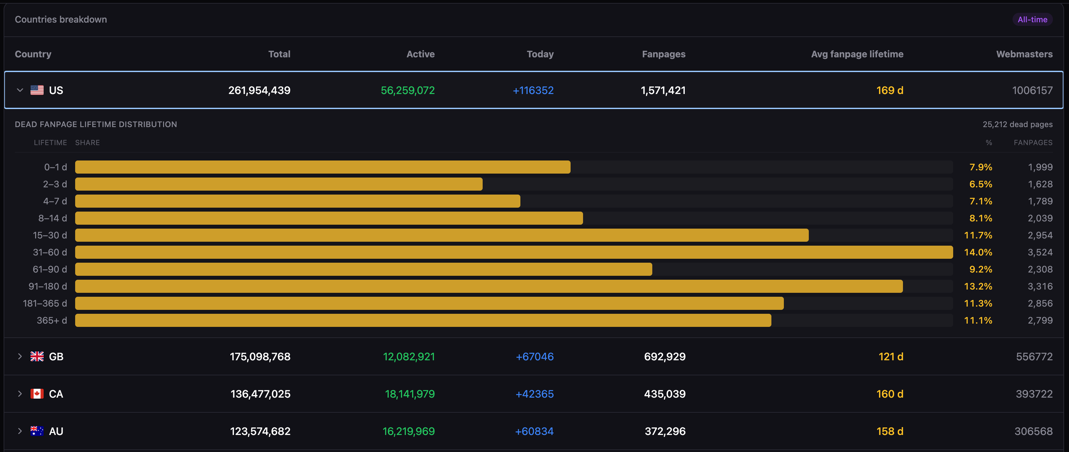
The layout by volume (Total):
- US, 261.9M in total, 56.3M active, +107,154 today, 1.57M fan pages, an average fan page life of 169 days, 1,006,157 webmasters;
- GB, 175M, with a fan page living 121 days on average;
- CA, 136.5M, 160 days;
- AU, 123.5M, 158 days.
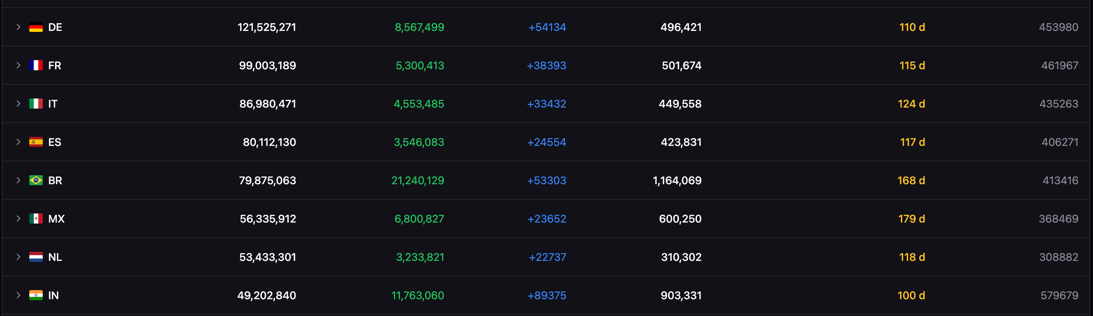
What is valuable here: the Avg fanpage lifetime column tells you outright how aggressive moderation is in a country. Where a fan page lives 179 days (MX) things are calm, and where it is 100 (IN) or 110 (DE) accounts burn fast and you have to budget more for assets. The Total / Active / Today combination shows which geo is ramping up right now and which is stagnating.
Apps: applications and their real niche
The last tab, Apps, is especially useful for those who work with applications. Here I already set a filter: Gambling + Argentina + the last 7 days. The database immediately narrowed to 237 apps (Android 190, iOS 47) that actively advertised gambling to Argentinians over the week.
One telling detail catches your eye straight away. Look at what categories these apps sit under in the store:
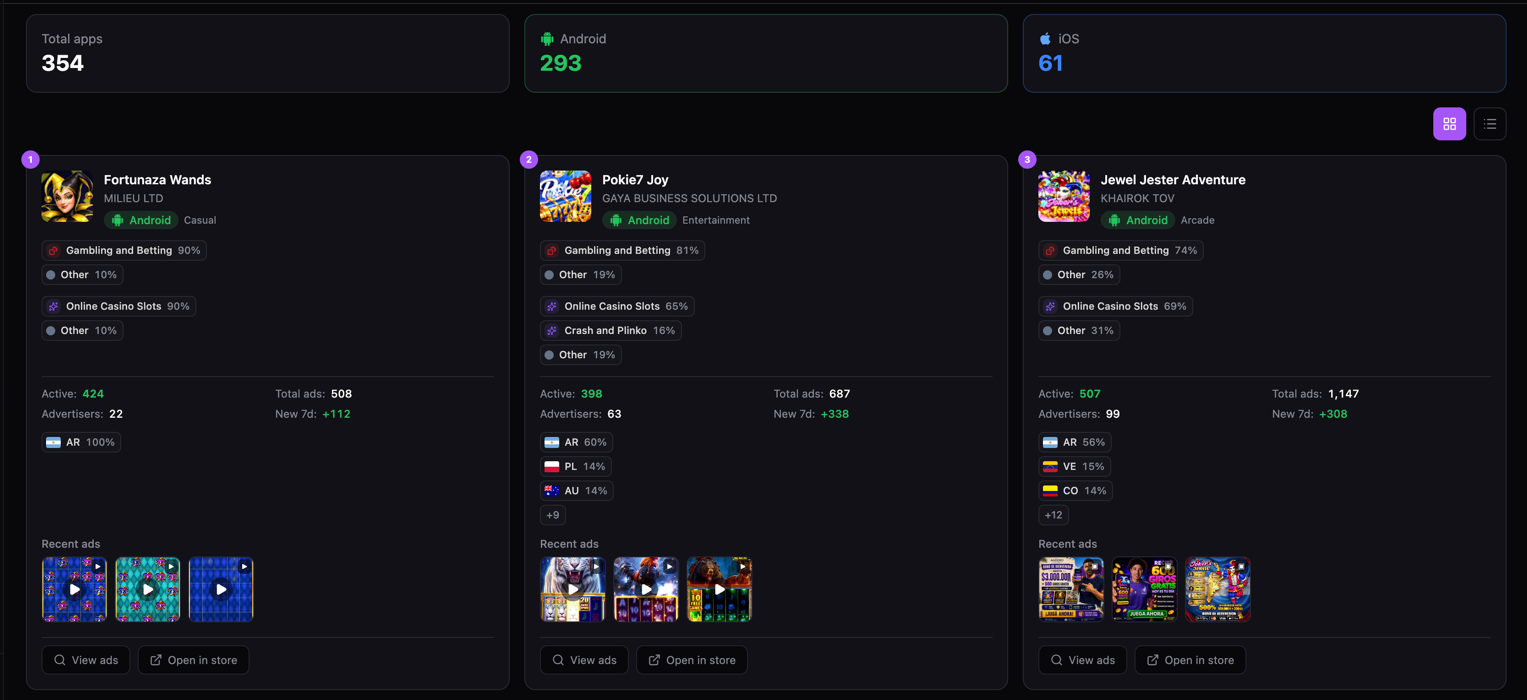
- Fortunaza Wands, listed as Casual in the store while in fact it is Gambling 90%, Online Casino Slots 90%. Active 424, Total ads 508, Advertisers 22, +112 ads over the last 7 days. Geo AR 100%, cleanly built for Argentina.
- Pokie7 Joy, Entertainment in the store, inside it is Gambling 81%, Online Casino Slots 65% + Crash and Plinko 16%. Active 398, Total ads 687, Advertisers 63, +338 ads over the last 7 days. Geo AR 60%, PL 14%, AU 14%.
- Jewel Jester Adventure, Arcade in the store, inside it is Gambling 74%, Online Casino Slots 69%. Active 507, Total ads 1,147, Advertisers 99, +308 ads over the last 7 days. Geo AR 56%, VE 15%, CO 14%.
There is a ready insight sitting right in the tagging: real casino apps disguise themselves in the store as "Casual", "Arcade" and "Entertainment" to slip through moderation. Spytrend sees the real niche through that and labels it with a percentage rather than with what is written on the shop front.
Every card carries the same metrics as advertisers do: Active / Total ads / Advertisers / New 7d, plus geo with flags and the latest creatives. Pay particular attention to the Advertisers + New 7d combination. Jewel Jester Adventure has 99 advertisers and +308 new ads in a week, which means dozens of teams are pushing the app right now rather than a single author. That is the marker of a hot offer with a crowd already gathered around it. Fortunaza Wands, on the other hand, has only 22 advertisers at AR 100%, a narrow but dense focus on one geo.
At the bottom of the cards sit the familiar View ads (drill into every ad for the app) and Open in store (open the app itself in the store). Convenient: you spot an app growing by New 7d, click View ads, and take apart the creatives currently scaling it to Argentina.
What the section is for
The main strength of the section is that you can assemble your own canon: Explosive growth + vs 3 days + x5 + ≥3 acc in the category you need, and you get only those creatives that grew fivefold in three days through at least three new accounts. That is no longer "look at somebody's top list", that is your own detector of take-offs built to your criteria. And By GEO and Apps give context from above: where the market is hot, where fan pages burn fast, which apps are ramping up.
Trends answers the question of which winning ads are scaling right now and by my rules. You set the threshold for explosive growth yourself (the multiplier, the window, the number of accounts), and the service catches creatives while they are still on the way up and the bundle is alive. Plus a slice of the market by country (with fan page lifetimes) and by application. A tool for entering a trend while it accelerates rather than picking up the leftovers.
FAQ
What does the Trends section do?
It is a constructor: you define what counts as explosive growth yourself, and the service shows the bundles scaling against that criterion in the moment. You can take the ready presets or set everything by hand.
How is the growth detector configured?
From four blocks: the growth type (Explosive growth, Early signal, Revival, New, All), the ≥3 acc filter for creatives run by at least three new fan pages, the comparison window vs yesterday / vs 3 days / vs 7 days, and the multiplier x2 / x5 / x10.
What does the Timeline tab show?
The pulse of the whole market over a selected period: how many new ads and new creatives entered the database, how many are active right now, when there was a wave of mass shutdowns. It can be narrowed to your category and geo.
What is the Avg fanpage lifetime column for?
It tells you outright how aggressive moderation is in a country. Where a fan page lives 179 days things are calm; where it is 100 or 110, accounts burn fast and the cost of assets is higher.
How is the Apps tab useful?
It shows an app's real niche rather than the one declared in the store: casino apps under Casual, Arcade and Entertainment are still labelled as Gambling with a percentage. Plus the Active / Total ads / Advertisers / New 7d metrics for each.
Parts of the Spytrend walkthrough
- Part 1. Dashboard and Ads
- Part 2. Creatives
- Part 3. Webmasters
- Part 4. Advertisers
- Part 5. Hubs
- Part 6. Websites
- Part 7. Trends — this page