Quick answer: A meta ads library search takes three picks, with no login: a country, one of five ad categories, and a keyword or exact Page name. It can't search by industry, link one operator's Pages and domains, or show an ad's reach. Spytrend's Webmasters section ties them into one owner profile.
What the Meta Ads Library actually is
The Meta Ads Library is Meta's own public tool for looking up ads. Many people still call it the Facebook ad library. It covers ads running across Facebook, Instagram, Messenger, Threads and Audience Network. It's free, it needs no account, and Meta builds and runs it itself. Whatever you call it, the address is facebook.com/ads/library.
Most people use it the same way: they type a competitor's name and hope it turns up. There's also a side door. The "Page transparency" panel on any Facebook Page links straight to the library, already filtered to that Page's ads.
How to search the Meta Ad Library in three picks and read the result
The library takes three inputs and nothing else. It doesn't run a free-text lookup across everything Meta knows about an advertiser. I walked through the steps below with one search: "fitness" in the United States, all ads.
- Country. You pick one country at a time. There's no "all countries" option, and you can't put two markets side by side in one search.
- Ad category. There are five options: all ads, plus four regulated special categories. Those four are social issues, elections or politics; housing; employment; and financial products and services. The last one is the former "Credit" category, widened in January 2025. Everything else lands in "all ads," with no industry or niche breakdown inside it.
- Search term. You type either a keyword or the exact name of the advertiser's Page. Keywords match in any order, or as an exact phrase if you put them in quotes. You can't ask to see everyone advertising in a niche, so you always start from words or a name you already have. The Filters button narrows results by language, platform, media type, active status and impressions by date. None of those is an industry filter.
- Read the result. Each ad card shows the creative, the Page it ran from, a Library ID, the platforms it ran on and a "Started running on" date. For regular commercial ads outside the EU, it shows no spend, no impression count and no reach. Spend and impression ranges are limited to the regulated social-issue, electoral and political category. Reach shows up only for EU-delivered ads, under the Digital Services Act.
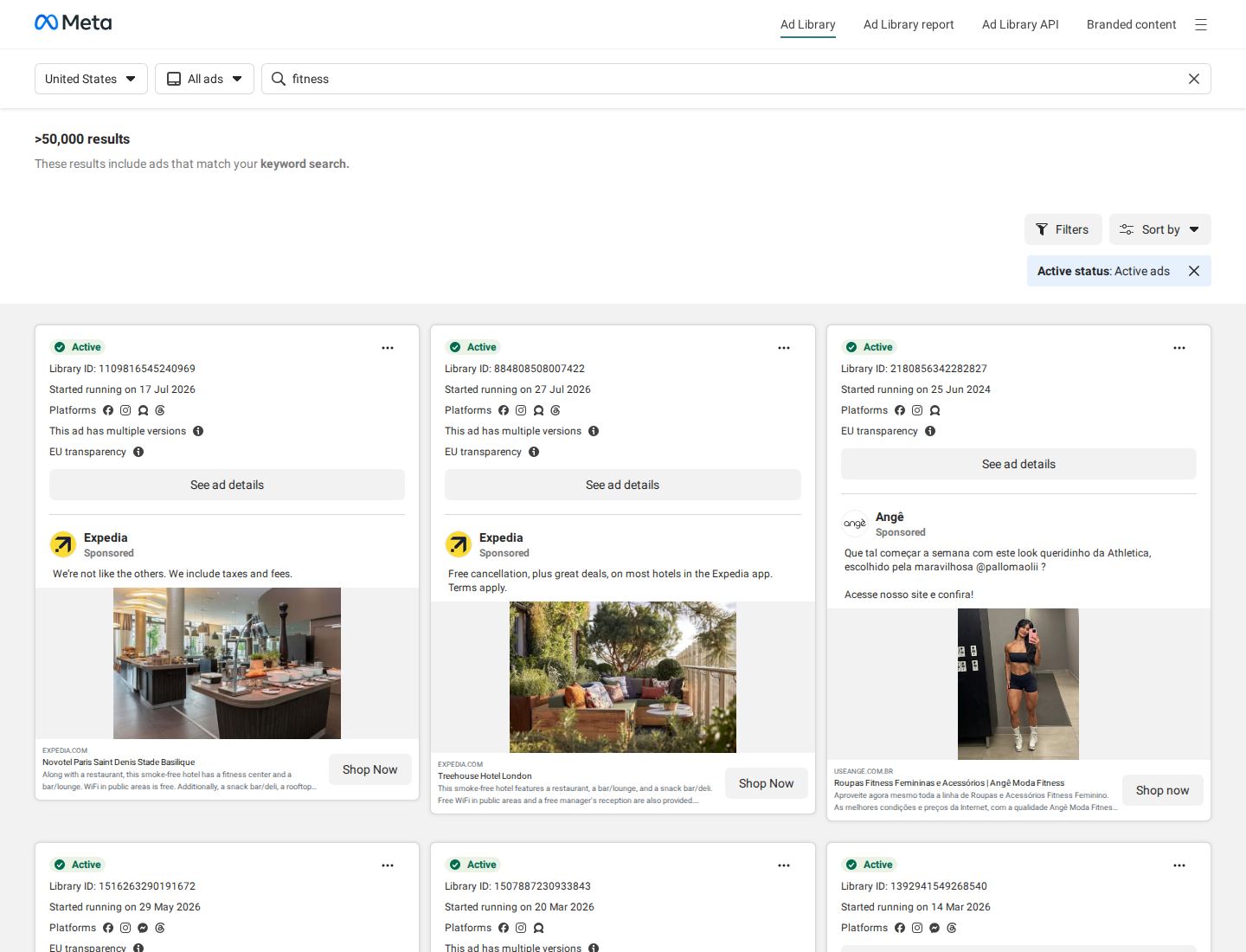
That's the entire search: one country, one category, one keyword or Page name. It tells you what a given Page is running today in under a minute. My "fitness" search in the US returned over 50,000 ads that use the word. So what do you actually get? A pile of ads containing one word. A list of fitness advertisers would need an industry filter, and the library doesn't have one.
The 5 things you can't search the Meta Ads Library for
- Your industry. The search only looks at the literal words inside an ad. You can't ask for "everyone running e-commerce ads in Brazil." You can only look up a phrase and hope the advertisers you care about happen to use it.
- An advertiser who isn't already on your radar. A keyword search misses different wording and the same pitch written a new way. It misses text baked into an image. It also misses the same operator working under a different legal entity or a regional Page. To find an advertiser reliably, you need to know the exact Page already.
- What used to run, once it's off. Outside the EU, the library drops a regular commercial ad the moment it stops. Ads delivered in the EU stay archived for one year after their last impression. Social-issue, electoral and political ads stay for seven years. So you can't compare what a competitor ran in March with what it runs now. For ordinary commercial ads, that history isn't kept.
- How many people saw it, and how long it ran once it's off. A live card carries a "Started running on" date, so you can count run length while the ad is up. That's the one free performance signal the library gives. An ad still live 90 days after its start date is one the advertiser keeps paying for. For commercial ads, reach and impressions are published only where the Digital Services Act requires it, for delivery in the EU. Outside the EU, the card and its date vanish when the ad is switched off.
- A shortcut through the noise. Sorting is basic: by start date, newest first. You can't sort by an advertiser's number of active ads, by total ad volume, or by fresh launches in a chosen period. Those are the sorts Spytrend uses for its advertiser lists. Commercial ads have no export. The Ad Library Report and the Ad Library API cover social-issue, electoral and political ads, plus ads delivered in the EU. There are no alerts either, so every session starts from a blank search box.
The library is good at one thing: showing what a specific ad or Page says. It can't tell you what a whole market is doing. For that wider question, see how to spy on competitor ads for the full workflow.
| What you need | Meta Ads Library | Spytrend |
|---|---|---|
| Search by industry | No. Keyword text or Page name; five categories, four of them regulated | Yes. 33 business categories with 342 subcategories, across Facebook and TikTok |
| One owner behind many Pages and domains | No. One Page per search, no link between an operator's Pages or domains | Yes. The Webmasters section: domains, Page IDs and shared pixels in one profile |
| History after an ad stops | No outside the EU (EU-delivered ads kept one year; political ads seven years) | Yes. Total, active and stopped counts per owner (Withauvia: 316,804 / 6 / 316,798) |
| Run length and reach | "Started running on" date on live cards; reach only for EU-delivered ads | Active/stopped status kept after the ad stops |
| Sort, export, alerts | Sort by start date only; export via the Ad Library Report and API for political and EU-delivered ads; no alerts | Sort by active ads, total volume or fresh launches in a period |
| Price | Free, no account | Free Starter tier with archive ads older than three months; paid plans at spytrend.com/pricing |
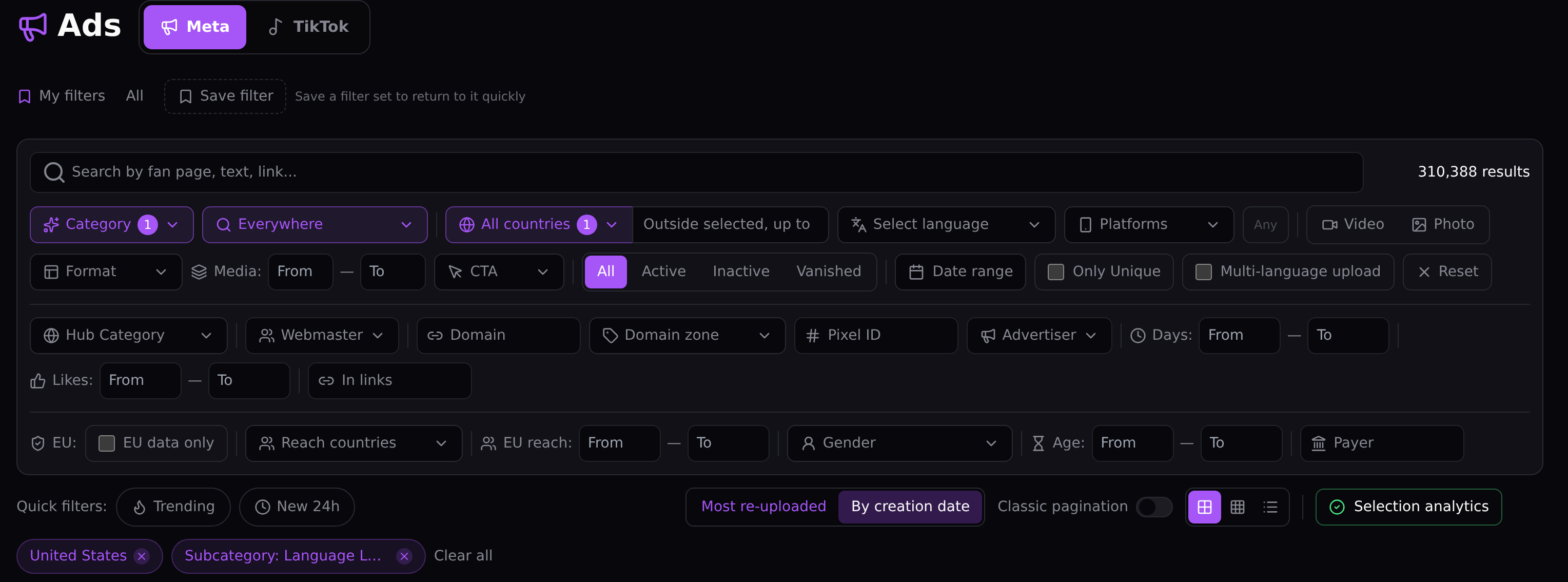
What the Webmasters section shows instead
Spytrend’s own one-line summary reads: Spytrend is an ad intelligence platform for Facebook and TikTok advertising: an archive of ads going back to 2018, AI-classified into 33 business categories, with every advertiser assembled into a single card — all ads, pages, domains and countries in one place.
The Webmasters section ties the scattered domains, Facebook Pages and shared pixels behind one advertiser into a single profile. That happens automatically, before you search. You don't have to piece it together by hand after finding one ad.
To see it on a real owner, I opened Webmasters, filtered by the Ecommerce and Retail category and picked Withauvia. Its network ties together 3 domains (withauvia.com, osimcarestore.com and curatedstyleco.com) and 11 Facebook Page IDs under one owner. Five of those Page IDs are currently active. The profile counts 316,804 ads from that network in total: 6 active and 316,798 stopped. The Ads Library doesn't carry that active/stopped split for commercial ads at all.
The network has all but stopped. In the Meta Ads Library, this owner would show up as six live ads today. Here, the 316,798 ads that already ran stay on record. Its top countries are Canada, Australia, the US, the UK and Mexico, and its ads are tagged mainly Ecommerce and Retail.
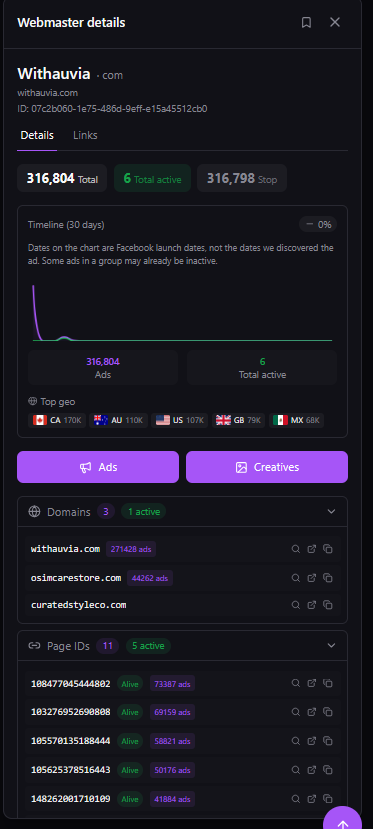
That's the answer to gap #2 above, a different domain or Page hiding the same operator. It also answers gap #3, the missing history once an ad stops. In the library you'd see one ad card with a start date. Here you see one owner with a domain list, a Page-ID list and a total/active/stopped count. That count shows how much of everything they've run is still live. Behind that view, Facebook and TikTok ads are AI-tagged into 342 subcategories inside 33 business categories. The library offers four special categories and one undivided "all ads" bucket.
What these checks don't show: my library test was one keyword in one country. I didn't try the Ad Library Report or the API. Withauvia is also a single owner in a single category. Its profile can't tell you how common a stop rate like that is across the market.
What free actually costs in time
The Ads Library does its one job well: confirming what one known Page is running right now. The cost is time, once the question gets bigger than that. Reading one competitor carefully means opening ad after ad and noting each one by hand, and a sweep before a launch repeats that for every rival Page. Watching a niche means doing the morning check of each Page again, every day. No alert does that watching for you.
Spytrend's paid plans search across the whole base, so a session doesn't begin from a blank search box. The free Starter tier shows archive ads older than three months, so you can see the difference before paying anything. See what's included on the pricing page. For a closer look at the Webmasters view itself, there's a full walkthrough on how the Webmasters section works.
When a Facebook ads library search is enough, and when it isn't
A Facebook ads library search is enough on its own when the job is narrow. Maybe you're checking whether one competitor runs Facebook ads right now. Maybe you're pulling up a campaign someone mentioned, or confirming an ad is live before flagging it. For a single, known target, it's the right free tool.
Once the question is about a whole market, it's no longer enough. Which advertisers are active in a category? Which of them have run long enough to be worth studying? Are the "five different brands" you keep seeing actually one operator with five Pages? A per-ad, per-search tool without owner grouping, history or export isn't built for those questions. That's where a webmaster-level view picks up. See how the two compare in practice in Spytrend’s competitive ad intelligence guide.
You can check all of this on your own competitors. Open facebook.com/ads/library, pick your country and type the exact Page name of one rival. Count how many of their Pages you can find, and look for any ad that has already stopped. After that, look the same competitor up in Spytrend's free Starter tier and compare the two results.
FAQ
What is the Meta Ads Library?
It's Meta's own free tool for looking up ads running across Facebook, Instagram, Messenger, Threads and Audience Network. You pick a country and one of five ad categories: all ads, or the regulated social-issue/political, housing, employment and financial-products categories. Then you search by keyword or the advertiser's Page name. No account or login is required.
Is the Meta Ads Library free?
Yes, entirely. Meta runs it at facebook.com/ads/library with no account, no login and no paid tier. Every filter, ad card and "See ad details" view is open to anyone. What it costs you is time, since every ad has to be opened and noted by hand.
Meta ad library search: can you filter by industry or niche?
A Meta ad library search can't filter by industry or niche. It looks only at the literal words in an ad, and there's no filter for "e-commerce" or "SaaS." You only get the four regulated special categories (social issues/elections/politics, housing, employment, financial products and services) plus an undivided "all ads." Spytrend's Ads section filters by 33 business categories and 342 subcategories.
How long do ads stay visible in the Meta Ads Library?
Outside the EU, only as long as they're running. A regular commercial ad disappears from the library once it's turned off, so you can't look back at what a competitor ran last quarter. Ads delivered in the EU stay archived for one year after their last impression. Social-issue, electoral and political ads stay for seven years.
Does the Meta Ads Library show ad spend or how long an ad has run?
Every card shows a "Started running on" date, so you can see run length for live ads. For ordinary commercial ads outside the EU, it shows no spend, impressions or reach. Spend and impression ranges appear only for social-issue, electoral and political ads. Reach appears for EU-delivered ads under Digital Services Act rules.
Facebook ads library search: how do you find one advertiser?
A Facebook ads library search for one advertiser starts at facebook.com/ads/library: set the country and leave the category on "All ads." Type the advertiser's exact Page name into the search box and choose the Page from the suggestions. Every live ad from that Page appears with its "Started running on" date, and "See ad details" opens the Library ID and platforms. A misspelled Page name returns nothing.
Meta Ads Library search: where does Spytrend's Webmasters section come in?
On top of a Meta Ads Library search, Webmasters ties an advertiser's domains, Facebook Pages and shared pixels into one profile automatically. Each owner gets a total, active and stopped ad count. A library search returns one ad card at a time and doesn't link an operator's different Pages or domains. In Webmasters, those Pages and domains sit together in one place.