In short: A media buyer plans, negotiates and buys ad placements, then answers for what that spend brought back. Most of the work isn't buying. It's reading numbers from two sides: what your own account did yesterday, and what competitors still pay to keep on air today.
Job posts say a media buyer "plans and purchases advertising space." That's accurate, and it tells you almost nothing. It skips what the day looks like, which numbers you're judged on, and how you decide a competitor's ad is worth studying. This page covers those three in order: the day, the metrics, and the workflow behind each step.
What a digital media buyer actually does all day
A digital media buyer works in cycles measured in hours. A typical day has four blocks, and only one of them is buying.
Morning: read yesterday. Open the accounts and check spend against results by campaign and ad set. Look at prospecting and retargeting separately. Nothing gets scaled or killed on one day of data. But anything that broke overnight gets caught now: a rejected ad, a stalled creative, an audience that suddenly costs twice as much.
Late morning: act. Turn off what has spent enough to fail. Raise budget on what holds its cost per action. Do it in small steps, so you don't reset the auction's learning. This is the only block that's literally buying, and it's the shortest of the four.
Afternoon: the creative pipeline. In paid social, creative usually moves results more than targeting does. That's why the pipeline gets its own block. Someone decides what gets tested next week, such as new hooks, formats and angles, and briefs it. A buyer who can't brief creative usually watches the account plateau.
Whenever there's a gap: research. What's running in the vertical, who's new, and what has run long enough to pay for itself. This block gets skipped in a busy week. It also decides whether next month's tests start from evidence or from a guess.
Three contexts change the emphasis. In-house, the buyer defends a forecast within brand rules. At an agency, the same person runs several accounts and reports to clients. In performance and affiliate work, cycles are shortest, and a campaign can be built and killed inside a week.
Media buyer meaning: where the role sits next to media planning
The definition most teams use is narrower than the textbook one. A planner decides where money should go and why: audiences, channels, budget split, flighting. A buyer gets that plan into market and makes it perform. That means placements, bids, pacing and the daily optimization that follows.
In a large organization those are two people, sometimes two departments. In a small one, it's the same person before lunch and after it. The split still matters. A planner answers for whether the plan was right. A buyer answers for whether the execution earned its budget back.
A related title, paid media buyer, usually signals a bid-driven, platform-native role. Think Meta, TikTok, Google, or programmatic through a DSP. Negotiating fixed placements with publishers is a different job. Direct buying still exists, but the profession has largely moved to auctions. There, the daily skill is diagnostic: knowing which number to check first when performance drops.
Paid media buyer metrics: the seven numbers that decide a budget
A paid media buyer answers for these seven numbers in every review. They're the KPIs of the account. ROI asks the same question as ROAS, only about the whole business. ROAS asks it about the ad account. The right-hand column is the one most definition lists leave out. It says what it means when that specific number is the one that broke.
| Metric | What it answers | What it means when this is the number that broke |
|---|---|---|
| CPM (cost per 1,000 impressions) | What it costs to reach people at all | The audience is too narrow, the auction got pricier, or the creative is penalized on quality |
| CTR (click-through rate) | Does the creative earn attention | Hook, format or offer mismatch. Rarely a targeting problem |
| CPC (cost per click) | Reach and attention combined | Read it only after CPM and CTR. On its own, it hides which of the two moved |
| CPA / CPL (cost per action or lead) | What one result costs | If CPM and CTR are healthy and this isn't, the break is after the click: landing page, form, price, delivery promise |
| ROAS (return on ad spend) | Whether the account pays for itself | A ratio, so it moves when either side moves. Falling ROAS with stable CPA means average order value dropped, and the ads may be fine |
| Frequency | How often one person sees the same thing | Creative fatigue. The number rises quietly, and results decay before anyone spots the cause |
| Hold rate (3-second and beyond) | Whether video survives its first seconds | The first frame lost the viewer. Everything downstream measures an audience that already left |
So which number do you check first? The table's order is the diagnostic sequence, and it's worth using literally: CPM → CTR → CPC → CPA → ROAS. Walk down it until a number is out of line. That's where the problem is. If you read ROAS first, you learn that something's wrong but not where. A report ordered by headline metric pushes you into exactly that. Platform-reported ROAS also rests on the platform's own attribution. Compare it with the order count in your store before you trust the trend.
Two more numbers sit outside the funnel but decide the week: days a competitor's ad has been running, and how many times a creative has been re-uploaded. Both come from outside your own account, which is what the workflow section is for.
The workflow, step by step
The seven metrics above come from your own ad account. The six steps below come from outside it: evidence of what already works for someone else, on someone else's budget. Each step is one screen from Spytrend. In the product's own description, Spytrend is an ad intelligence platform for Facebook and TikTok advertising: an archive of ads going back to 2018, AI-classified into 33 business categories, with every advertiser assembled into a single card — all ads, pages, domains and countries in one place.
I walked through all six steps on one vertical, Home and Garden, and followed one advertiser from step to step.
Step 1. Map who is advertising in your vertical
In Spytrend, filter ads by country, category, format and status. For this walkthrough, I set one country, the Home and Garden subcategory, active status, and Days from 90. What you want from this step is a list of names. They're the advertisers you didn't know were competing with you in the same auction.

Step 2. Separate what runs from what works
A live ad proves someone paid for it once. Two signals separate live from working: how long it has run, and how many times it has been re-uploaded. In Spytrend both sit on the same screen. Set the Days filter to your threshold, then sort by Most re-uploaded.
Here's why that works. A re-upload is a person deciding to spend money on the same thing again. A forgotten test keeps running, but nobody re-uploads it. So re-uploads separate a real winner from an expensive accident more reliably than any engagement number on the ad itself.
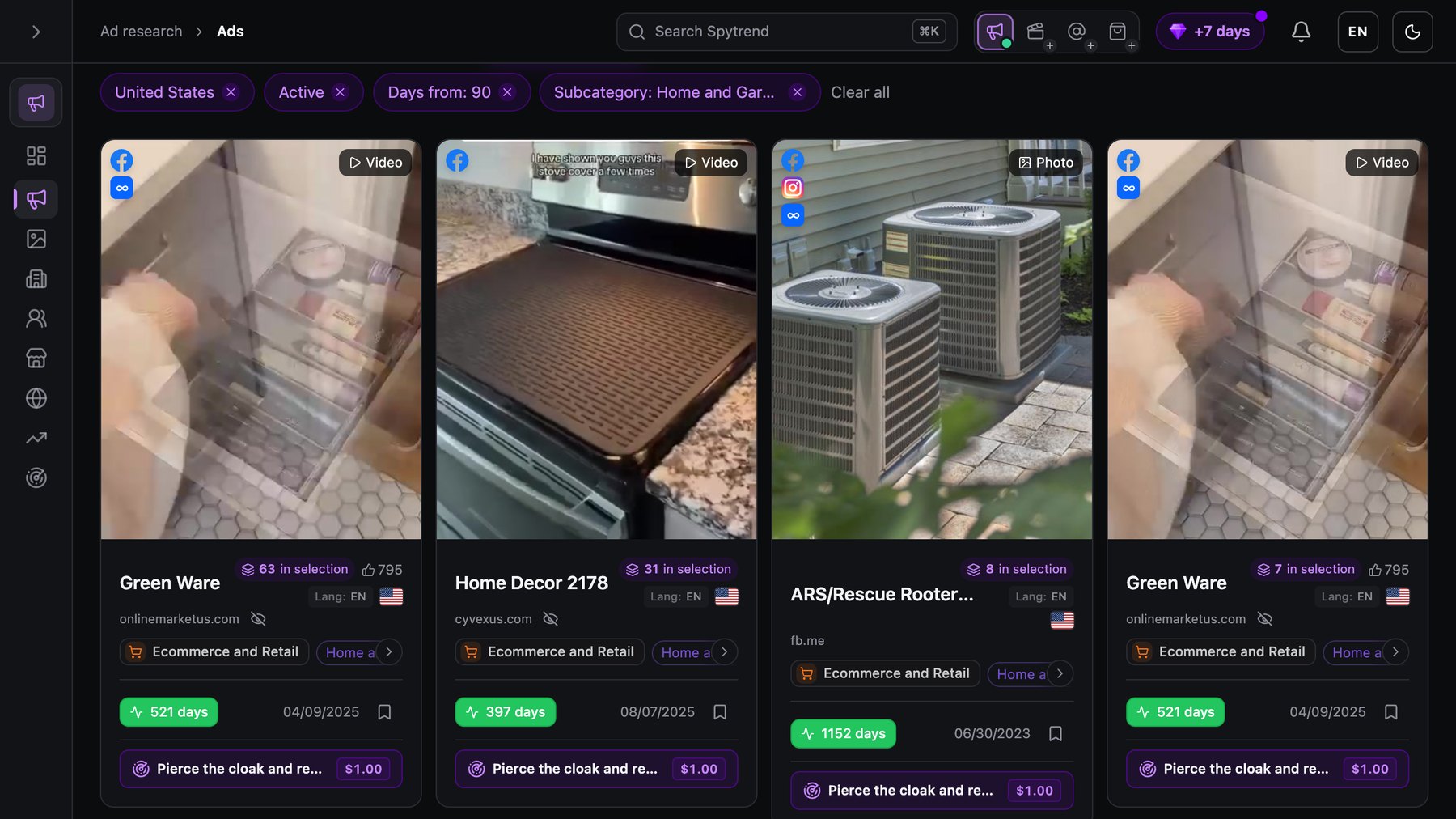
In practice, a Home and Garden ad that has stayed on air for 100 days or more is a good place to start digging. The oldest on this screen has run 1,152 days.
Step 3. Open the operation behind the ad
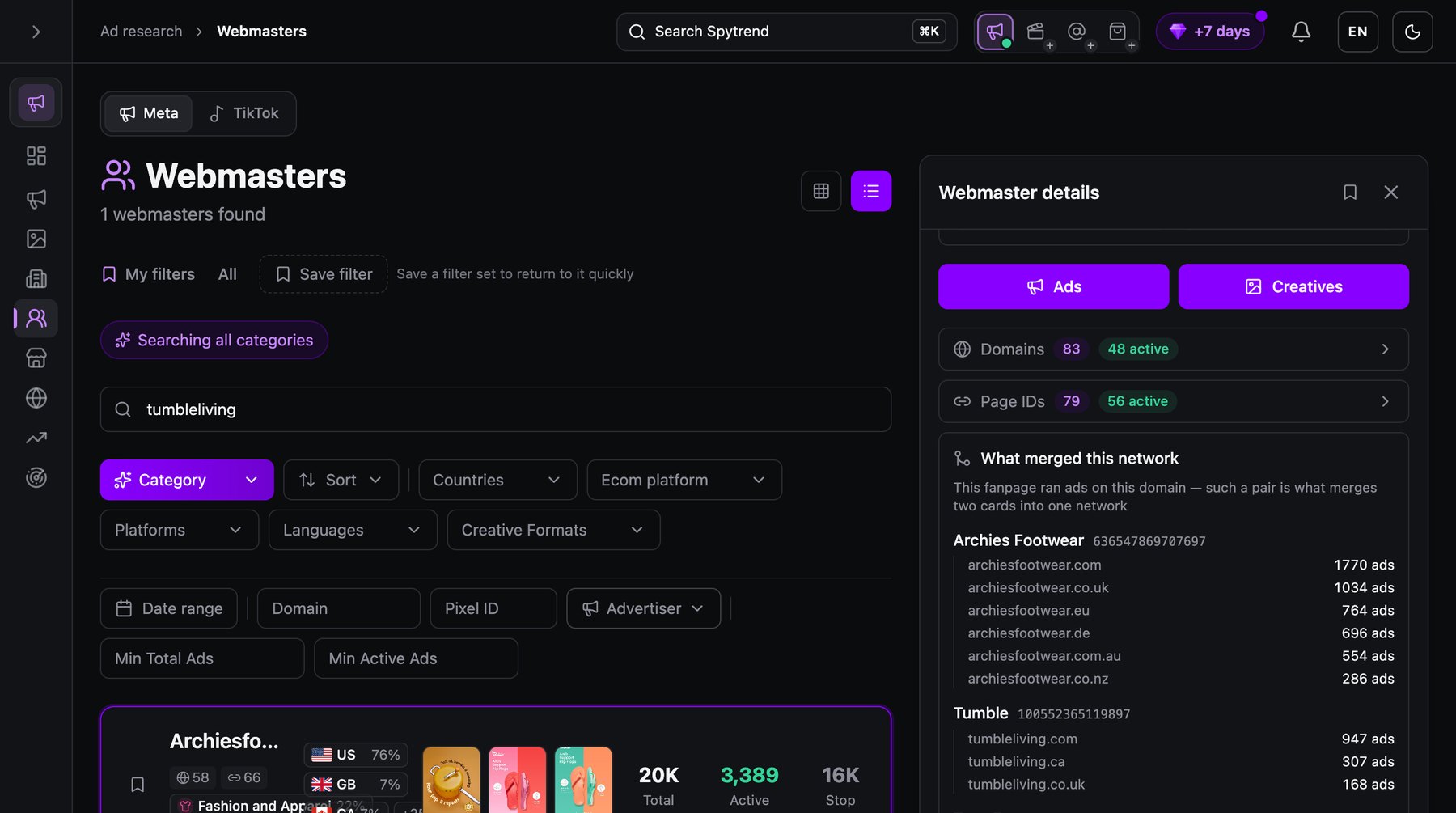
One ad is a single data point. The account behind it is the actual competitor. In Spytrend that account is a Webmaster: the owner behind a whole group of ads, with its domains, pages, pixels and countries assembled into one card. One click takes you from the ad to its Webmaster, and from studying an ad to studying a business.
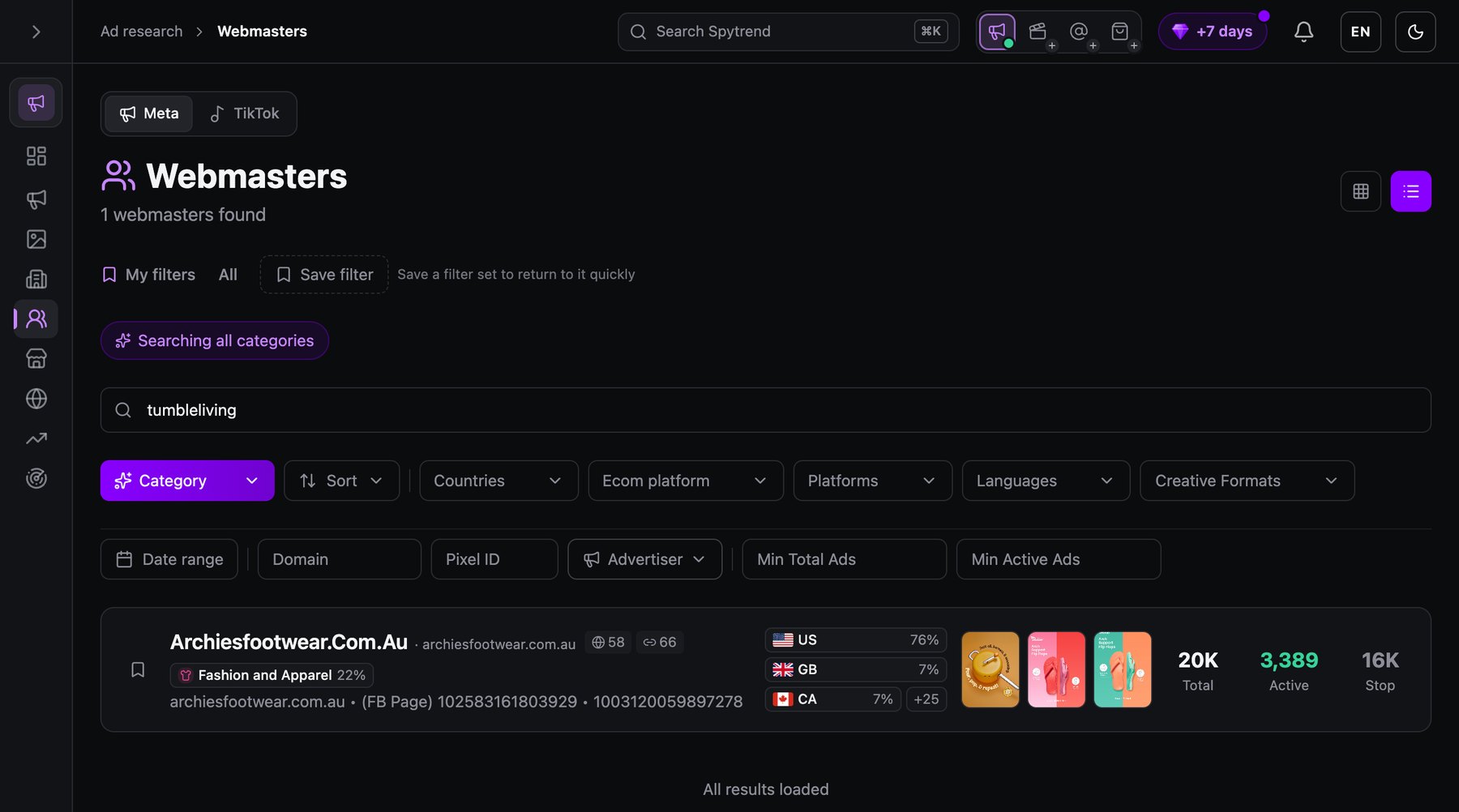
From the same Home and Garden vertical, I followed Tumble, the advertiser whose ad steps 5 and 6 open, and searched its domain, tumbleliving, in Webmasters. I read all the figures below in one Spytrend session. The search returns one card, and it is a network: Spytrend merges pages that ran ads on the same domain. Tumble’s three domains, tumbleliving.com with 947 ads, .ca with 307 and .co.uk with 168, sit inside a network named Archiesfootwear.Com.Au, with 83 domains and 79 page IDs, 76% of it in the United States.
Step 4. See where the traffic actually goes
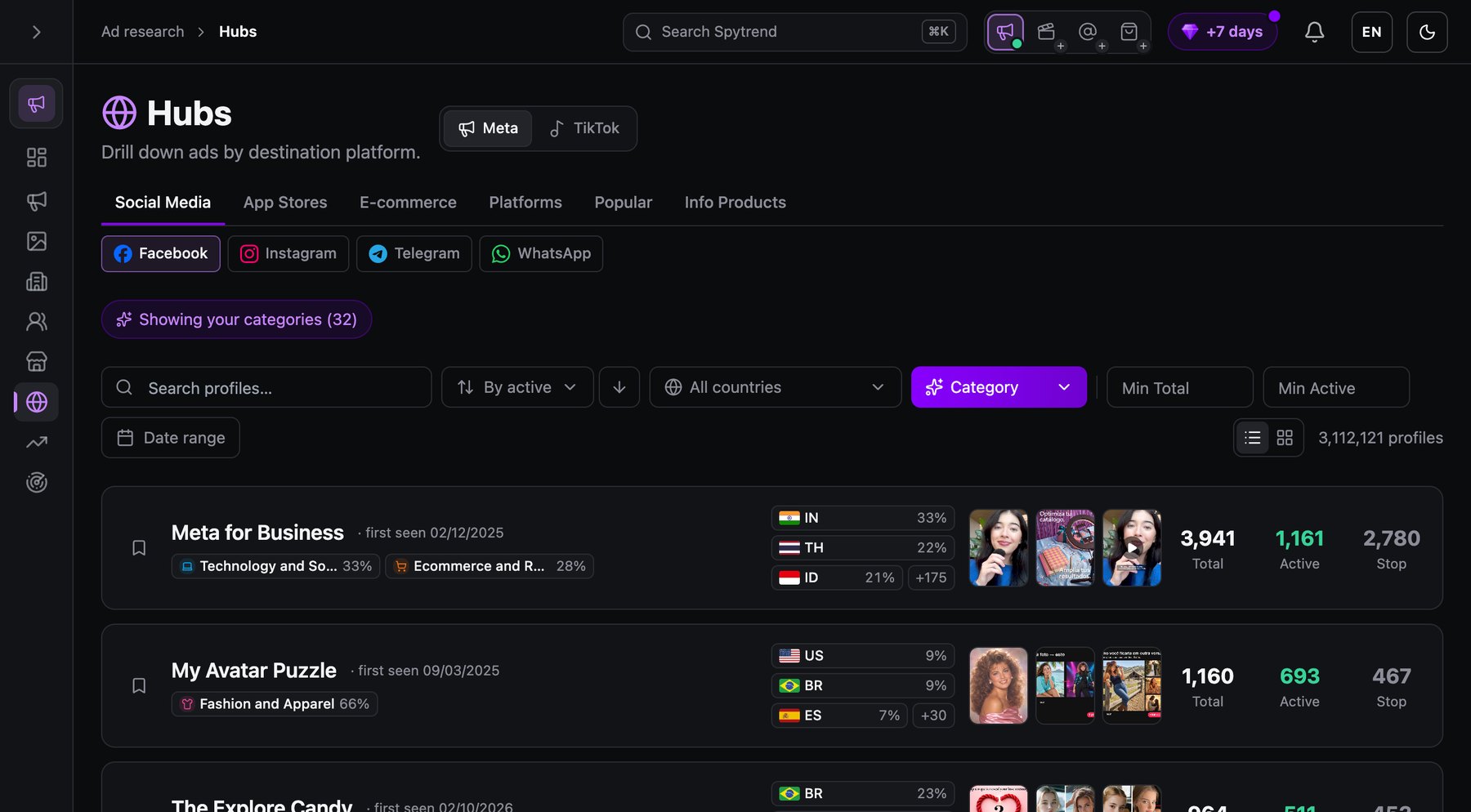
Paid social doesn't always send people to a website. Traffic gets routed into messengers, app stores, marketplaces and storefronts, and the destination changes the funnel. Before you assume the answer is a landing page, check which destinations carry the volume in your category. Do it in Hubs, the Spytrend section that groups advertisers by where their ads send people: social platforms, app stores, marketplaces and storefronts.
Step 5. Open the real landing page
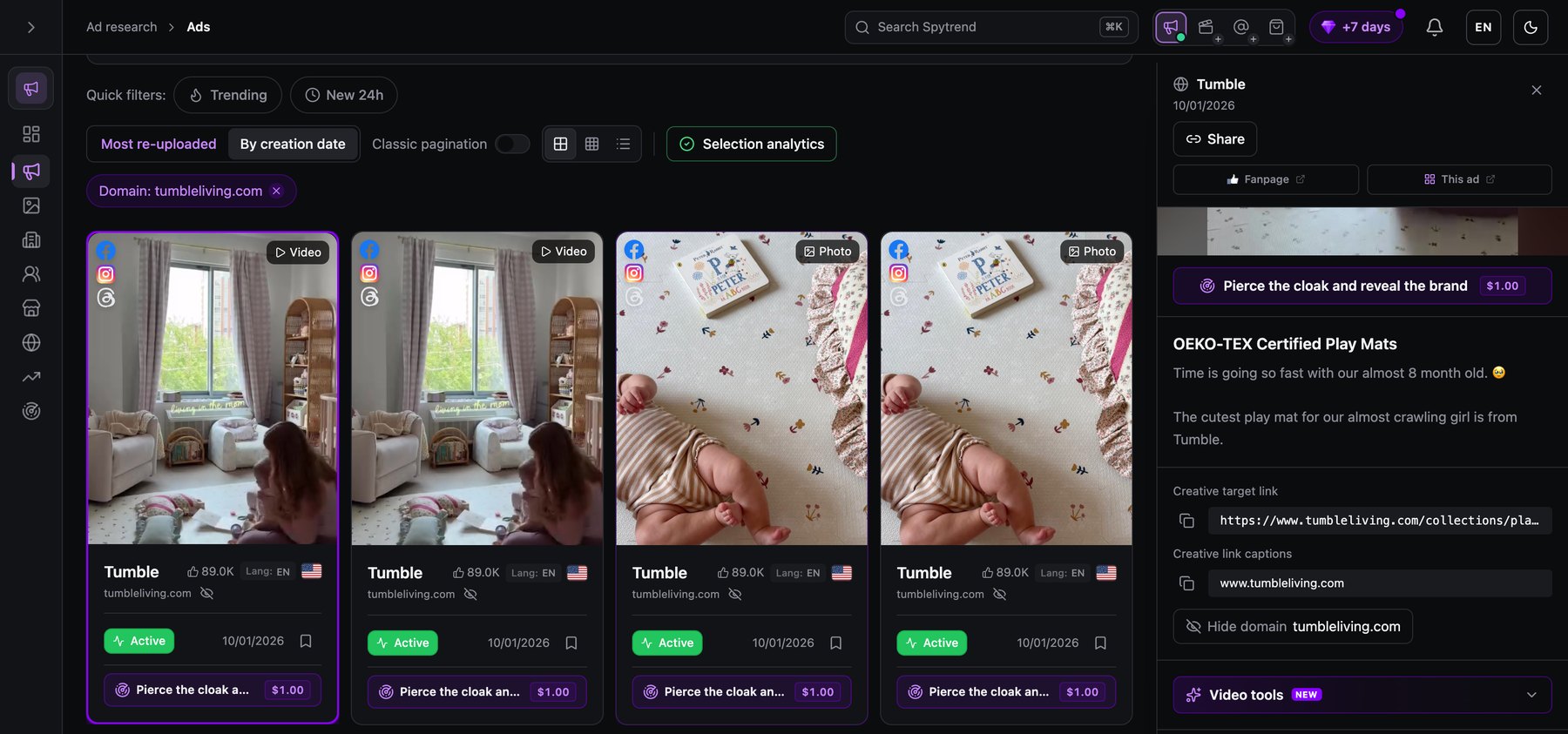
The page shown to a crawler isn't always the page shown to a buyer from a given country. In Spytrend, the real destination page costs $1 per run on any plan, refunded if the run fails. This step takes the most manual effort to reproduce by hand. It's also where the offer, price and guarantee actually live.
Step 6. Find the creative that gets reused
Duplicates collapse into one card in Creatives. A creative that many pages run shows up once, with the reuse count attached. I opened one Tumbleliving video, and it carried six ads on one creative from one owner. That count measures how proven an idea is in your vertical. The length of the feed tells you much less.
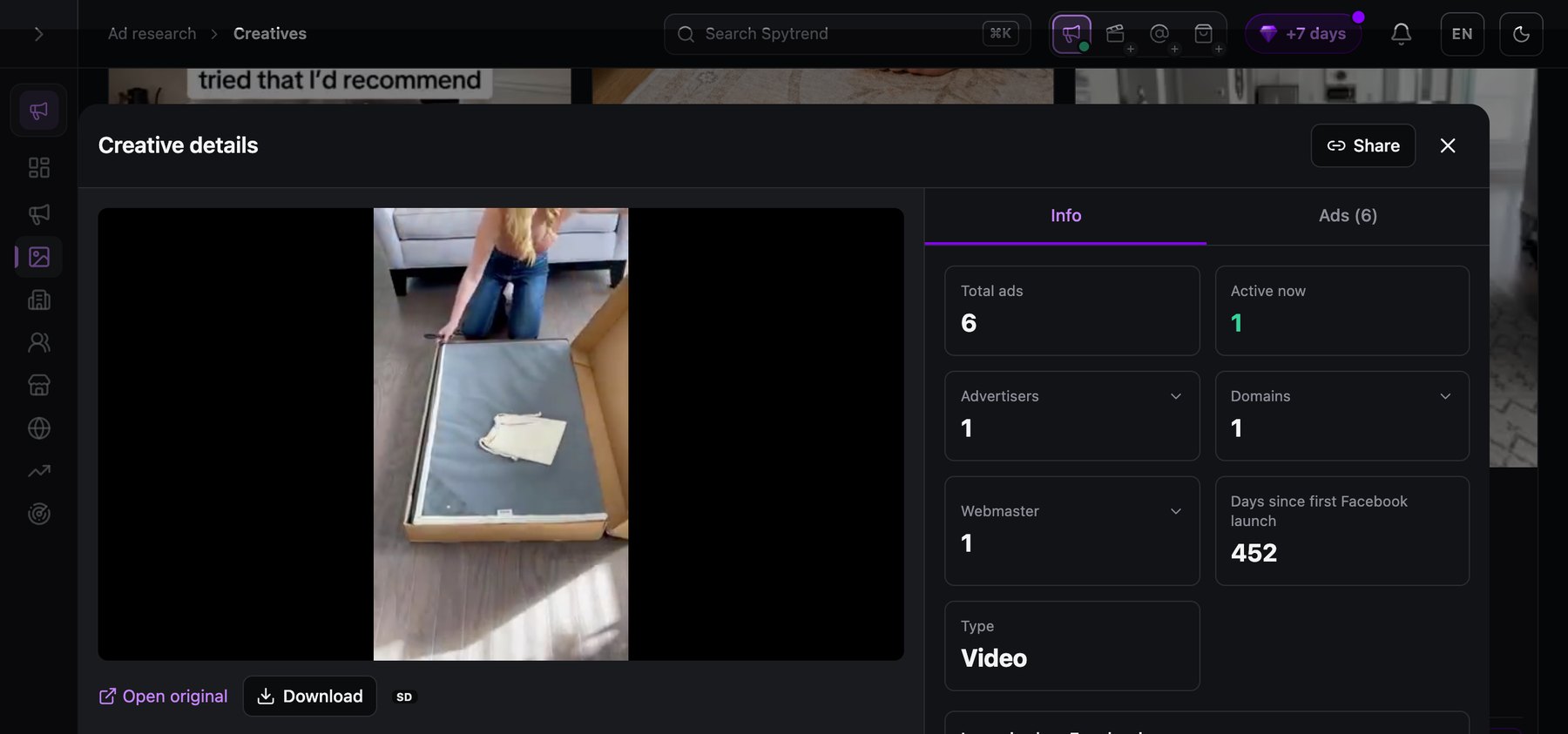
Six ads on one video, one of them still live 452 days after the first Facebook launch, show the owner kept paying for that idea.
What this walkthrough doesn't show. It follows one owner in one vertical, read in one session. The counters are live, so the same owner can show slightly different totals on two screens. Frame 5 shows the control that requests the real page. The page it returns isn't in the frame. And none of it replaces the seven numbers from your own account.
Where the free ad library hits a ceiling
The public ad libraries are genuinely useful and free, and every media buyer should be able to work in one. Each limit below takes a minute to verify, so it pays to be precise about where the libraries stop:
- No watchlist. There's no follow button, no notification and no saved list of brands. Every check is manual, repeated by hand.
- No result signals for ordinary commercial ads outside the EU. Reach and targeting data apply only inside the EU, under Digital Services Act rules. A US commercial ad in the Meta Ad Library shows only that it exists. It doesn't show how it performed.
- No sorting or grouping. A large advertiser's ads arrive as one wall, ordered by date.
- Landing pages one click at a time. Collecting destinations for a set of competitors is manual work. It grows linearly with the number of ads.
- TikTok is more closed than Meta. Its creative center shows only what advertisers choose to make visible, so absence there proves nothing. The TikTok Commercial Content Library covers the EEA, the UK and Switzerland. Its supported-countries list excludes the United States.
These five limits don't make the free libraries useless. They answer "what is this brand running?" They leave open "who's competing in my category, and which of them is making money?"
What the Webmasters section adds on top
One misreading in competitor research costs more than the rest: counting the same operator more than once.
Say five stores in a vertical all advertise the same product. They read as five independent confirmations that it sells. The Webmasters section in Spytrend collapses that. It assembles the ads, domains, pages and pixels of one owner in advance, across three axes and broken down by country. Five domains under one operator count as one confirmation. That difference decides whether you enter the product or walk away.
Tumble, the advertiser from step 3, is a working example, and a cautionary one. As a feed, it’s three home-goods storefronts, each on its own domain: the .com carries 947 ads, the .ca 307 and the .co.uk 168. As one Webmaster, the search for tumbleliving returns a single row, the whole network it was merged into: 20K ads in total, 3,389 running and 16K stopped, with 76% of the ads in the United States. The opened card lists what merged the network. Check that list before you treat a network’s totals as one competitor’s.
So is the product really selling, or does one owner just look like many shops? The stopped-to-running ratio is the second reading of the same row. 16K stopped against 3,389 running says this network tests heavily and keeps about one ad in six of what it launches. The opposite ratio, few stopped and most still running, means something has been found and is now funded. In a plain feed the two look identical.
You’d study one competitor here and treat its many storefronts as separate markets.
When a free tool is enough, and when it isn't
A free library is enough when the question is narrow and occasional: one named competitor, one campaign, once a month. You don't need a subscription to check whether a rival launched the promotion you heard about.
It stops being enough when the question becomes systematic. That means the whole category, evidence of what's working, and the same check every week without someone rebuilding it by hand. At that point, manual research quietly becomes the most expensive part of the week.
Starting costs nothing. The free Starter tier in Spytrend shows ads from three months ago in a limited mode. That's enough to see how the sections fit together before you decide anything. The full grid is on the pricing page.
Try it on a competitor you already know. Look it up in the Meta Ad Library, then open the same brand on the Starter tier, and compare what each one shows you.
FAQ
What is a media buyer?
A media buyer buys advertising placements and is accountable for how they perform. In digital work, that means running campaigns inside ad platforms and optimizing them daily against cost per action and return on ad spend. It also means deciding what gets tested next and writing the brief for it.
Media buyer vs media planner: who decides what?
A media planner decides where budget should go and why, and a media buyer puts that plan into market and makes it perform. In small teams one person does both. The two parts are still judged differently: the plan on whether it was right, and the buying on whether it earned its budget back.
Paid media buyer: which metrics matter most?
A paid media buyer reads CPM, CTR, CPC, CPA and ROAS, in that order. The sequence matters more than any single number. The first metric that's out of line tells you where the problem sits. A return-on-ad-spend figure on its own can tell you something's wrong, but it can't tell you where.
Digital media buyer: how much design do you need to know?
A digital media buyer doesn't need to produce creative, but needs enough design sense to brief it and to explain why a specific ad failed. Accounts plateau on creative more often than on targeting. So being able to say what to make next is part of the job, even when a designer makes it.
Do I need a paid tool to research competitors?
No. The free libraries should be the first thing you learn. A paid tool earns its cost once research turns systematic: whole categories, evidence an ad is actually working, and the operation behind it. For the full method, see how to spy on competitor ad campaigns. Spytrend's free Starter tier is enough to judge the workflow above.