Quick answer: TikTok Creative Center is a free TikTok site with a curated set of high-performing auction ads, trend pages and AI tools for making ads, now running under the TikTok One Creative Suite name. Its ad cards give likes, a CTR band and a budget level. It never shows the full set of ads one advertiser runs, or which accounts and domains sit behind them.
I wrote this for media buyers and marketers who open TikTok Creative Center to see what competitors run. The tool has changed its address and its name, and several links that older guides still point to now land on different pages, so I went through every part again.
What TikTok Creative Center is in 2026
Creative Center now lives at ads.tiktok.com/creative/creativeCenter. The logo in the corner still says TikTok Creative Center, while the browser tab reads TikTok One Creative Suite. The top menu has four items: Top Ads, Trends, Creative Tools and Influencer marketing. Creative Studio, Automation and the API sit under Creative Tools.
Scroll down and the balance of the site is clear. The first screen is a full-width TikTok Symphony banner, and a pink strip above it offers early access to Dreamina Seedance 2.0 inside Symphony. Top Ads gets a single block with sample cards, and the rest of the page goes to Symphony products and case studies.
Old links still work, but some now lead elsewhere. Here is where each one took me:
| Old Creative Center address | Where it leads now |
|---|---|
| creativecenter.tiktok.com | Creative Suite home page |
| …/creativecenter/inspiration/topads/pc/en | Top Ads page, still at the old address |
| …/creativecenter/trends/home/pc/en | /creative/creativeCenter/trends |
| …/creativecenter/inspiration/popular/hashtag/pc/en | /creative/creativeCenter/trends |
| …/creativecenter/top-products/pc/en | Creative Suite home page |
| …/creativecenter/keyword-insights/pc/en | Creative Suite home page |
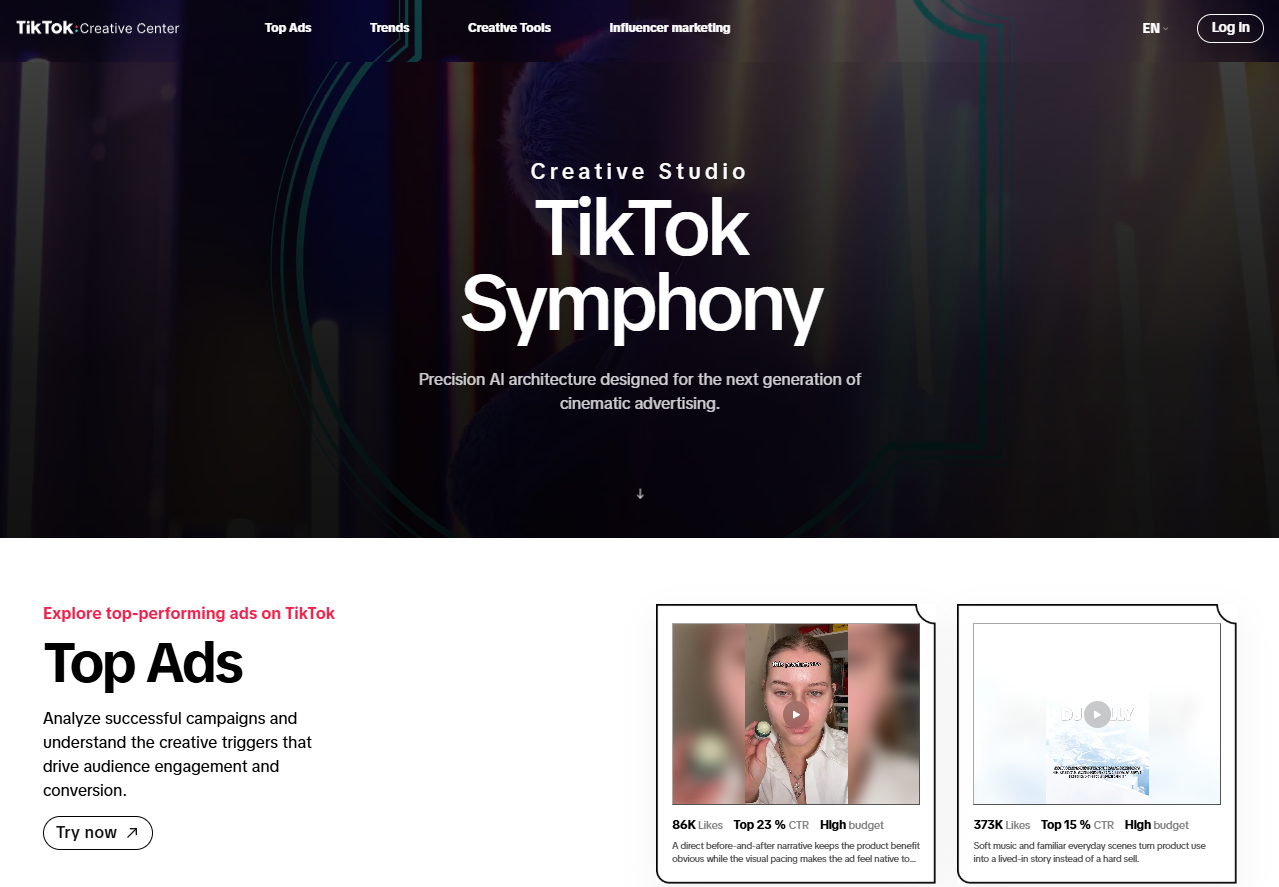
If a search for “creative center tiktok” drops you on a page about Symphony, you are in the right place. That page is the new front door.
The sample cards on the home page carry something the old layout never put up front: a sentence from TikTok on why each ad works. Under an ad with 86K likes, a Top 23 % CTR band and a High budget, the note says a direct before-and-after narrative keeps the product benefit obvious. Under the one with 373K likes and Top 15 % CTR, soft music and everyday scenes turn product use into a lived-in story. These lines are TikTok's own reading of its ads. They're phrased like a creative brief, though, and I'd happily paste one into a designer's task.
TikTok Creative Center Top Ads: filters and what the ranking means
Top Ads is the part media buyers actually use. TikTok titles the page “Top Ads: high-performing auction ads”: a selection of auction ads TikTok considers successful, with no way to search every ad on the platform. The page still uses the older menu (Inspiration, Trends, Creative Tools), offers a search by brand or product keywords and has two tabs, Top Ads Dashboard and Top Ads Spotlight.
- Open Top Ads from the top menu of TikTok Creative Center.
- Set the country to your market, then Industry, Objective and the period (Last 30 days by default).
- Narrow by Ad Language and Ad Format, and set a Likes range to drop low-engagement ads.
- Sort by CTR or Reach instead of For You, and open See analytics on the ads that stand out.
- Note the brand and the creative angle of the ads that keep coming up, then check them in a tool that shows the whole advertiser.
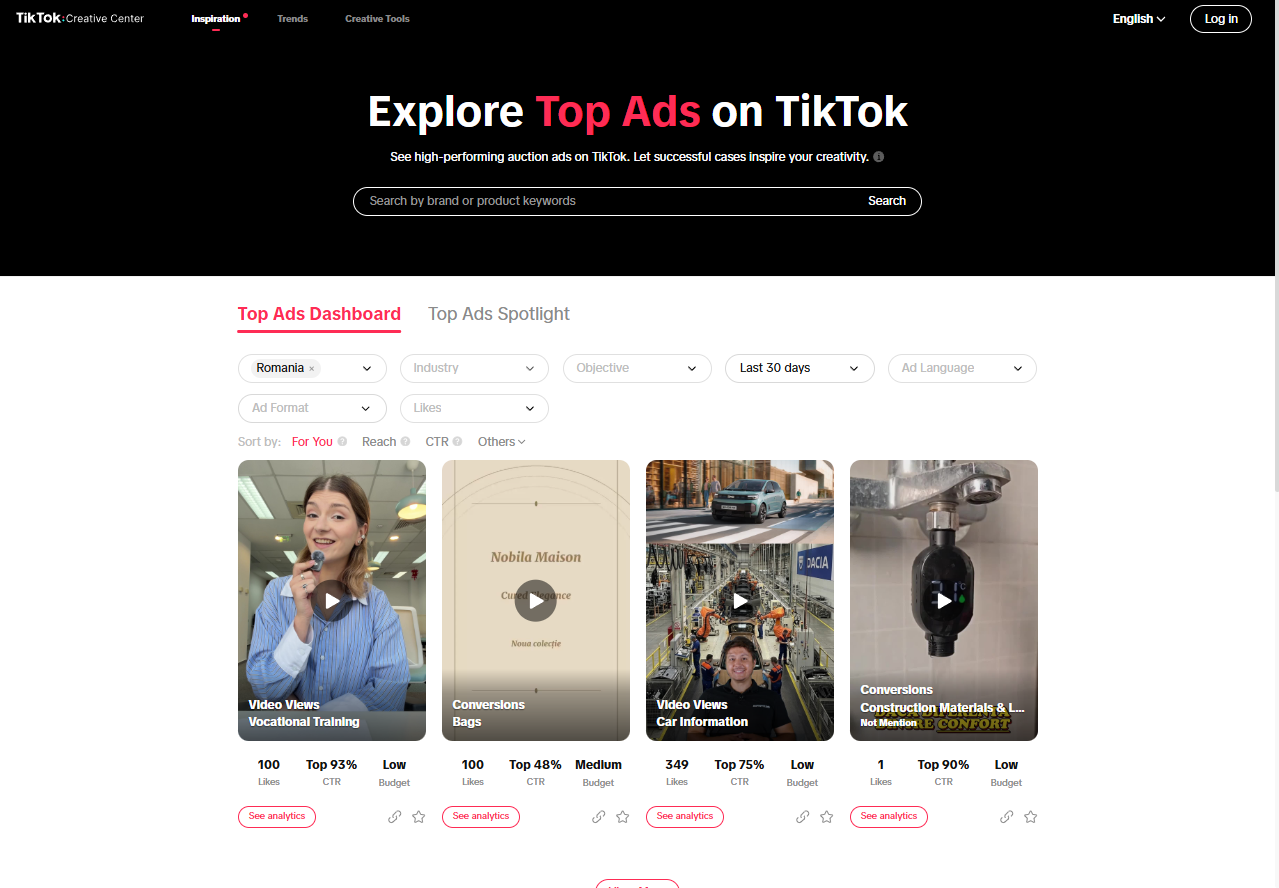
The region on this screen is Romania, and its four cards are a handy lesson in reading them. Two ads have exactly 100 likes: a vocational training video in the Top 93% for CTR and a bag brand, Nobila Maison, in the Top 48%. A Dacia video aimed at video views has 349 likes and sits in the Top 75%. The fourth, a construction materials ad optimised for conversions, made the dashboard with a single like and a Top 90% band.
On a card you see likes, a CTR position and a budget level such as Low, Medium or High, and never an actual click-through rate or a spend figure. That's enough to spot which hooks work in a category and a country. Comparing two ads on cost is out of reach, and so is telling whether a brand is scaling or winding down.
The word “selection” has a second consequence. If a competitor doesn't appear in TikTok Creative Center Top Ads, you have learned nothing about them. The showcase holds only what made TikTok's pick, and a brand that's missing may still be spending heavily.
TikTok Creative Center trends: what the Trends page is for
Trends is the organic side of Creative Center. The old addresses show how it was built: separate pages for popular hashtags, music and creators. Today the old Hashtags link lands on a single Trends page at /creative/creativeCenter/trends, and the old Trends home goes to the same place.
I use it to see what people are watching: which sounds and hashtags are rising in a country this week. A TikTok Creative Center trend tells you what the audience is into. It says nothing about who pays to reach that audience, so it belongs in the creative brief and stays out of competitor research. Check the country selector before reading anything, because a sound climbing in one market can be invisible in the next.
Creative Tools, Creative Studio and Symphony
The rest of the new menu is for making ads. Symphony Creative Studio generates TikTok-ready ads with AI, Symphony Automation supplements and repairs creative assets during delivery, and the Symphony API lets a company embed the same generation in its own workflow. For competitor research they add nothing, because they only work on your own assets.
What happened to Top Products, the TikTok Shop Creative Center favourite
Top Products and Keyword Insights were where product sellers, TikTok Shop sellers included, looked for ideas in the old Creative Center. Both old addresses now redirect to the Creative Suite home page, and neither is in the home page menu. A guide on TikTok Creative Center Top Products that sends you there is describing the previous layout.
A product question can still be worked from ads, from another angle. An ad that has run for weeks suggests the seller keeps finding it worth the money, though run length alone proves nothing about margin. In Spytrend, the TikTok tab of Ads has a Days filter for how long an ad has been running, status buttons for Active, Inactive and Vanished, and a Creative reuse min field for creatives that get uploaded again and again.
What stays hidden in Creative Center
Creative Center was built to inspire ad creation, and following one advertiser is outside that design. Side by side:
| What you want to know | TikTok Creative Center (Top Ads) | Spytrend, TikTok tab |
|---|---|---|
| Which ads work | A curated selection with likes, a CTR band and a budget level | Collected ads with status (Active, Inactive, Vanished), days running and a creative reuse count |
| Everything one advertiser runs | Only the ads that made the selection | Ads filtered by Advertisers, Webmaster or Domain |
| Who pays for the ads | Not on the ad card | Payer filter; Webmasters groups ads by the paying company |
| Where the traffic goes | Not on the ad card | The landing domain on every ad card |
| How much is spent | A budget level: Low, Medium or High | No spend figure either; EU reach filter for ads shown in the EU |
Neither tool gives exact TikTok spend. The real difference is the unit: Creative Center shows one ad at a time, Spytrend shows the business behind a group of ads.
TikTok ad spy beyond the showcase: Spytrend Ads and Webmasters
The screens in this section come from Spytrend, and its makers' positioning line is short enough to quote: Spytrend is an ad intelligence platform for Facebook and TikTok advertising: an archive of ads going back to 2018, AI-classified into 33 business categories, with every advertiser assembled into a single card — all ads, pages, domains and countries in one place.
Two of its sections do the work people buy a TikTok ad spy tool for.
Ads, TikTok tab. With no filters set, the results counter on this tab read 203,701,783. Each card shows the creative, the landing domain, the advertiser, countries, category and status. The filters go further than Creative Center: advertiser, webmaster, domain and domain zone, days running, creative reuse, ads per advertiser, age and gender, EU reach and the payer's name.
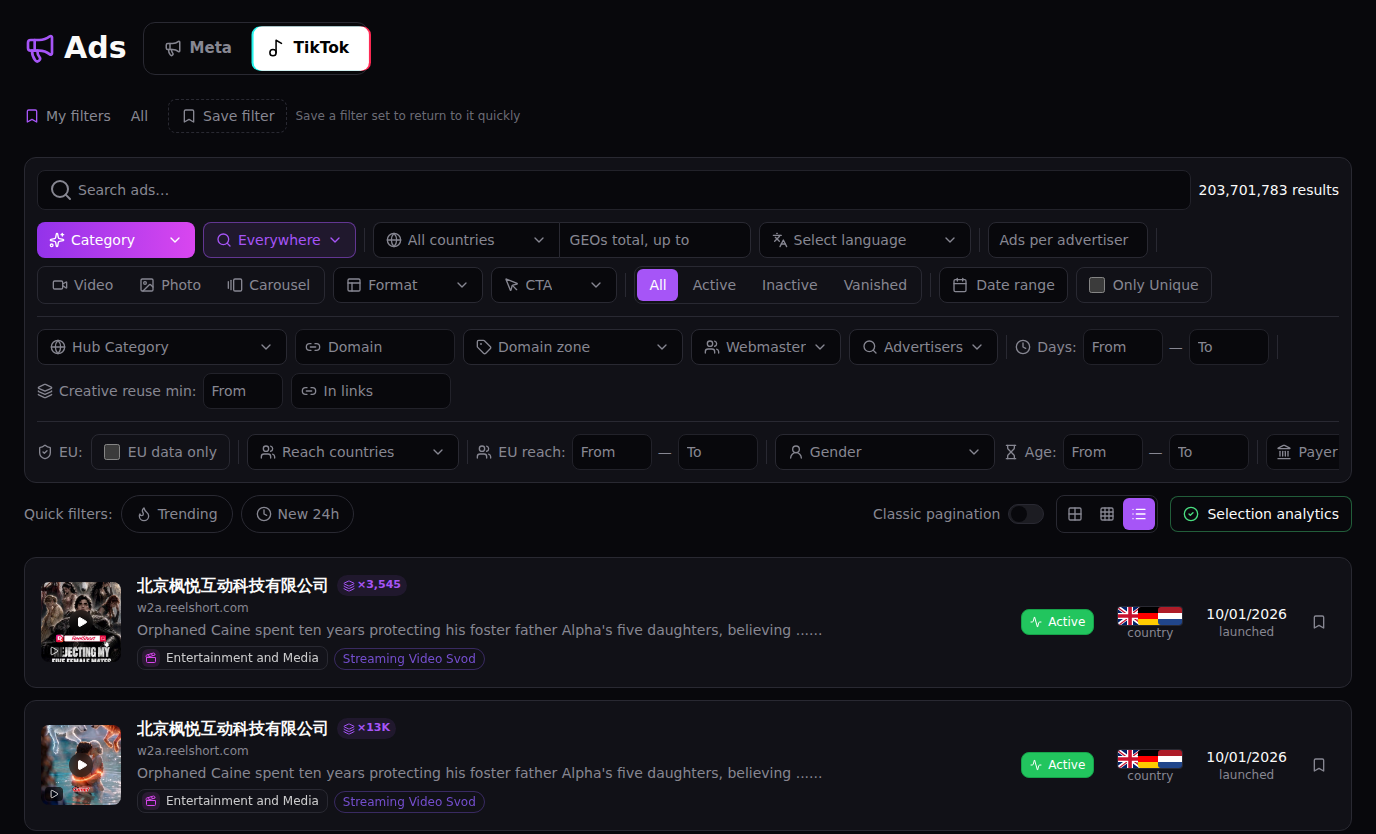
The first two rows of that unfiltered feed made a small case study of their own. Both came from the same Beijing company behind w2a.reelshort.com, both told the same story about an orphan named Caine, and both ran in the UK, Germany and the Netherlands. One creative carried a reuse badge of ×3,545, the other ×13K. Creative Center would show such an ad once, if at all. Here the badge tells you how hard the advertiser is pushing a single story line.
Webmasters, TikTok tab. Here the unit is the company that pays for the ads, and the tab listed 70,083 of them. Sorted by ads, the top row was Vibeshort, a short-drama app: the row ties a paying company with a Chinese name to the domain w2a.vibeshort.live. Its ads went to Germany, Spain and the United Kingdom, 16% each, plus 26 more countries. The counters read 9.1M ads in total, 174K active and 8.9M stopped, so fewer than one in fifty was live at that moment. In Creative Center you could meet a few of these ads one by one and never learn that they belong together.
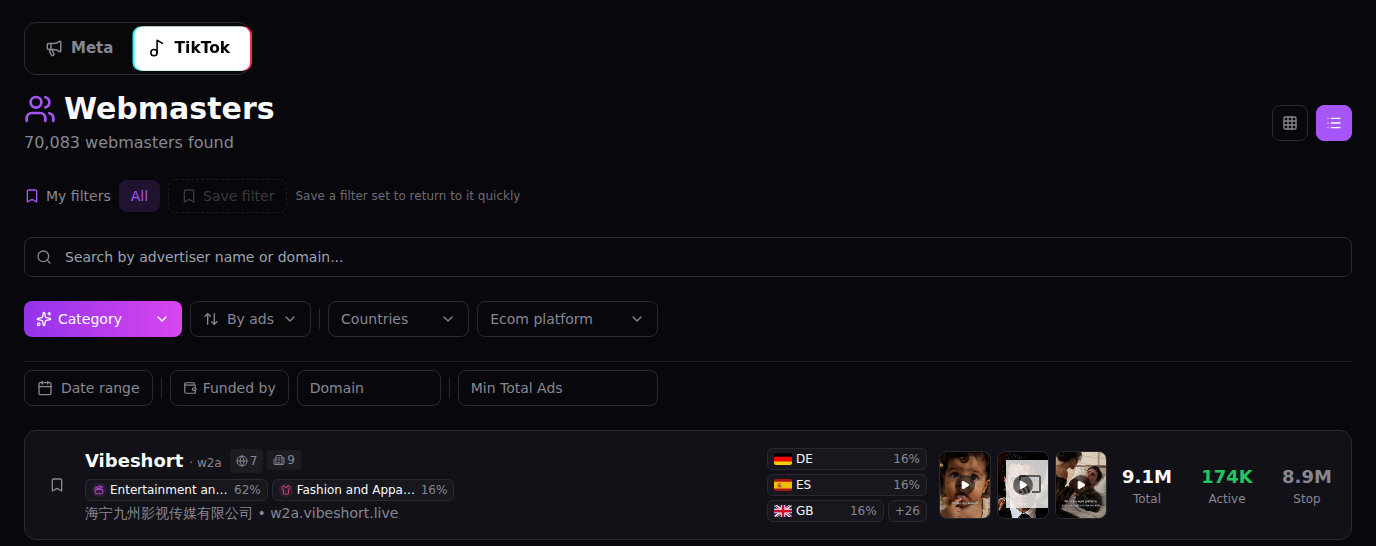
The category tags deserve a glance too. Spytrend's AI put 62% of Vibeshort's ads in Entertainment and 16% in Fashion and Apparel, an odd split for a streaming app and a good reason to open a few creatives before trusting a label. The filters on this tab are By ads, Countries, Ecom platform, Funded by, Domain and Min Total Ads, so the same view works for online shops as well as for apps.
For Meta, Webmasters also links ads by pixel. On the TikTok tab the grouping runs through the paying company, its ad accounts and domains. More on the section: how Webmasters works.
From a Creative Center ad to the whole advertiser
Creative Center tells you which ad caught on; Spytrend tells you who is behind it. A five-minute check:
- In Creative Center, note the brand name and a distinctive phrase from the ad text.
- In Spytrend, open Ads, switch to the TikTok tab and paste the phrase into the search, or put the brand's site into the Domain filter.
- Open a matching ad and read its landing domain, countries, status and run dates.
- Filter by its Webmaster to pull every ad from the same paying company, then open the Webmasters row to see its domains and countries.
- Set Days to 30 or more with status Active: an ad that has stayed live that long is one the advertiser keeps paying for.
If the search comes back empty, check the country first. A brand that advertises on TikTok only in the US may simply be missing from the public data.
TikTok coverage by country: Europe deep, the US thin
Spytrend uses only advertising data that is publicly available, and on TikTok that depends on the country. With the United States as the only country selected, the counter dropped from 203,701,783 to 6,289. If you buy TikTok traffic for European markets, the TikTok tab gives you depth. If you run only in the US, expect few TikTok results; Spytrend still covers the European side of the same advertisers, and Facebook.
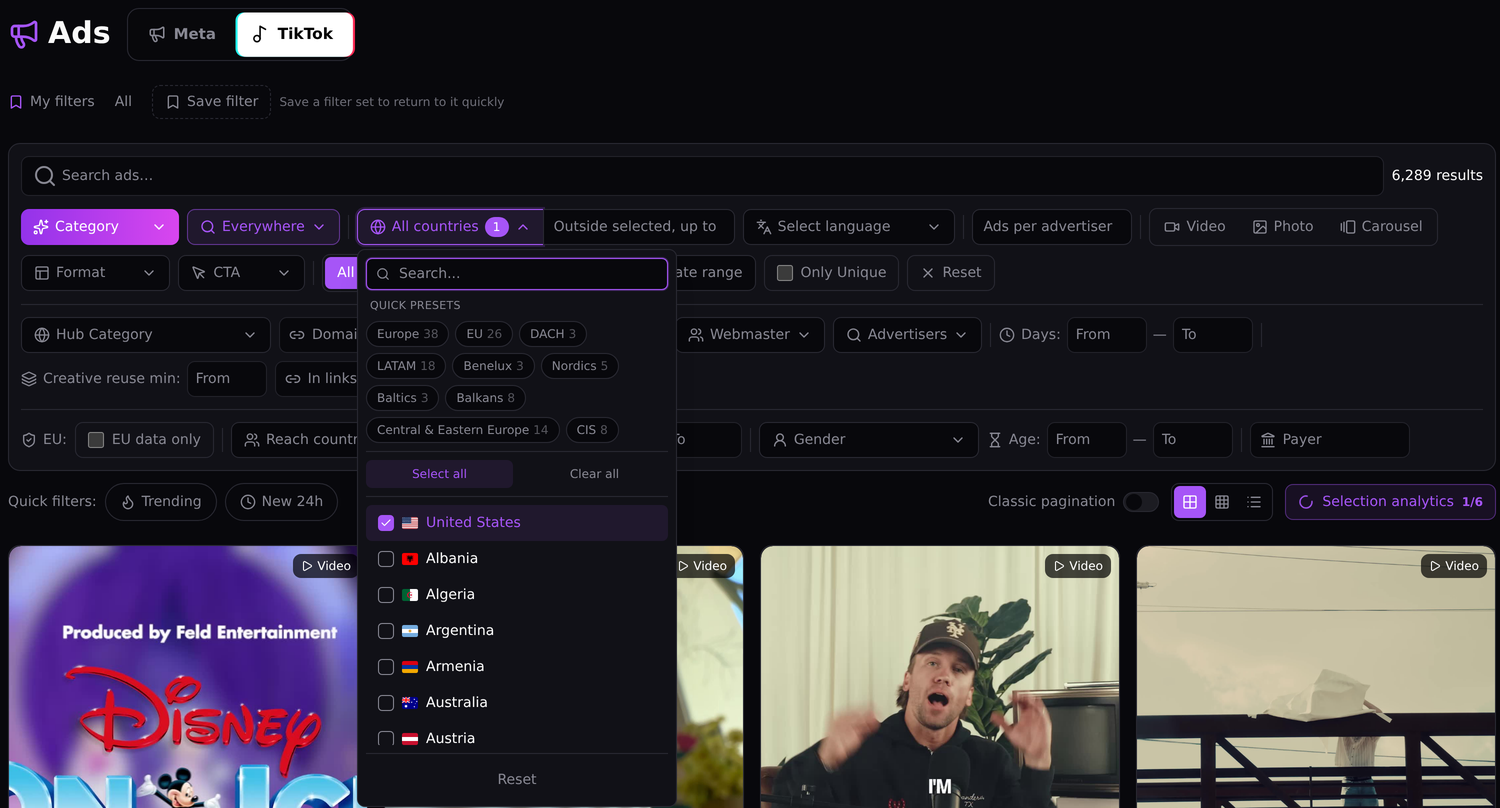
On the US list, the first row was a church inviting people to a weeknight service through a netlify.app page. The second was a launch ad for Dune: Awakening on PlayStation 5 and Xbox, shown in the US, Brazil, Canada and five more countries. Both were active and only a day old. The US data is there, it's just a small slice next to the European volume.
Behind each domain sits the real landing page, which Spytrend fetches for $1 per run; a run that fails is refunded. The free Starter plan opens ads older than 90 days, and the pricing page lists the paid plans with live ads. For studying a rival beyond TikTok, see the step-by-step competitor research workflow.
When Creative Center is enough, and when it isn't
For creative ideas, Creative Center covers the job: hooks, formats and sounds that work in a category right now, free, with TikTok's own pick of top ads that no outside tool reproduces.
Once the question turns to one competitor (what else they run, through which domains, from how many ad accounts and in which countries) you need an ad research tool. This comparison of ad spy tools covers the options, including which of them handle TikTok.
FAQ
Is TikTok Creative Center free: do you pay anything to browse Top Ads?
Yes, TikTok Creative Center is free. TikTok charges nothing for it, and both screens of Creative Center in this article were taken logged out, with the Top Ads filters working.
Where is TikTok Creative Center: why does the old link open a Symphony page?
TikTok Creative Center is now at ads.tiktok.com/creative/creativeCenter, and creativecenter.tiktok.com redirects there. The home page opens with a TikTok Symphony banner, since the new site leads with TikTok's AI ad tools. The browser tab says TikTok One Creative Suite; Top Ads is the first item in the menu.
How to access TikTok Creative Center: do you need an account at all?
To access TikTok Creative Center you only need a browser. Top Ads, its filters and the sorting opened for me without an account. Logging in uses a TikTok for Business account, via the button in the top right corner next to the language switch.
TikTok Creative Center top products: where did the page go?
The TikTok Creative Center Top Products page no longer has a place in the menu. Its old address, like the one for Keyword Insights, redirects to the Creative Suite home page. For product ideas, the closest substitute is Top Ads filtered by industry and objective, or long-running ads in a research tool.
What is TikTok Creative Center: a library of every TikTok ad?
TikTok Creative Center is a showcase, so the answer is no. Top Ads holds a selection of high-performing auction ads and doesn't group them by advertiser. A competitor missing from it may still be advertising.
Is Spytrend the same as TikTok Creative Center?
No. Spytrend collects TikTok ads from public data and groups them by the paying company, while Creative Center is TikTok's own curated showcase. On the TikTok tab, 6,289 of the 203,701,783 results matched the United States filter, so its TikTok side is far deeper outside the US.
