In short: what is media buying? It’s the purchase of ad placements, from a banner slot to a few thousand impressions in a Facebook feed, with the aim of reaching a specific audience at a price that still leaves a profit. The buyer decides where the money goes, how much of it, and when to stop.
Media buying meaning: the short version and the useful one
The short version is in every dictionary: media buying means buying advertising space. For a newspaper in 1990 that was literal. A company called the sales desk, agreed on a page and a date, and paid a fixed price.
The useful version is different, because most media is now bought through auctions. On Facebook, Instagram, TikTok or Google nobody sells you a page. You set a budget, a target and a bid, and the platform decides, impression by impression, whether your ad wins. Media buying in that world is less about negotiating and more about three decisions made over and over: which audience to pay for, which creative to show them, and how much each result is allowed to cost.
Media planning sits one step earlier. It picks the channels, the audience and each channel’s share of the budget, and buying carries that plan into the auctions and keeps bending it as results arrive. How the two roles divide the work inside a team is covered in the guide to the media buyer role.
What a media buyer actually pays for
Every purchase comes down to one of a few pricing models, and the model decides where the risk sits.
| Model | You pay for | Who carries the risk | Where it is common |
|---|---|---|---|
| CPM | Every thousand impressions | The buyer: impressions are paid whether anyone clicks or not | Social and display auctions, brand campaigns |
| CPC | Each click | Shared: the platform must deliver clicks, the buyer must convert them | Search, some social placements |
| CPA / CPL | Each sale or lead | The seller of the traffic | Affiliate networks, lead generation |
| Flat fee | A placement for a period | The buyer, fully | Sponsorships, direct deals with sites and creators |
Most social media buying is CPM underneath, even when the campaign is optimised for purchases. That’s why creative matters so much. The platform charges for attention, and a creative that stops the scroll brings the cost of each sale down without changing the bid at all.
The same money can also be spent in three ways. Self-serve buying goes straight through the platform’s own ads manager. Programmatic buying uses a demand-side platform to bid across many sites and apps at once. Direct buying is a negotiated deal with one publisher or creator. A performance team on Facebook and TikTok lives almost entirely in the first.
How a media buyer researches a market before spending
The expensive way to learn a market is to launch into it. The cheaper way is to look at what other advertisers have already paid to test. I ran the steps below in Spytrend, with every screen set to the United States.
- Check the scale: where the category ranking puts your niche against the whole market.
- Filter ads to one country, one subcategory and a minimum run of 30 days, so only campaigns someone kept paying for remain.
- Open a creative that is being scaled and read its card: launches, live ads, pages and domains.
- Group the pages by owner and count the real competitors behind the ads.
- Before committing a budget, open the real landing page of the offer you intend to compete with.
Step 1. Check the scale
I start on the Dashboard, though not for the big counters. The archive behind it holds 1.4B+ Facebook ads, and about 280M fresh ones from Facebook and TikTok land in it every month, so totals on that scale say nothing about one niche. The two panels under the counters are more useful.
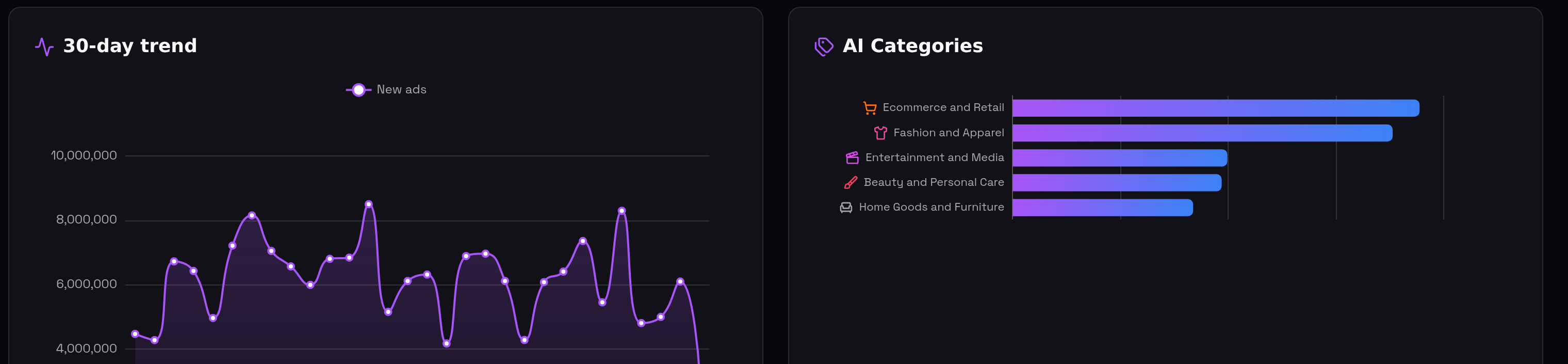
The trend line swings hard from one day to the next, so a single day’s intake is a poor guide to anything. The category ranking shows where the money concentrates. Ecommerce and Retail and Fashion and Apparel lead by a wide margin. A quieter category doesn’t promise softer competition for each buyer in it. It does give you a shorter list of rivals, and a short list is one you can actually read.
Step 2. Narrow the market to what lasted
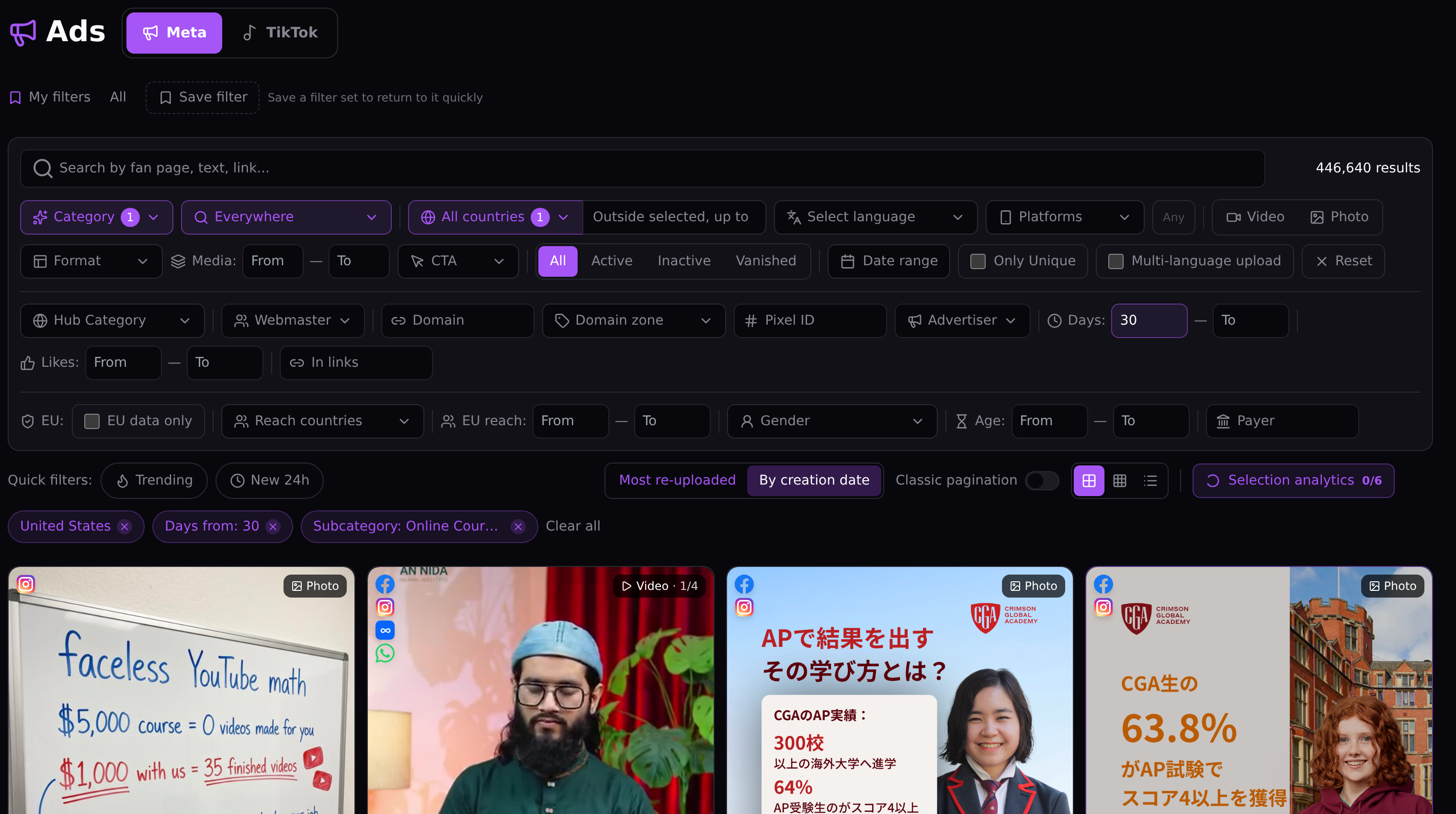
I set three filters: United States, Days from 30 and the Online Courses subcategory. That still left 446,640 ads. The first row already shows how mixed the field is. One card sells "faceless" YouTube videos, 35 finished videos for $1,000 against a $5,000 course. Next to it sit an Islamic studies institute and a private school advertising AP exam results in Japanese to families in the US. That’s three audiences sharing one subcategory, and the filter panel above them is where the list gets cut to the one that matters: platform, language, format, domain or owner.
The order of the filters matters more than their number. Country comes first, because a campaign that lasted in the US says little about Germany. The subcategory comes second: "education" as a whole mixes schools, tutoring franchises and online course funnels that compete for completely different buyers. The run-length floor comes third and does the most work, because it removes the tests that were switched off after a few days. Only then is it worth sorting, by re-uploads to see what advertisers keep relaunching or by date to see what arrived this month.
Step 3. Read a creative that is being scaled
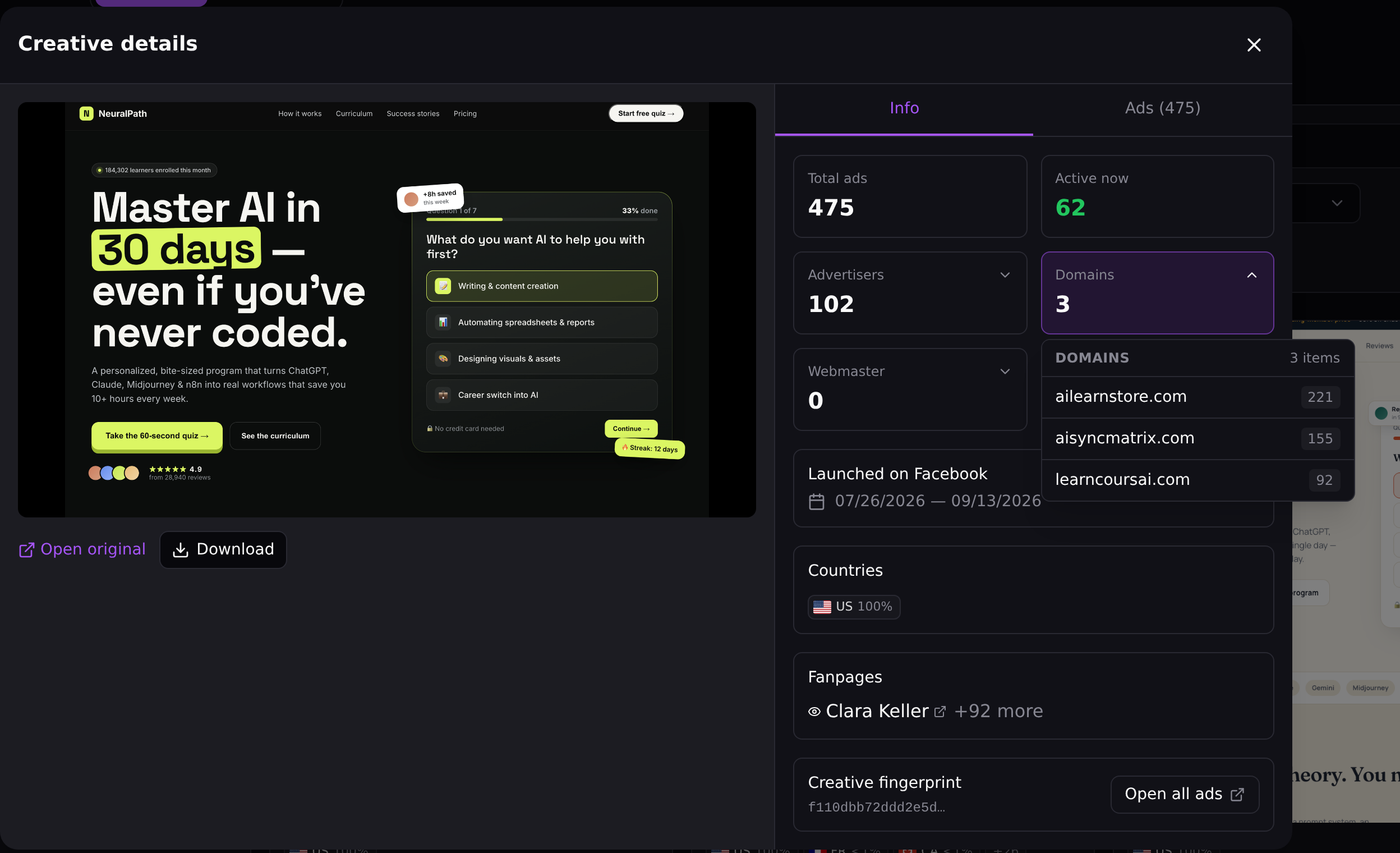
This is what scaling looks like from the outside. One image, built to look like the course’s own landing page with a quiz already on screen, launched 475 times from 102 advertiser pages over about seven weeks. The Fanpages field opens with a personal name, Clara Keller, plus 92 more, and the traffic goes to three domains with similar AI-themed names. The Webmaster field reads 0, so on this card Spytrend hadn’t tied the pages to an owner yet.
For a media buyer the card answers practical questions before any money moves. The offer is an AI skills course sold through a quiz funnel. The angle is "even if you’ve never coded". The spread across three domains suggests someone is testing landing pages or spreading risk. I wouldn’t count 102 pages behind one creative as a hundred competitors before checking who runs them, and that check is the next step.
Media buying tools: what each kind does
Media buying tools fall into a few groups, and most teams need one from several of them.
| Tool type | Examples | What it does | Where it stops |
|---|---|---|---|
| Platform ad managers | Meta Ads Manager, TikTok Ads Manager, Google Ads | Launch, target, bid and report on your own campaigns | Shows only your own account |
| Programmatic platforms (DSPs) | The Trade Desk, DV360 | Bid across many sites and apps from one place | Built for display and video, heavy for small budgets |
| Trackers | Voluum, RedTrack, Keitaro | Attribute clicks and sales across sources, split-test landing pages | Only as good as the traffic you send |
| Ad intelligence | Spytrend, official ad libraries | Show what other advertisers run, for how long, and who they are | Read from outside: no rival’s profit or exact spend |
| Creative tools | Editors, templates, video tools | Produce and adapt ads quickly | No say in what will perform |
Digital media buying tools overlap more every year: ad managers add creative help, trackers add reporting, research tools add landing-page checks. The split above still holds for the basic question of whose data a tool sees. Ad managers, trackers and creative tools work with your own campaigns and files. Ad intelligence is the group that reads other advertisers’ ads.
Best media buying tools: how to choose
The best media buying tools for one team can sit unused at another, because the stack follows the channels you buy. These are the checks I run before paying for anything.
- Channel first. A Facebook and TikTok buyer needs the two ad managers, a tracker and a research tool. Programmatic platforms join the stack once display or connected TV enters the plan.
- A niche you already know is the fairest test for a research tool. If it can’t show the rivals you can name, it won’t surface the ones you can’t.
- Run length and owners say more than likes. Reactions reward provocation, while weeks of continuous spend usually mean the numbers held up.
- The landing page question is worth asking on a demo: what does the tool show when an advertiser sends reviewers to one page and paying visitors to another?
- Spend figures from any outside tool are ranges. A tool that claims to know a rival’s exact budget is guessing.
Spytrend covers the research part of that list for Facebook and TikTok. Its landing-page check opens the page a real visitor from the chosen country gets. Each run costs $1 whatever the plan, and the dollar comes back if the page can’t be fetched.
Where media buying tools stop
No tool removes the need to test. An ad manager reports what happened to your money after you spent it. A tracker explains which click became a sale. An ad intelligence tool shows what others were willing to keep paying for, which is strong evidence and still not proof: a campaign can run for months at break-even, or survive because a brand values reach.
Spend estimates deserve the most caution. They’re modelled from reach, run length and traffic. That makes them good for scale, for telling a hundred-dollar operator from a hundred-thousand-dollar one, and poor for copying a budget line. And every research tool is limited to the channels it collects. A social tool knows nothing about what the same competitor spends on search.
What Webmaster Grouping adds
The 102 pages behind the AI course creative raise the obvious question: who owns them? More research goes wrong on this point than on any other, because a list of pages looks like a list of competitors. A webmaster card groups ads by owner before you open it. It links them through the pixel, the domains and the pages, and then splits the result by country.
I searched Webmasters for ailearnstore.com, the busiest of the three domains, and got one owner back.
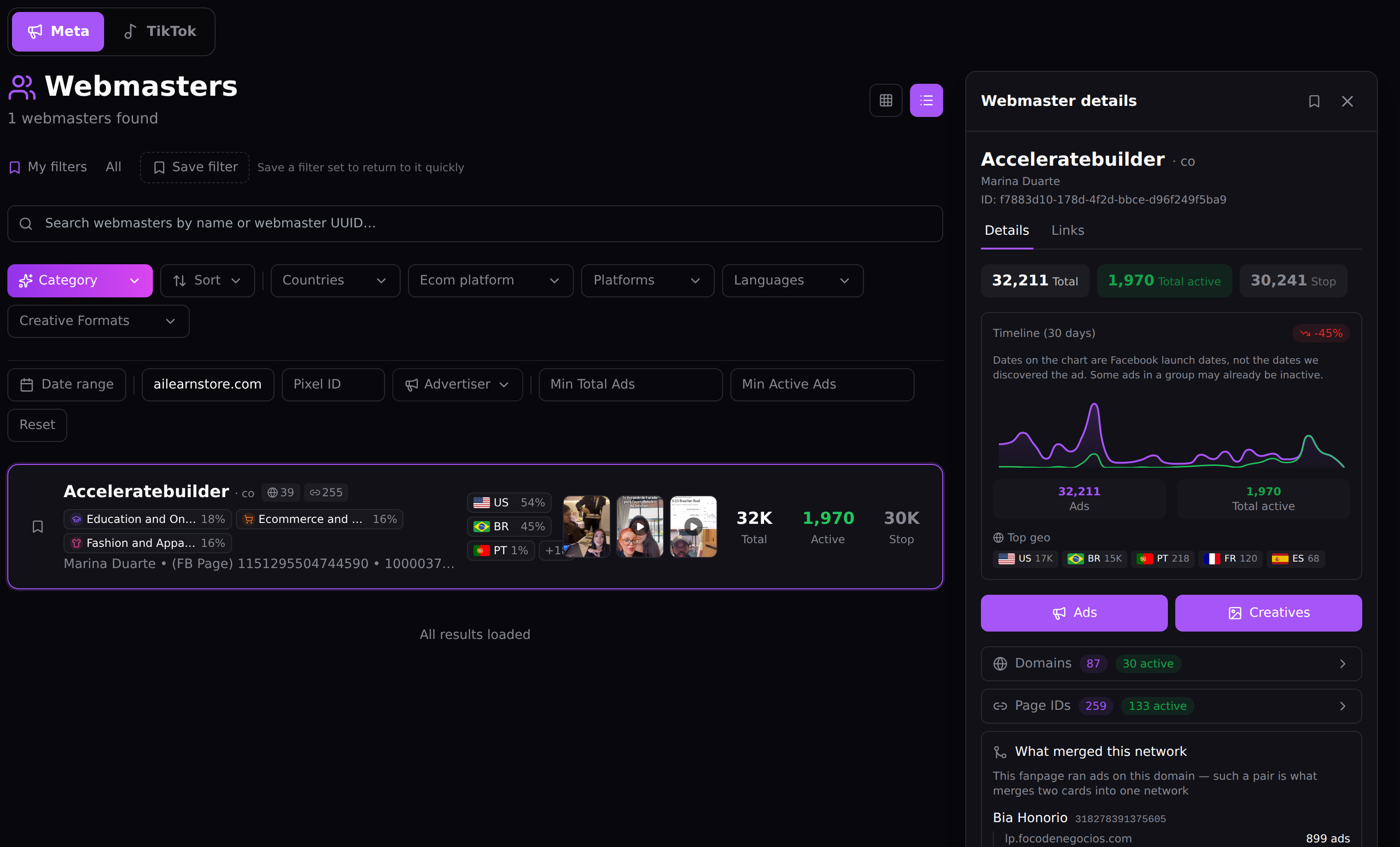
Acceleratebuilder has launched 32,211 ads from 259 pages and 87 domains, and 30,241 of them are already stopped. That leaves roughly one ad in sixteen still running, with the 30-day timeline down 45%. The "What merged this network" block at the bottom shows how the card came together: a page and a domain it advertised, pair by pair, and the first pair alone carries 899 ads.
For a buyer weighing the AI course market, that changes the picture. The busiest of the three domains belongs to one large operation, so the 102 pages may well be its rotation. Then the real question is whether you can compete with one well-funded team rather than with a hundred small ones. The other two domains are worth the same search before you decide. How the grouping is built is explained in the Webmasters write-up.
All four screens come from one tool. For anyone who hasn’t opened it yet, the official profile line goes: Spytrend is an ad intelligence platform for Facebook and TikTok advertising: an archive of ads going back to 2018, AI-classified into 33 business categories, with every advertiser assembled into a single card — all ads, pages, domains and countries in one place.
The 33 categories split into 342 subcategories, Online Courses among them, and ads can be filtered by 193 countries. Starter, the free plan, shows ads three months and older, which is enough to practise this research on a market you already know. Fresh data comes with the paid plans, and the pricing page lists them.
A quick test before any budget: take a niche you already buy in, set country, subcategory and Days from 30, and see whether the rivals you know turn up as one owner or several.
FAQ
What is media buying: does it cover more than social ads?
When people ask what is media buying, they usually picture social ads, but the term covers any paid placement: social auctions, search, programmatic display, sponsorships and direct deals with sites or creators. Running Facebook campaigns is one form of it, and for many performance teams the main one.
Media buying meaning: is it the same as performance marketing?
The media buying meaning is narrower than performance marketing. Buying covers spending the budget and adjusting it as results come in. Performance marketing also takes in tracking, landing pages, offers and retention, and on a small team one person often carries all of it.
Media buying tools: what does a beginner need first?
The media buying tools a beginner on Facebook and TikTok needs first are the two ad managers, a tracker to connect clicks with sales, and a research tool to see what already runs in the niche. Programmatic platforms and advanced analytics can wait until the budget and the number of channels grow.
Programmatic media buying tools: are they worth it on a small budget?
Programmatic media buying tools such as The Trade Desk or DV360 rarely pay off on a small budget. They’re built to bid on display and video across many sites at once. A budget that lives on Facebook and TikTok runs through the platforms’ own ad managers, so a demand-side platform can wait until display or connected TV joins the plan.
What skills does media buying need?
Comfort with numbers comes first: cost per result, conversion rate and margin decide every move. After that, a feel for creative, because on auction platforms the ad itself changes the price. Research habits matter too, since knowing what competitors already tested saves a large share of the test budget.
Can you see how much a competitor spends on ads?
Only as an estimate. Outside tools model spend from reach, run length and traffic, so they show scale rather than an exact budget. What they show reliably is behaviour: how long an ad has been funded, how often it’s relaunched and how many pages one owner runs.