In short: ad intelligence is the research a media buyer does on other advertisers' ads before spending: which creatives run, how long they've been paid for, who stands behind them and where the click lands. A good tool turns those questions into filters and cards. No tool shows a competitor's profit.
What ad intelligence answers for a media buyer
Most of what decides a campaign's return is settled before the first dollar goes out: the offer, the opening angle, the country, and how many people already compete for the same buyers. You can learn that from your own tests, slowly and on your own budget. Or you can learn it from what other advertisers have already paid to find out.
That second route is ad intelligence. On a normal morning it comes down to five questions:
- what competitors in one country and one category pay to show right now;
- which of those ads have lasted a month or more, and which creatives keep getting relaunched;
- whether ten pages pushing one offer are ten businesses or one operator with ten names;
- what page the click actually lands on, since some advertisers show reviewers one page and buyers another;
- roughly how much is being spent, which no outside tool can know exactly.
Does the order matter? More than it seems. Start from spend and you end up chasing the loudest advertiser in the niche. Start from what has lasted, then check who's behind it, and the spend estimate turns into a sanity check.
How an ad intelligence tool turns ads into a research workflow
I ran the steps below in Spytrend. Every screenshot comes from a US search I made for this guide.
- Open Ads, pick the country you buy traffic in and a business category, and set a days-active floor so short tests drop out.
- Check the category's momentum in Trends: how many ads launched in the last 30 days and how many are live now.
- Sort by Most re-uploaded and open the creative behind a promising ad.
- Open the webmaster behind those pages and count how many domains and pages one owner controls.
- For an offer worth a test, open the real landing page a buyer in your country sees, even behind a redirect. It costs $1 per run, refunded if the run fails.
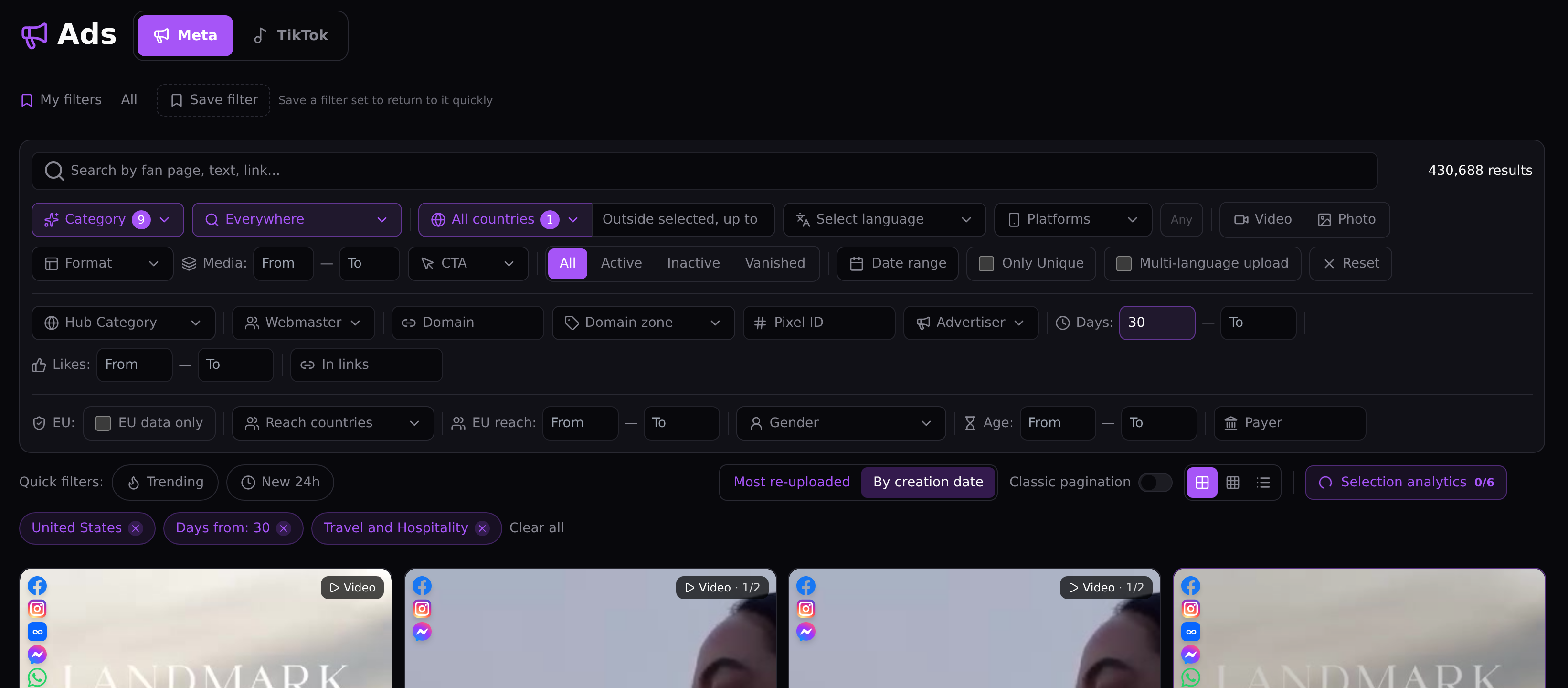
Here the floor is 30 days and the status switch is left on All, so stopped ads stay in. US travel and hospitality returned 430,688 ads, and every one of them ran for at least a month. Nobody reads that many. The count shows how deep the category is, and the next filters cut it down. The same panel narrows by platform, format, language, domain, pixel or webmaster, and the Active switch drops everything that has stopped. Without the Days floor, a week-old test sits next to a proven ad and looks just as important.
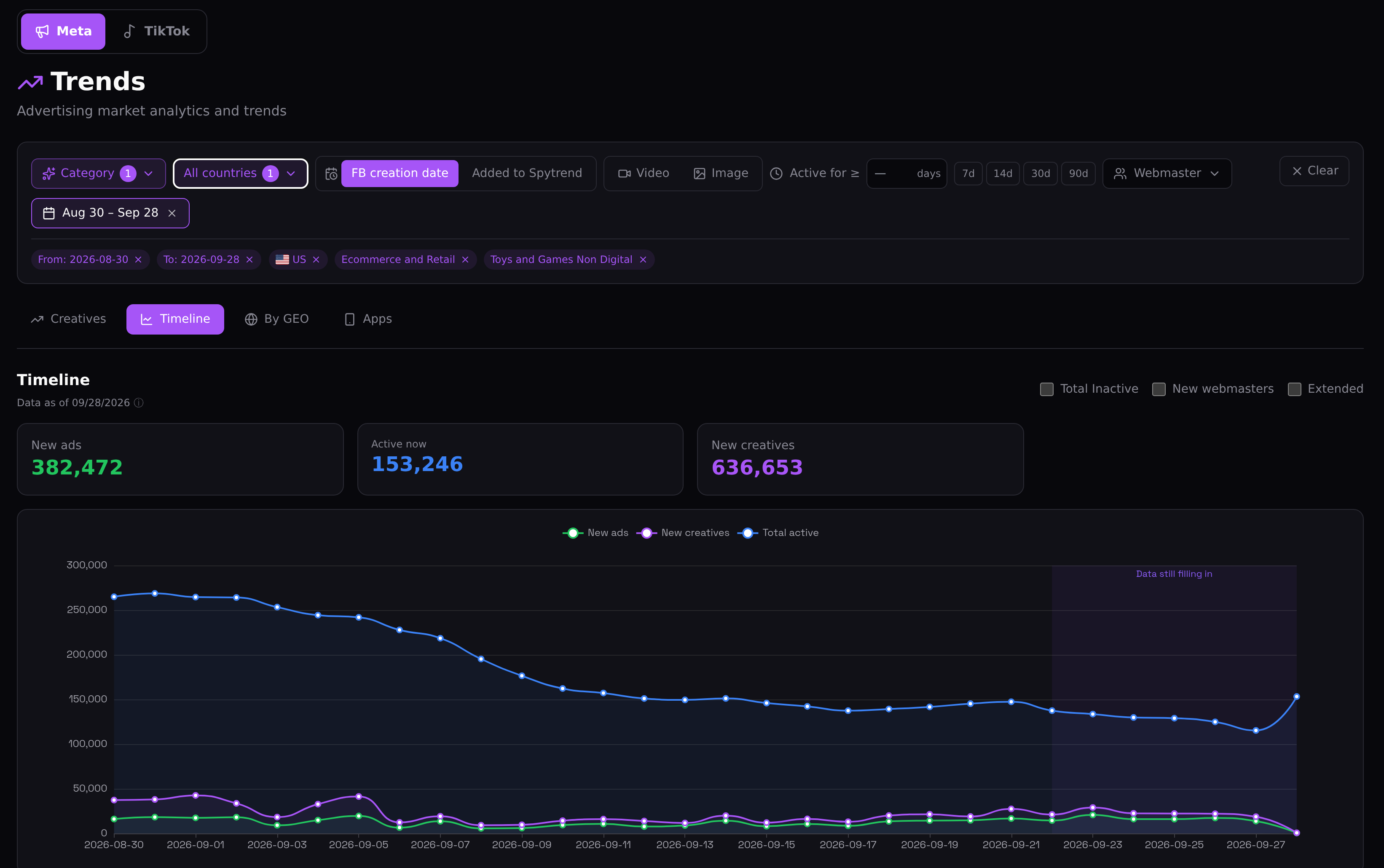
Before digging into single ads, check how busy the category is. Non-digital toys and games got 382,472 new ads in thirty days, and 153,246 ads were live at the end of the window. The line of live ads tells more than either number. It started near 265,000, slid through the first half of September and flattened at about 140,000 to 150,000. So launches kept coming, but on any given day fewer ads were live than at the start of the window. One caution: the chart marks its last week as still filling in, so the jump at the very end may still move.
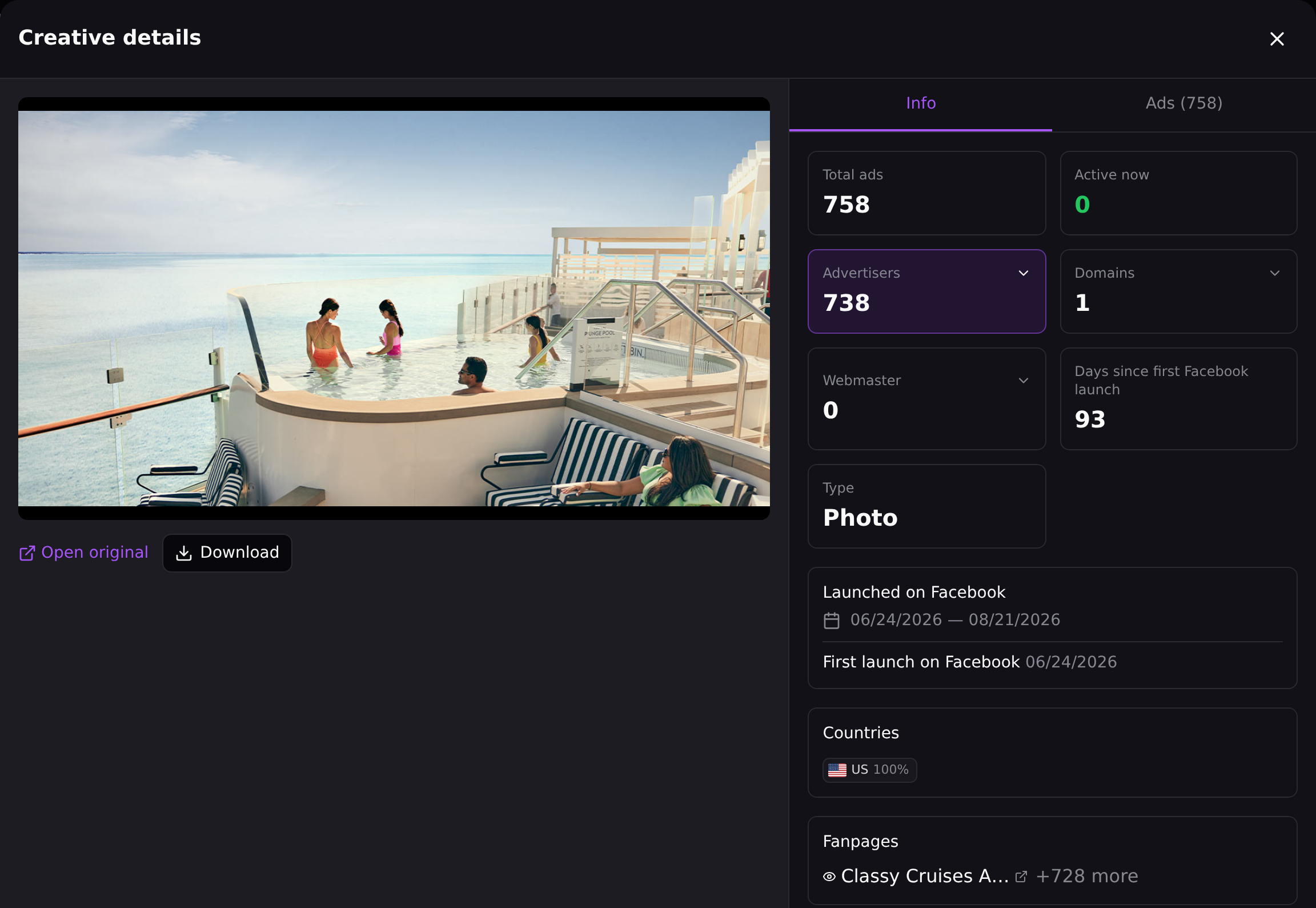
I opened this cruise photo from the same US travel category as the first screenshot. It ran in 758 ads from 738 advertiser pages, which at first glance looks like a crowded offer. Then the Domains field says 1, and the Ads tab shows why: every one of those ads sends traffic to travelleaders.com. Seven hundred pages with one destination look like a franchise program, with independent agents each posting the brand's approved photo from their own page. The Webmaster field stays at 0, because no single operator owns those pages. So the number measures how far one brand's network reaches. It doesn't count 738 competitors fighting for the same buyer. The section is covered in more detail in the Creatives write-up.
Many tools stop at the creative. The offer, the price and the margin sit on the landing page, and some advertisers show that page only to real buyers from the target country. Spytrend opens the page such a buyer lands on. It costs $1 per run on any plan, and a failed run is refunded.
Ad intelligence tools by what they watch
The same label covers products that watch very different corners of the ad market. Check which corner a tool covers before you compare prices.
| Type | What it watches | What it answers | Where it stops |
|---|---|---|---|
| Official ad libraries | Ads a platform discloses about itself: Meta Ad Library, Google Ads Transparency Center, TikTok Commercial Content Library | Which ads one named advertiser runs now | One platform at a time; limited history for stopped commercial ads; no ranking by run length |
| Social ad intelligence | Facebook, Instagram and TikTok ads collected into one archive | Which creatives and offers lasted in a category and who runs them | Paid social only; no view of search or display |
| Display and programmatic ad intelligence | Banner and video ads on websites and ad networks | Which publishers and networks a brand buys | Little help for creative testing on social platforms |
| Search ad intelligence | Paid search ads and the keywords behind them | Which keywords a domain bids on | Text ads only; no creative history |
| Mobile ad intelligence | Ads inside apps and app-install campaigns | Which apps advertise where, and with which creatives | Tied to app marketing; thin on e-commerce and lead generation |
Where does a Facebook and TikTok buyer start? With the free library, to spot-check one advertiser you can already name, and with a social tool for everything else. Display, search and mobile tools answer different questions about different budgets.
If you're choosing between social tools on price, two pages in this series compare them: the Facebook tools head to head, and the free plans of seven tools.
What an ad intelligence platform should show before you pay
Most platforms offer a free tier or a trial. Use it to run the seven checks below. Each one maps to a screen shown earlier on this page.
- Stopped ads as well as live ones. Last season's winners have usually stopped by now. If a tool keeps only live ads, you can't compare today's tests with what lasted before.
- A days-active filter and a re-upload sort. Both sit on the first screenshot: the Days field and the Most re-uploaded switch above the results. Engagement counts can't stand in for them.
- Business categories with subcategories. The first screenshot scopes a whole category in one filter, and the Trends chart narrows to a single subcategory.
- The countries you buy in, filterable one at a time.
- Pages grouped by owner. The creative card above shows why: two pages and three domains led to one webmaster.
- The real landing page. Ask the vendor what you see when an ad sends reviewers and buyers to different pages, and what that costs.
- Spend as a range. An exact figure for someone else's budget is a guess.
Spytrend covers most of this list for Facebook and TikTok. Its own description reads: Spytrend is an ad intelligence platform for Facebook and TikTok advertising: an archive of ads going back to 2018, AI-classified into 33 business categories, with every advertiser assembled into a single card — all ads, pages, domains and countries in one place.
Behind that sentence are about 280 million new ads a month across Facebook and TikTok, more than 170 million of them on Facebook. The 33 categories hold 342 subcategories, and the country filter covers 193 countries. Spend shows up as a from–to estimate. The free Starter plan needs no card and opens ads older than 90 days. That's enough to see what survived a season, but not what launched this week. Paid plans are on the pricing page.
Where ad intelligence hits a ceiling
Ad intelligence sees what advertisers publish. Their accounts stay closed, and that's where the limits come from.
The biggest gap is conversions. The cruise card proves one photo went out in 758 ads. It can't tell you whether any of them booked a cabin.
Spend estimates have the same weakness from another angle. They're built from reach and run length, so they show whether a rival works with thousands or hundreds of thousands. They don't tell you what to put in your own plan.
Run length needs a careful read too. The 93 days on that card count from the photo's first launch, not from how long any single ad stayed live. None of the 758 ads is live now, and the Ads tab shows launches spread over two months.
Then there's geography. Every screenshot here is a US search, and the same filters in Germany would return a different list. That's why the country filter comes first in the workflow above. And a tool built on social ads doesn't see search or display at all; the table above shows which tools do.
So what should come out of the research? A list of what to test first on your own budget, and in which country.
What the Webmasters section adds to ad intelligence
The creative card above already hinted at the problem: two advertiser pages, three domains, one webmaster. Scale that up, and a niche with twenty pages can turn out to be two or three owners.
The Webmasters section in Spytrend groups ads by the webmaster behind them: pixel, domains and pages, with a breakdown by country. It isn't limited to e-commerce. Here it is on a B2B software advertiser from the Technology and Software category.
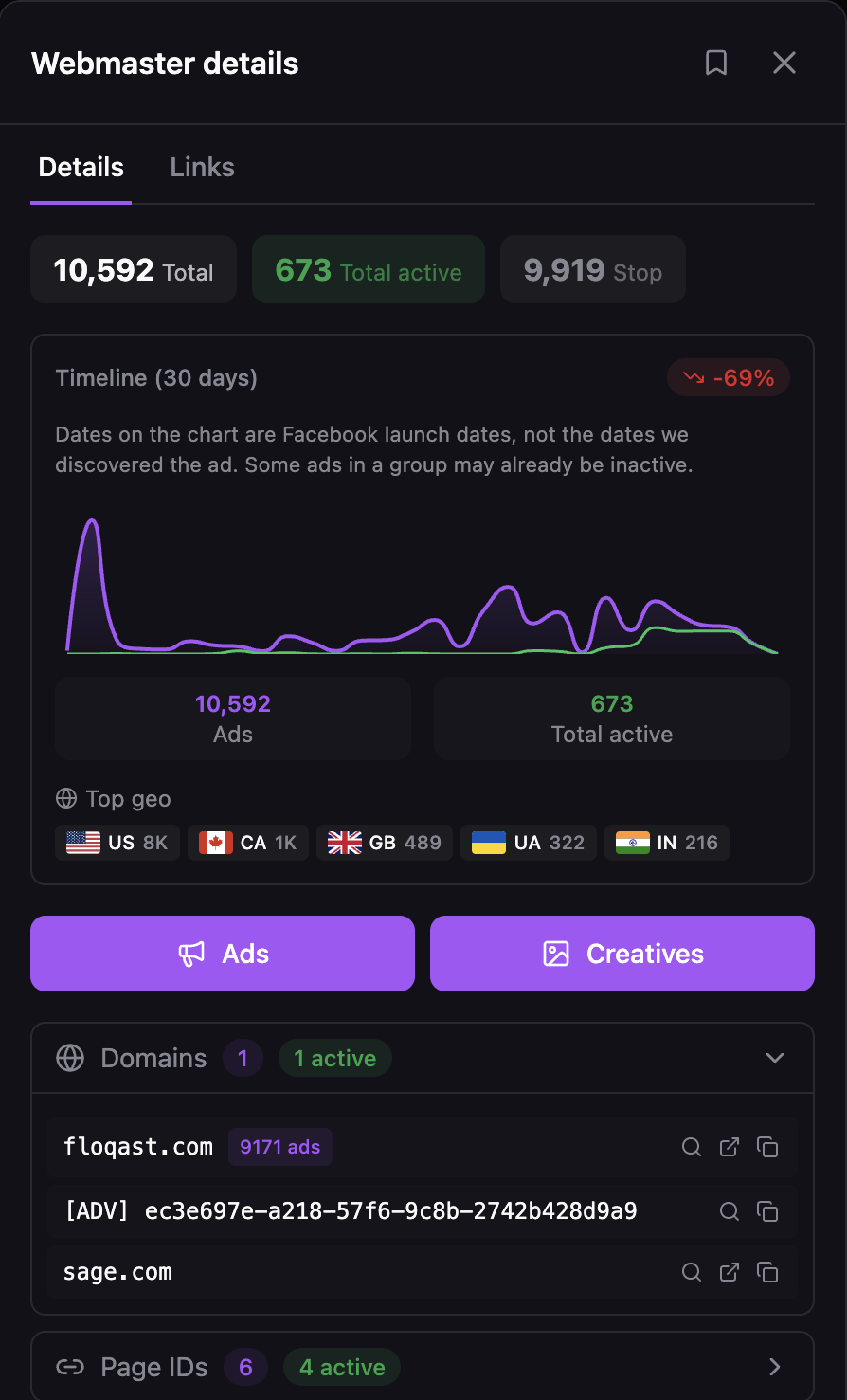
Floqast has launched 10,592 ads from six Page IDs, and 673 were still running when the screenshot was taken. For a marketer in the same space, that's one competitor with a long ad history. The Ads and Creatives buttons on the card open all of it. In a consumer niche, the same view shows how many real owners you'd be bidding against. The Webmasters write-up explains how the grouping works, and the competitor ad research guide walks through a wider method.
Want to test the method yourself? Open the free Starter plan, pick a niche you already know, and run the five steps above on it.
FAQ
Ad intelligence research: how long does it take?
Ad intelligence research takes as long as its scope demands. Checking one named competitor in a free ad library is quick. Reviewing a whole niche that way means opening advertisers one at a time and logging each in a spreadsheet. A dedicated tool shortens that, because one search filtered by category, country and run length returns the whole list at once.
Ad library vs ad intelligence tool: where does the library stop?
An ad library and an ad intelligence tool start from different owners. Ad libraries, such as the Meta Ad Library, are the platforms' own disclosures. They're free and official, but each covers one platform and mostly shows ads running now. An ad intelligence tool keeps stopped ads too, spans platforms and lets you filter by category, run length and owner.
What is mobile ad intelligence?
Mobile ad intelligence covers ads inside apps and app-install campaigns: which apps advertise, on which networks, with which creatives. App marketers get the most from it. If you run e-commerce or lead generation on Facebook and TikTok, you need social ad intelligence instead. It follows those platforms' ads and the pages behind them.
Ad intelligence tool pricing: what should you expect to pay?
Ad intelligence tool pricing runs from free to several hundred dollars a month for team plans. Spytrend's Starter plan is free, with no card required, and opens ads older than 90 days; paid plans are on its pricing page. Look past the headline price at what the money buys: archive depth, categories, countries, owner grouping and landing pages.
Can ad intelligence show a competitor's ad spend?
Ad intelligence shows spend only as an estimate, built from reach and run length. Invoices stay private. Treat the figure as a sense of scale. Knowing that a rival spends in the hundreds of thousands tells you what you're up against. It doesn't tell you what your own budget should be.
Is Spytrend an ad intelligence tool or a spy tool?
Buyers use both words for the same job. Spytrend calls its category ad intelligence, while many media buyers search for it as an ad spy tool. What matters more is what the tool keeps and lets you sort: stopped ads, run length, re-uploads, owners and real landing pages.