In short: Affiliate marketing tools fall into four groups with different jobs. A tracker records your own traffic. Research shows what others are running. Analytics explains why it converted. Session isolation keeps multiple accounts apart. Most roundups list twenty products from one group and call it a stack.
Search for a list of affiliate marketing tools and you get a ranked catalog. It's twenty names, a sentence each, and an affiliate link on every one. The catalog rarely says which products are alternatives to each other and which do unrelated jobs. That matters more than the ranking. A stack with three products from one group and nothing from the other three has a hole in it. Picking the best product in that one group won't fill it.
So this page is organized by job. It covers what each of the four answers, where each stops, and which question you're left with when one is missing. Spytrend sits in exactly one of them, the research layer. Describing that layer properly means saying what it can't tell you. That's most of what the other three exist to answer.
The best affiliate marketing tools each answer a different question
Read any affiliate marketing tools list by sorting it into these four columns first. Almost every product in a typical roundup lands in one of them. Products in different columns don't compete with each other. You use them one after another.
| The job | The question it answers | When you need it |
|---|---|---|
| Tracking | What happened on my traffic: which click, which source, which payout | From the first campaign. Nothing else substitutes |
| Research | What is other people's money doing: what's running, for how long, by whom | Before committing budget to an offer or a vertical |
| Analytics | Why it converted: page behavior, funnel drop-off, audience composition | Once there's enough traffic for patterns to be real |
| Session isolation | Keeping multiple accounts and profiles from contaminating each other | Once you run more than one account anywhere |
A tracker is the one piece of affiliate marketing tools software with no substitute. It stamps every click with a click ID and sub-IDs (source, placement, creative). It receives the network's postback when a conversion fires. Then it turns that into EPC and payout per source. That data never leaves your funnel, so no external service can rebuild it. Choose a tracker by the traffic sources and affiliate networks it already integrates with.
Analytics explains behavior once traffic is flowing: heatmaps, session recordings and funnel drop-off on the pages you own. It has nothing to read until there's enough traffic for patterns to be real.
Session isolation is infrastructure. An anti-detect browser gives each account its own browser fingerprint, cookies and proxy, so a ban on one profile doesn't reach the others. Publishing-side tools sit outside these four: SEO, email, landing page builders and link plugins. They run the site. They don't run the campaign.
Research is the odd one out, and it's the one that gets skipped. Tracking, analytics and isolation all work on traffic you already bought. Research works before you spend, and it's the layer that sees outside your own account. That's the job Spytrend does. Spytrend is an ad intelligence platform for Facebook and TikTok advertising: an archive of ads going back to 2018, AI-classified into 33 business categories, with every advertiser assembled into a single card — all ads, pages, domains and countries in one place.
How to check whether an offer is worth your budget: a five-step pass
This is the research layer in practice. It's the pass that happens before a tracker ever records a click. It runs on advertising data from Facebook and TikTok, collected continuously: about 280 million new ads a month, more than 170 million of them on Facebook. The archive goes back to 2018, and most of it is from 2025–2026. AI sorts it into 33 business categories with 342 subcategories inside them.
I ran the pass on one slice: the United States and the Pet Tech and Accessories subcategory.
Step 1. Filter to the vertical. Pick the category and country, and don't type a competitor's name. Free ad libraries can't do this part. Their search looks for literal text inside an ad. It doesn't know the industry behind it, so finding someone you don't already know means guessing the right word. Filtering by category returns the vertical even if you can't name a single player in it. I set a Days Active floor of 30 on top of that.
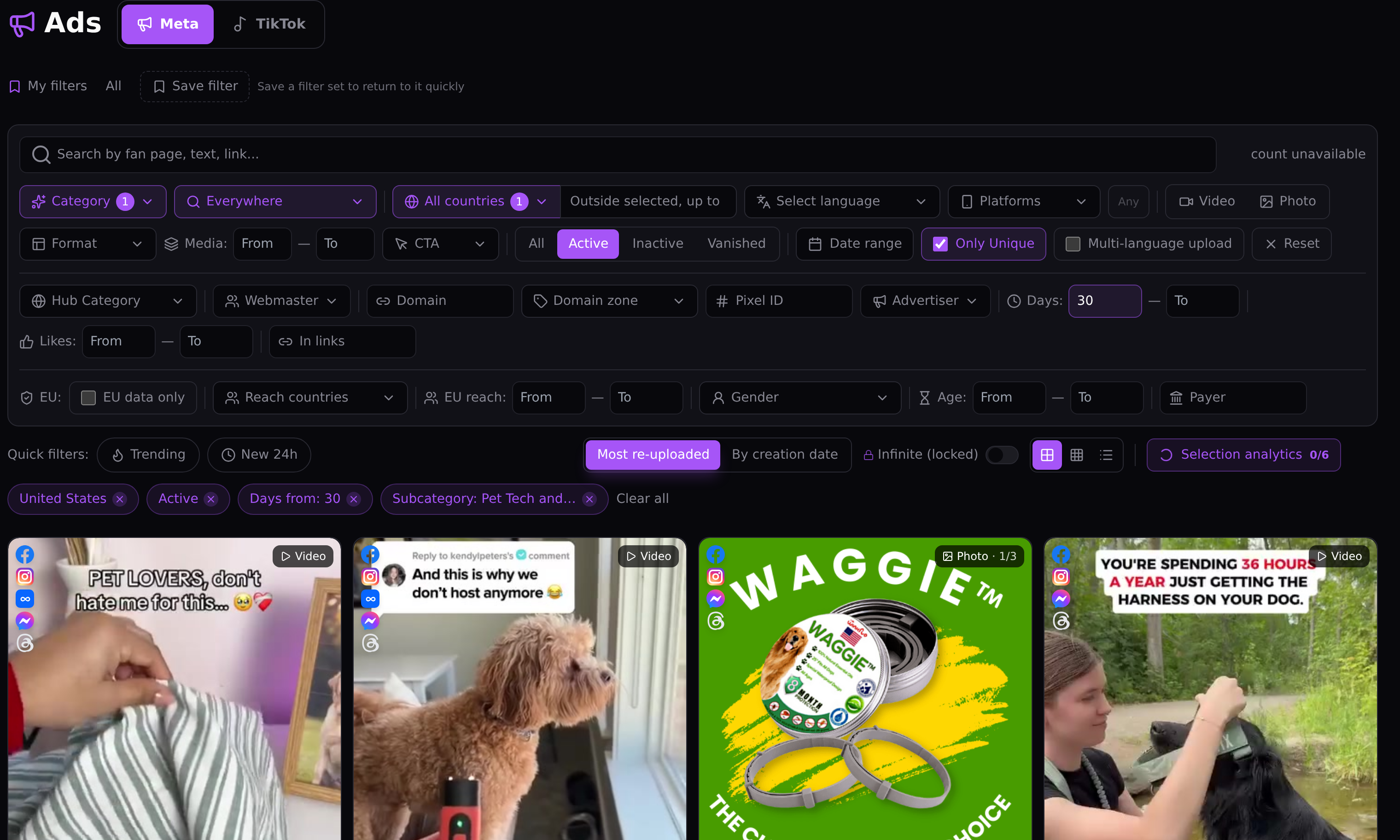
Step 2. Sort by how long ads have been running. Duration is the one profitability signal you can see from outside an account. Nobody pays for a month of impressions on an offer that stopped converting. So an ad still running after thirty days is being funded on purpose. Ads that appeared yesterday don't tell you anything yet, either way.
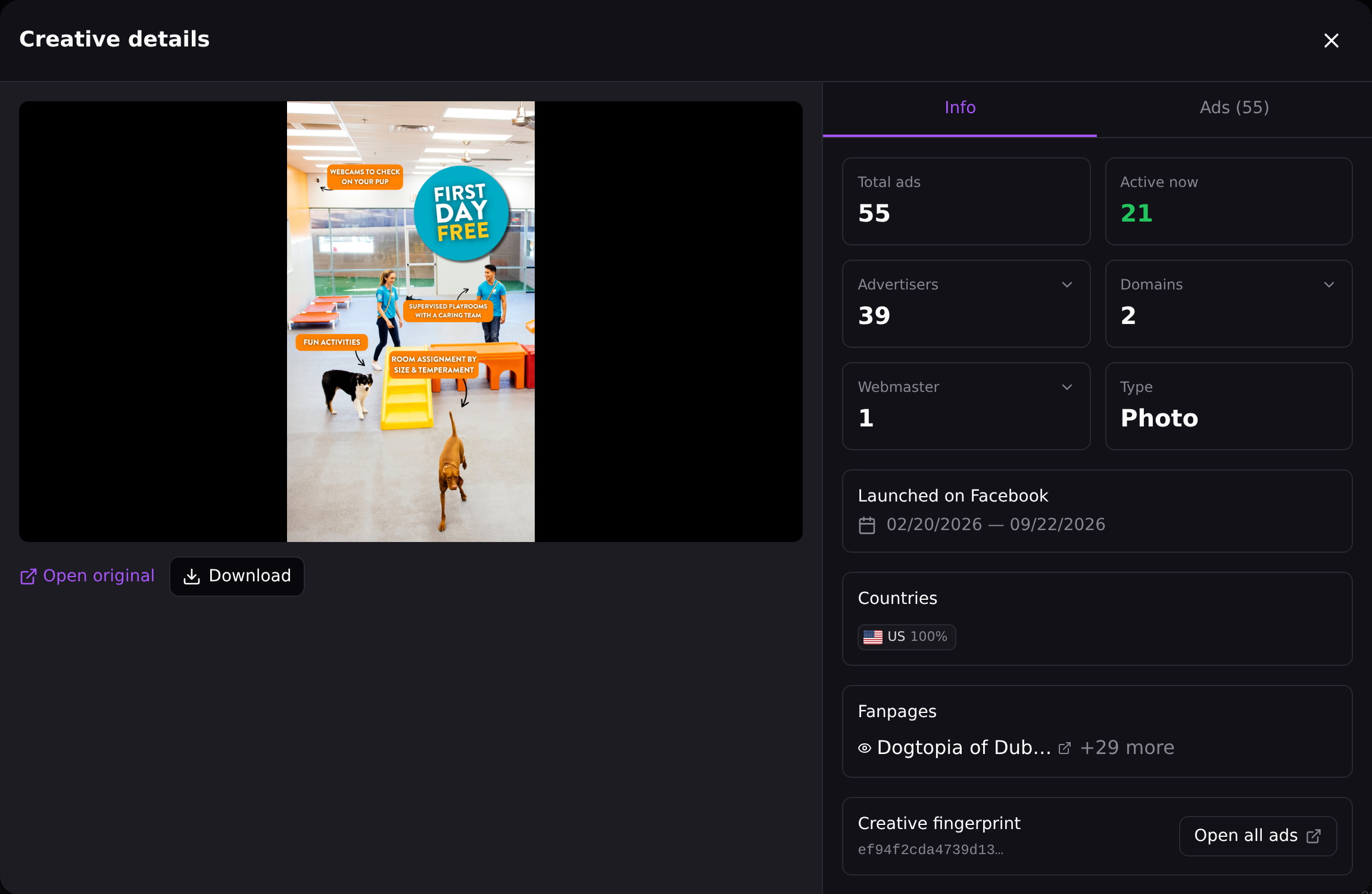
Step 3. Read the reuse numbers on a creative. Every card carries its own counts, and they matter more than how the creative looks. I opened one photo asset in the same Pet Tech slice. It showed 55 ads built on it, run by 39 separate advertiser pages, with 21 still active. Thirty-nine pages look like thirty-nine sellers. The same card shows 2 domains and 1 webmaster behind them. The page names explain it: a dog daycare chain runs a page for each location. That's one operator, and step 5 is how you catch it.
In practice, an asset like this is worth tracing to its owners before you build anything on it.
Step 4. Open the real landing page. The page a checker sees and the page a buyer sees are often different documents. The offer, the price and the guarantee usually live on the second one. Requesting it costs $1 per run on any plan, refunded if the run fails. That's cheaper than an afternoon spent testing an offer that turns out to be sold elsewhere at a different price.
Step 5. Check who's behind it before you count it as confirmation. Group the storefronts into one operator before you count them. Five stores running the same offer are five confirmations only if five different people fund them. The Webmasters section below covers how the grouping works and what it does to the numbers in the steps above.
That's five steps, with no tracker involved and no traffic bought. It's the case for keeping a research layer in the stack: it runs on someone else's budget.
What this pass doesn't show: it's one slice in one country, captured on one day. There's no frame for step 4, so you don't see what a real-page request returns. And none of it tells you how the offer will convert on your own traffic.
Where ai affiliate marketing tools genuinely help, and where they don't
AI does real work in two places in this layer and gets oversold in one. Telling them apart saves a lot of disappointment.
The first is categorization. Sorting about 280 million ads a month into 33 categories and 342 subcategories isn't a job a human queue can do. It's what makes "show me this vertical" a question you can ask at all. The second is search that reads meaning. You describe what you're looking for in ordinary words and get results by sense, without exact string matches.
Then there's the connection layer. Spytrend plugs into Claude, ChatGPT, Cursor, Codex and VS Code with one address and a button, with no keys to paste. It exposes 21 tools inside the assistant you already use: ads, advertisers, player profiles, creatives, trends, favorites folders and your remaining limit. Every row of data delivered there costs one token. A free account gets 500 tokens in total and sees only the archive. A paid plan gets 40,000 tokens a month.
The oversold part is the promise that an assistant will handle any task you hand it. The assistant is built for specific, repeating work: pull this vertical, list the advertisers behind this asset, fetch these creatives into a folder. Open-ended tasks aren't what it's for. Any affiliate marketing tools list that promises a general-purpose employee is selling the demo.
Where the research layer hits its ceiling
A product page usually skips this part. It's also the reason the stack has four columns.
Advertising data answers what's running, how long it has run, who's behind it and where it points. It can't tell you what happened after the click on your traffic. That event never touches an external dataset. It happens between your source and your offer, and only a tracker sees it. Ad data also can't tell you why a page converted, because that's behavior on the page itself, which belongs to analytics. And it can't tell you your own margin, because only you have your payout and your cost.
So why not just take a competitor's spend number at face value? The spend figure Spytrend gives is a range, from and to. It's never an exact sum. Anyone quoting an exact monthly figure for a stranger's ad account is reporting a model output as a measurement. Once that number fails to match the advertiser's own dashboard, every other number on the page becomes suspect too. A range is less satisfying, but it's the honest format.
So here's the ceiling. Research narrows the field before you spend, and it stops at the edge of your own funnel. Anything inside that funnel is the job of the tracker and the analytics layer. External data can't substitute for either one. A stack with research and no tracking can't tell you whether anything worked.
What the Webmasters section adds on top
Everything above treats each store, page and domain as a separate data point. The Webmasters section corrects that, and it changes what the earlier steps mean.
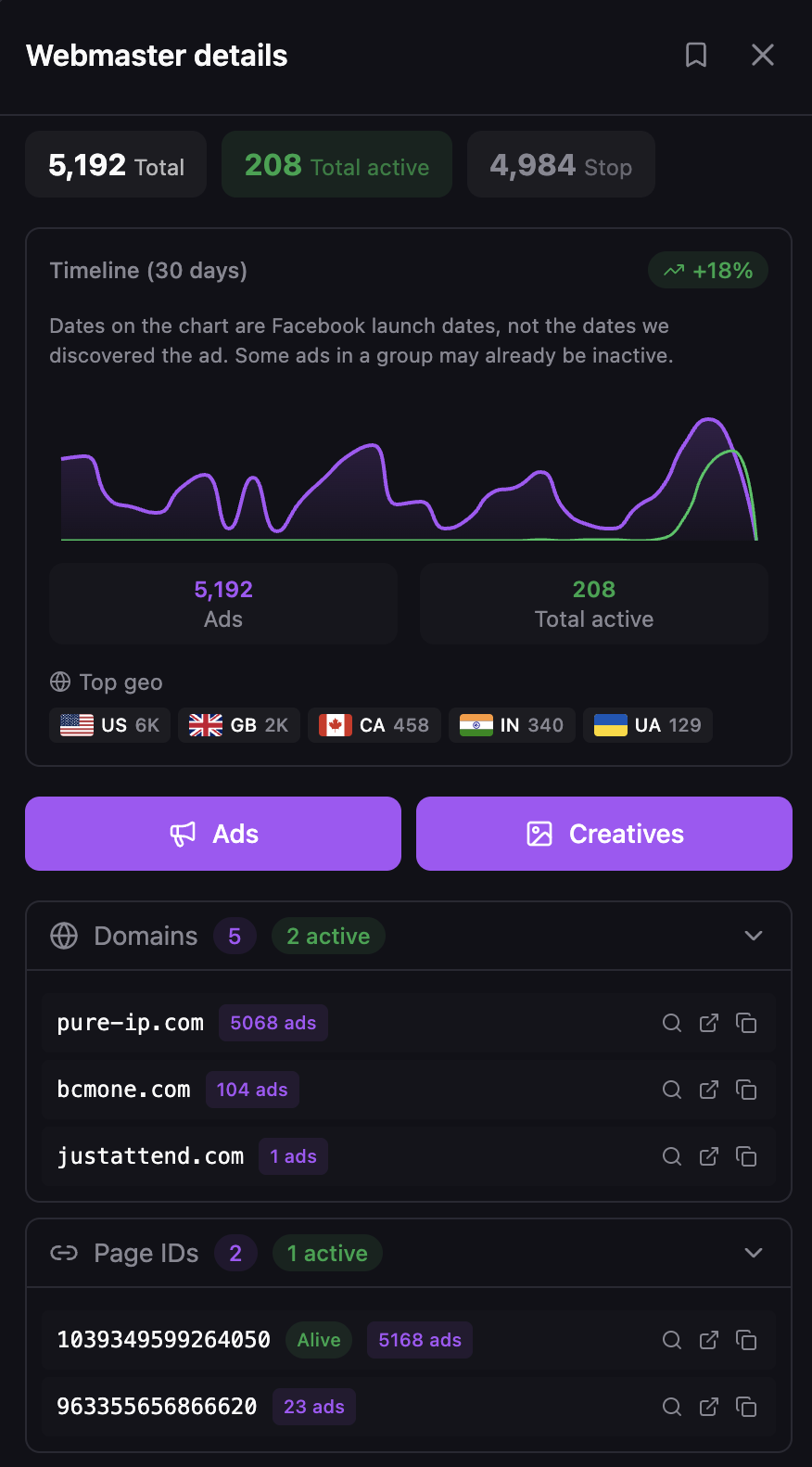
It assembles scattered ads, pages, domains and landing pages in advance into a single operator profile. The profile is built across three axes at once plus a breakdown by country, so one card shows the whole network behind a storefront. Without it, five stores running the same offer read as five independent confirmations that the offer converts. With it, they often turn out to be one person's bet placed five times.
I followed one operator through a software vertical. It ran 5 domains and 2 page IDs, with 5,192 ads total, 208 currently active and 4,984 stopped. That means 96% of everything this operator ever launched is switched off. Counted as five separate sites, it looks like a well-validated vertical. Counted as one operator who tested widely and dropped nearly all of it, it says something else entirely.
In practice, step 3's advertiser count and step 5's operator count are different numbers. Only the second one tells you how many people are really funding an offer.
Amazon affiliate marketing tools and other platform-specific cases
Plenty of affiliate work is tied to one destination platform more than to a vertical. The research question changes shape with it. Next to the category and country filters there are filters for Telegram, Instagram, WhatsApp and Amazon broken down by country. That's how you see the leaders on those platforms and what's working for them.
For an Amazon associate, the practical read is what's being advertised into the platform right now. The bestseller ranking is a different list. A ranking reflects sales that already happened. Paid ads reflect money spent this week in the hope of sales. Network-specific work has the same shape. The pass behind clickbank affiliate marketing tools, or any other network, asks "what's being funded here right now?" You answer that from the ad side. The network's own dashboard doesn't show it.
Affiliate marketing tools for beginners work best from this angle: ad data shows what's being funded now, and sales rankings show last quarter. Platform rankings and network marketplaces are free and easy to read. That's why most affiliate marketing tools beginners lists recommend the same handful of them. Ad data is the layer where the readings stop being identical for everyone who looks.
What the research layer costs
The free Starter tier shows ads from three months ago in a limited mode. That's too old to show what launched this week. It's recent enough to run the five-step pass once and see whether the layer earns a place in your stack at all.
Above that, paid plans differ by commitment and by how many of the 33 categories are included. The monthly rate isn't what separates them. Current terms are on the pricing page.
For anyone putting together affiliate marketing tools and resources on a budget, the real landing page request costs $1 per run on every plan, refunded if the run fails.
To check all this yourself, take an offer you're already weighing and run the five steps on the free tier before you spend on traffic.
FAQ
Affiliate marketing tools for beginners: which one comes first?
Among affiliate marketing tools for beginners, a tracker comes first, without exception. Nothing else records what happens on your own traffic, and nothing can rebuild it after the fact. Research comes second, because it stops you paying to find out an offer is dead. Analytics and session isolation follow once you have traffic and more than one account to manage.
What is the difference between a tracker and a research tool?
A tracker records events inside your own funnel: clicks, sources, conversions and payouts. A research tool reads advertising data from outside it: what other people are running, for how long, and who's behind it. They cover opposite sides of the same campaign, and neither one can substitute for the other.
Free affiliate marketing tools: are they enough to start?
Free affiliate marketing tools are a real starting point, and Spytrend has a free tier for exactly that. The difference is which question gets answered. A free ad library answers what one advertiser you already know is running. It can't tell you who's advertising in a vertical at all, what has run longest, or what ran last quarter.
Top affiliate marketing tools lists: where do they mislead?
Top affiliate marketing tools lists rank products that aren't alternatives to each other. A list that mixes trackers, ad research services, page builders and analytics into one ranked top 5 implies you should pick one. In practice you need one from each job. Read any such list sorted by job first.
Affiliate marketing tools for WordPress: what do the plugins cover?
Affiliate marketing tools for WordPress are mostly plugins. Link management, link masking and disclosure plugins are a real category, and they live on the publishing side of the stack. They handle how links behave on a site you own. Nothing about them answers what's being advertised outside it. That's why they sit alongside a research layer and don't replace one.
How is a spy service different from an ad library?
Depth, duration and grouping. A library shows what's running now, with no duration figures for commercial ads and no way to group several storefronts into one operator. A research service keeps history, sorts by how long an ad has run and assembles the operator behind it. See the ad spy tools overview.