In nutra, finding a funnel often stalls before the research even starts: the ad shows decoy slides, the link opens a safe page, and reaching the actual landing page takes proxies and an anti-detect browser. Even after finding the creative, you still need to check whether it is running or has been dropped. Nutra Affiliate — Spytrend’s ad spy tool for nutra — cuts that prep work. You see the real creative, the page shown to buyers in the target country, and signs of repeat launches. That gives you a basis for choosing your next test: how the funnel works and how active it is.
At a glance:
- The real creative appears first — no need to work through decoy slides manually. → learn more
- Access the landing page from the ad’s target country without your own proxies or anti-detect browser. → learn more
- Download a page archive to speed up adapting the landing page for your offer. → learn more
- Relaunches and days running help you shortlist funnels to research. → learn more
- Analytics and trends reveal common angles and growing niches before you test. → learn more
Interface data as of October 22, 2026
Creatives
450,744 ads — the real creative appears first
To research a funnel, you need the ads buyers actually see. In nutra ads, the real creative can be hidden behind slides in other languages: advertisers use these as decoys to pass moderation. These funnels are easy to miss in a standard ad library, especially when researching an unfamiliar market.
In the Nutra feed, ads using this technique carry a “Language decoys” label, and the real creative appears as the first slide. You can assess the angle, image and ad claim right away. That means less time sifting through ads whose opening slides show no sign of nutra.
Ad cards include an “Uncloak” button — a separate check costing 100 tokens. Tokens are paid for separately and are not included in the Nutra Affiliate subscription.
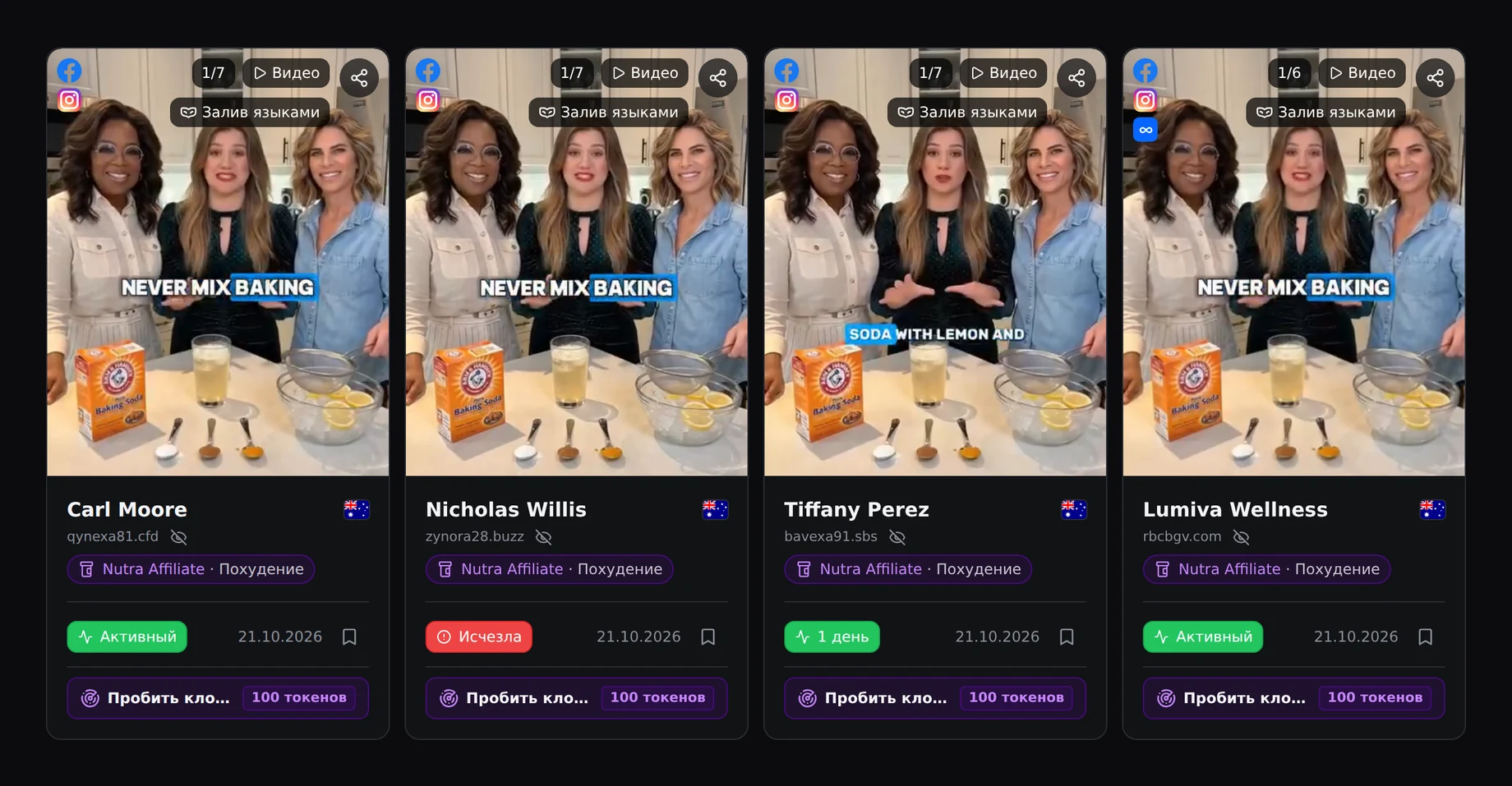
The “Creative activity” block explains the label alongside the ad’s status and delivery details. You can see what was hidden behind the decoys and whether the ad is still active. This helps you understand the masking technique and pick active creatives for a closer look.

Landing pages
4 steps to the offer — no need for proxies or an anti-detect browser
The page shown to buyers in the ad’s target country is available without manually getting past cloaking. Opening the link from another country may return a safe page. You get a screenshot of the page buyers see in the ad’s target country — including the angle, layout and content you need to study.
“Path to offer” connects the creative to the rest of the funnel: the ad link, redirects, landing page and order page, if reached. URL parameters are preserved throughout the chain, except for technical parameters: the fbclid click identifier and IP addresses associated with clicks. You can examine sub IDs, pixel parameters, campaign naming patterns and routes through prelanders. This helps you understand how a competitor’s funnel is put together.
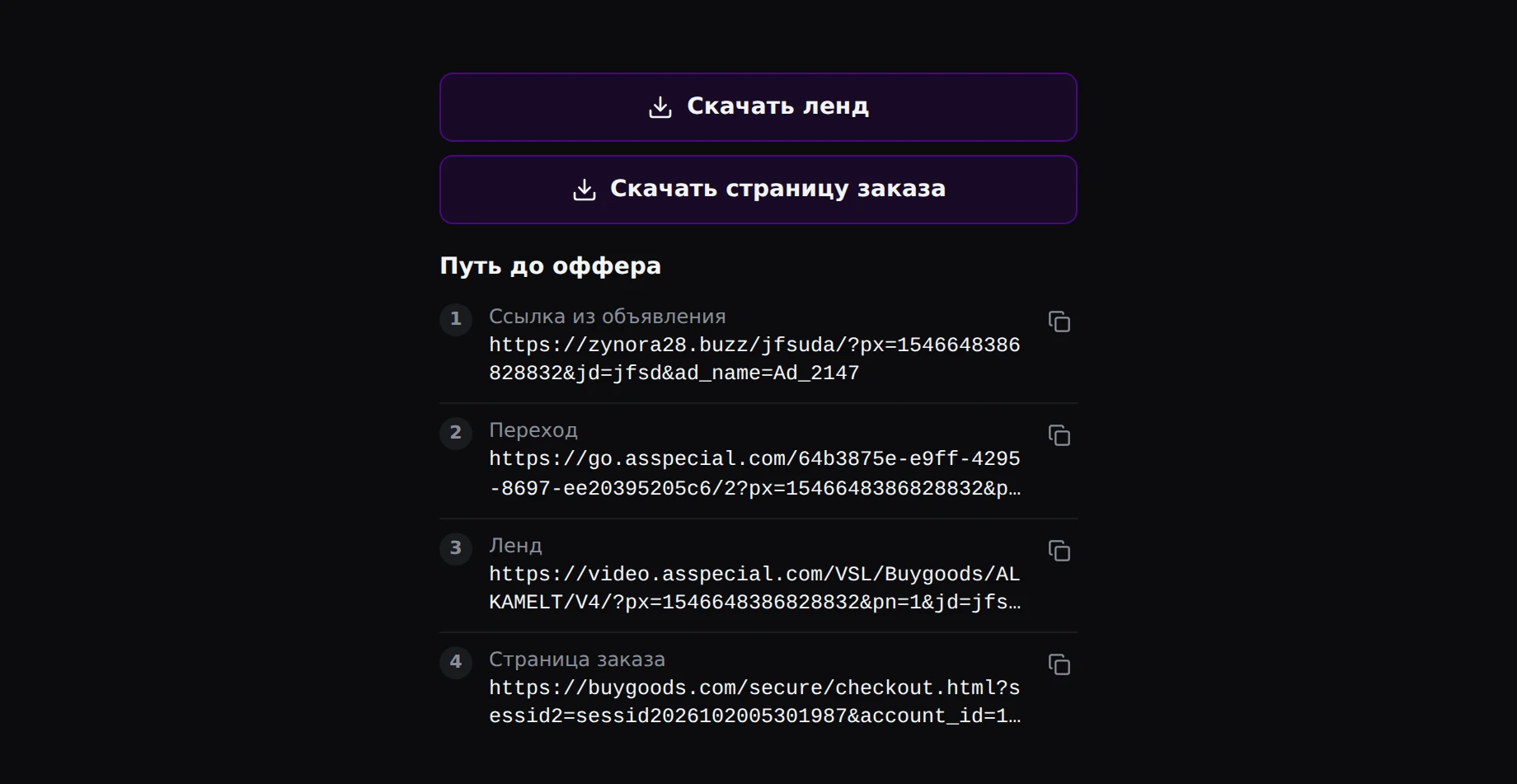
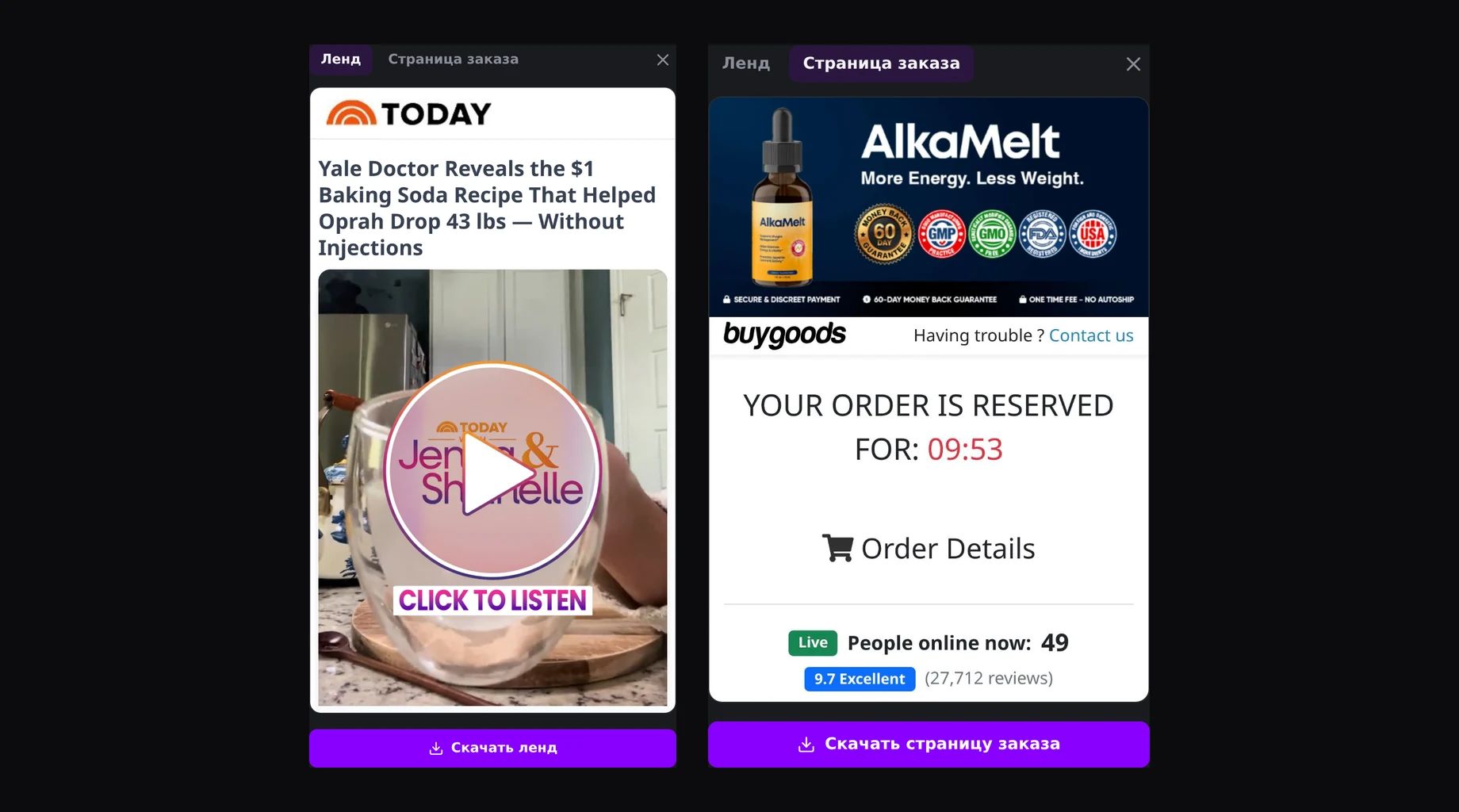
“Download landing” gives you a starting point for adapting the page to your offer: a ZIP with the landing page’s main HTML file, its assets (images, styles and scripts) and the original page snapshot. The screenshot is available separately in the funnel analysis. No separate website copier is needed. Before launching, adapt the content and check that the page works for your setup.
“Download order page” saves the order or payment form as a single HTML file, if it was retrieved. You can separately review the price, form fields, reviews and reservation timers — details that carry the landing page’s pitch through to the purchase.
Relaunches
New ads in 24h and relaunches make it easier to shortlist funnels
Repeat launches help you narrow down random finds to creatives worth investigating. A polished creative may disappear after a short test. Repeat launches and a longer run give you more reason to examine its angle, landing page and order page.
The “Most reuploaded” sort groups uses of the same image across different ads over a period of up to a month. It helps you spot creatives advertisers keep returning to. It tracks repeated images specifically: it does not group different language versions by meaning.
Sorting by days running, the “Active” and “Vanished” statuses, and the “Creative activity” block add context. The “Trending” and “New in 24h” quick filters help you find both ads gaining attention and fresh launches. These signals are available within Nutra without an “Ad research” subscription.
Time running and relaunches help you set research priorities: first study ads that advertisers continue to use, then choose a hypothesis to test with your own traffic. This cuts the time spent finding examples and helps focus your test budget on ideas you have already researched.
Analytics
Analytics across 96 countries help you choose markets before testing
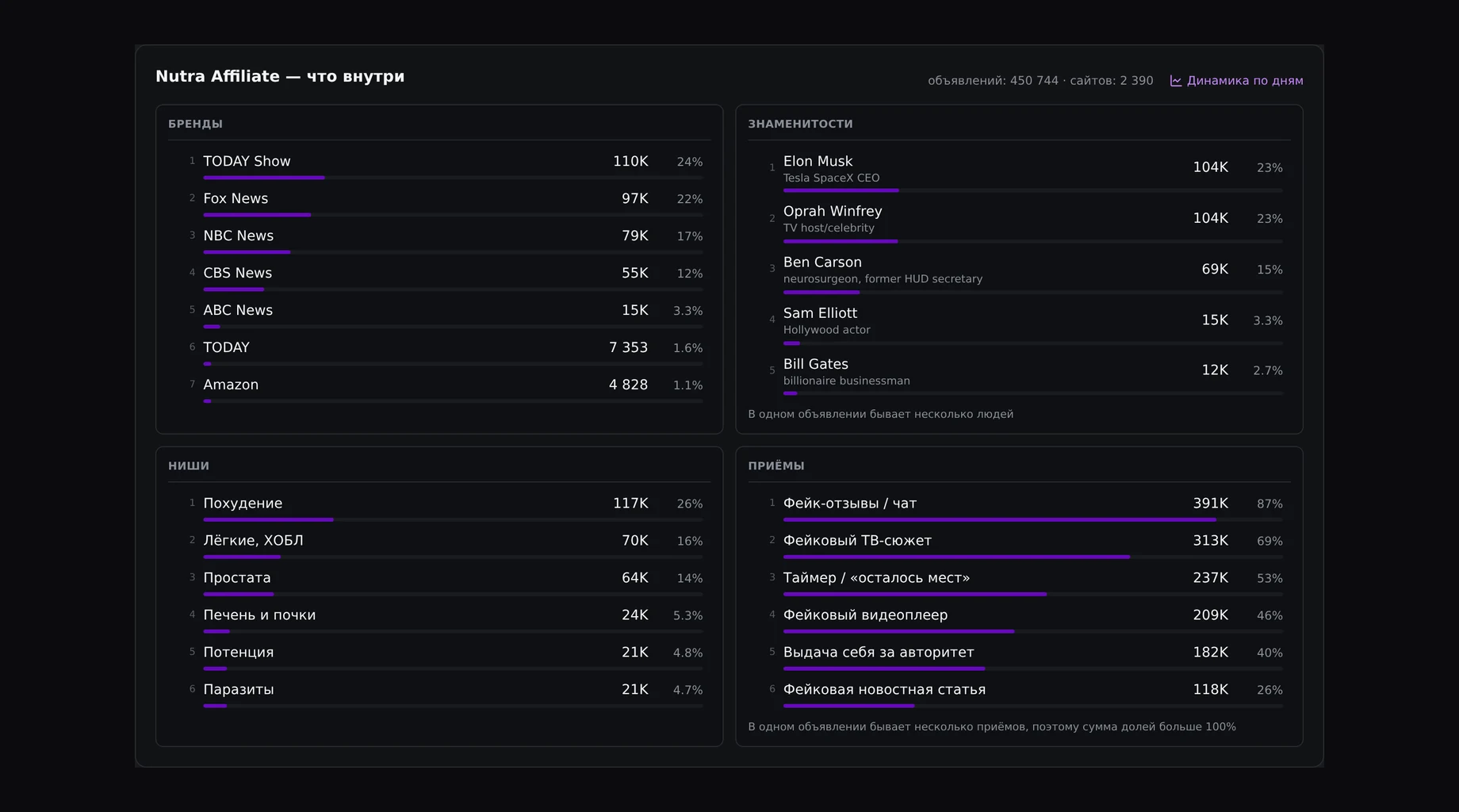
Before testing, you can see how common an angle is within a niche and make a more informed test plan. The “Nutra Affiliate — what's inside” panel, opened through “Selection analytics”, shows impersonated brands, celebrities, niches, landing page techniques and countries. It gives you a view of the selection beyond a handful of ad cards.
For example, fake reviews or chat appear in 87 % of ads, fake TV segments in 69 %, and “spots left” timers in 53 %. Impersonated brands include TODAY Show, Fox News, NBC News and CBS News. These figures help you distinguish a common presentation from a less frequent find and understand which approaches your test will compete alongside.
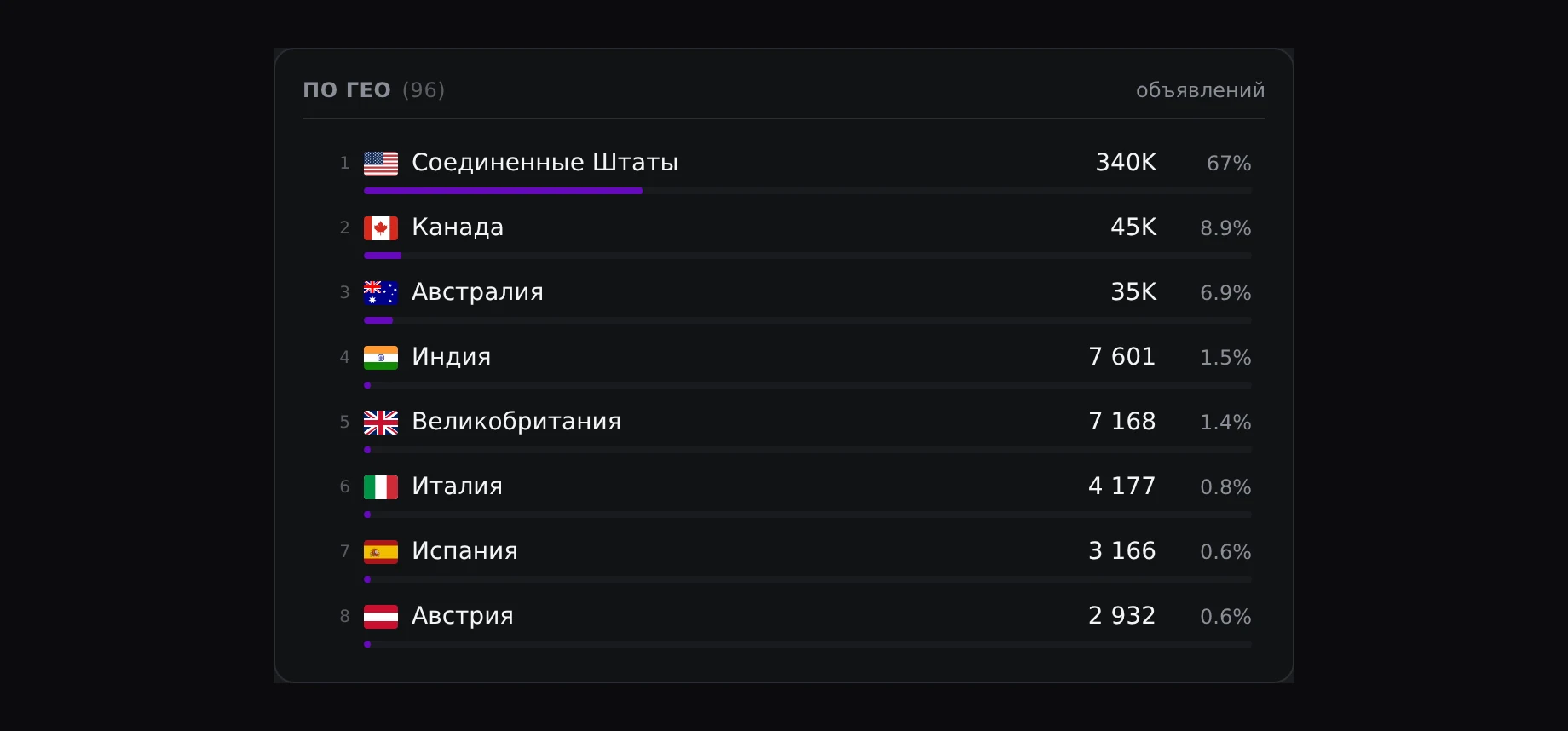
The breakdown across 96 countries shows how ad activity is distributed by market. The US accounts for 340,000 ads — 67 %; Canada and Australia are also represented. Buyers can see where ads are concentrated and narrow their search to specific countries, moving straight to relevant ads and ideas for testing.
To plan your nutra workflow and choose your tools, explore a media buyer’s day-to-day work and a comparison of Facebook ad spy tools. For ad research, read a step-by-step guide to searching Meta Ad Library and understanding its limits.
Build the basis for your next test
Real creatives, landing pages from the ad’s target country, and repeat-launch signals — in a separate nutra subscription.
Choose a Nutra Affiliate planTrends
362,987 new ads in 30 days reveal niche growth before launch
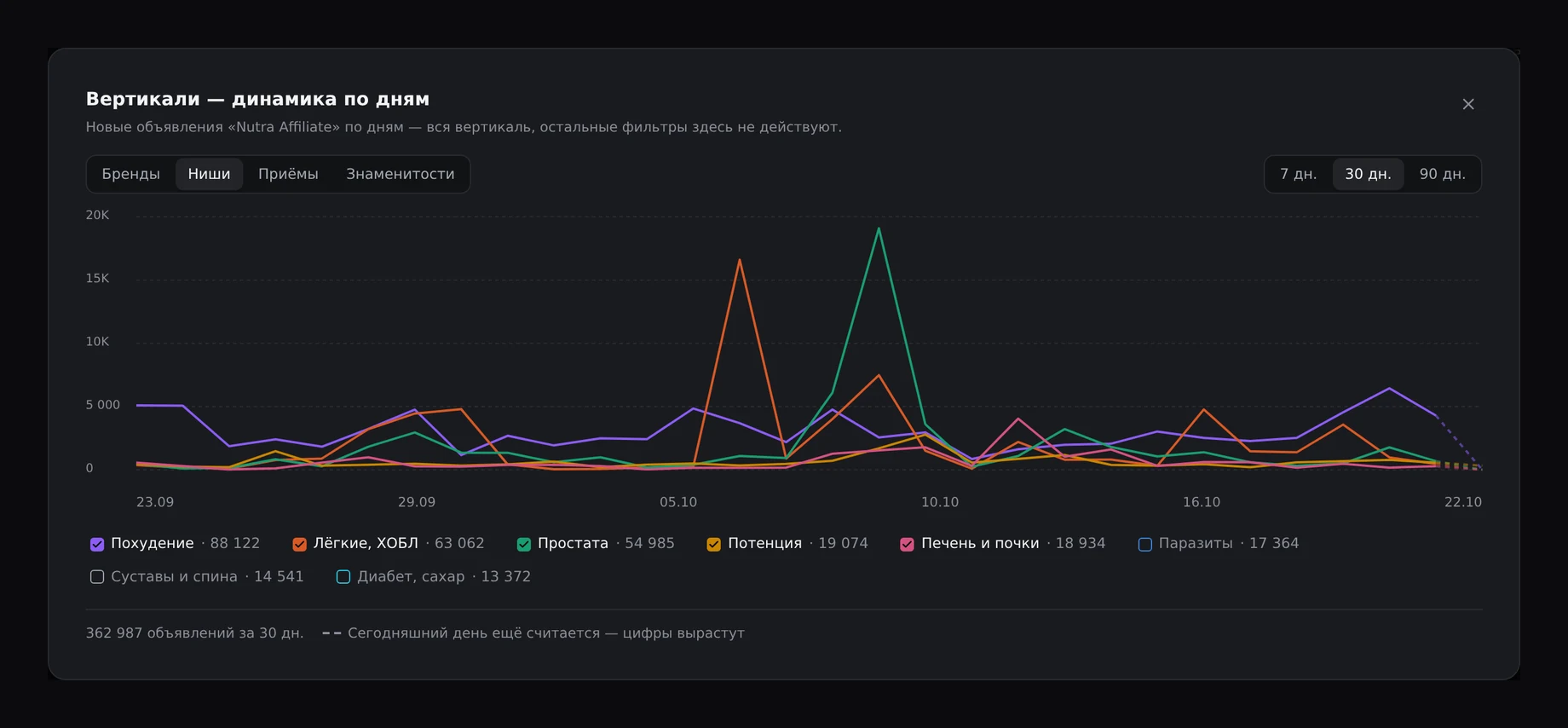
When you notice shifts in ad activity, you can adjust your testing priorities. The “Verticals — day by day” window shows changes over 7, 30 or 90 days. The “Brands”, “Niches”, “Techniques” and “Celebrities” tabs let you track individual segments alongside the total.
The 30-day view shows 362,987 new ads. Of these, 88,122 are in Weight Loss, 63,062 in Lungs & COPD, and 54,985 in Prostate. Comparing daily activity helps you spot where growth is picking up and choose an area to research. You can focus on funnels in growing niches and shortlist hypotheses before launching tests.
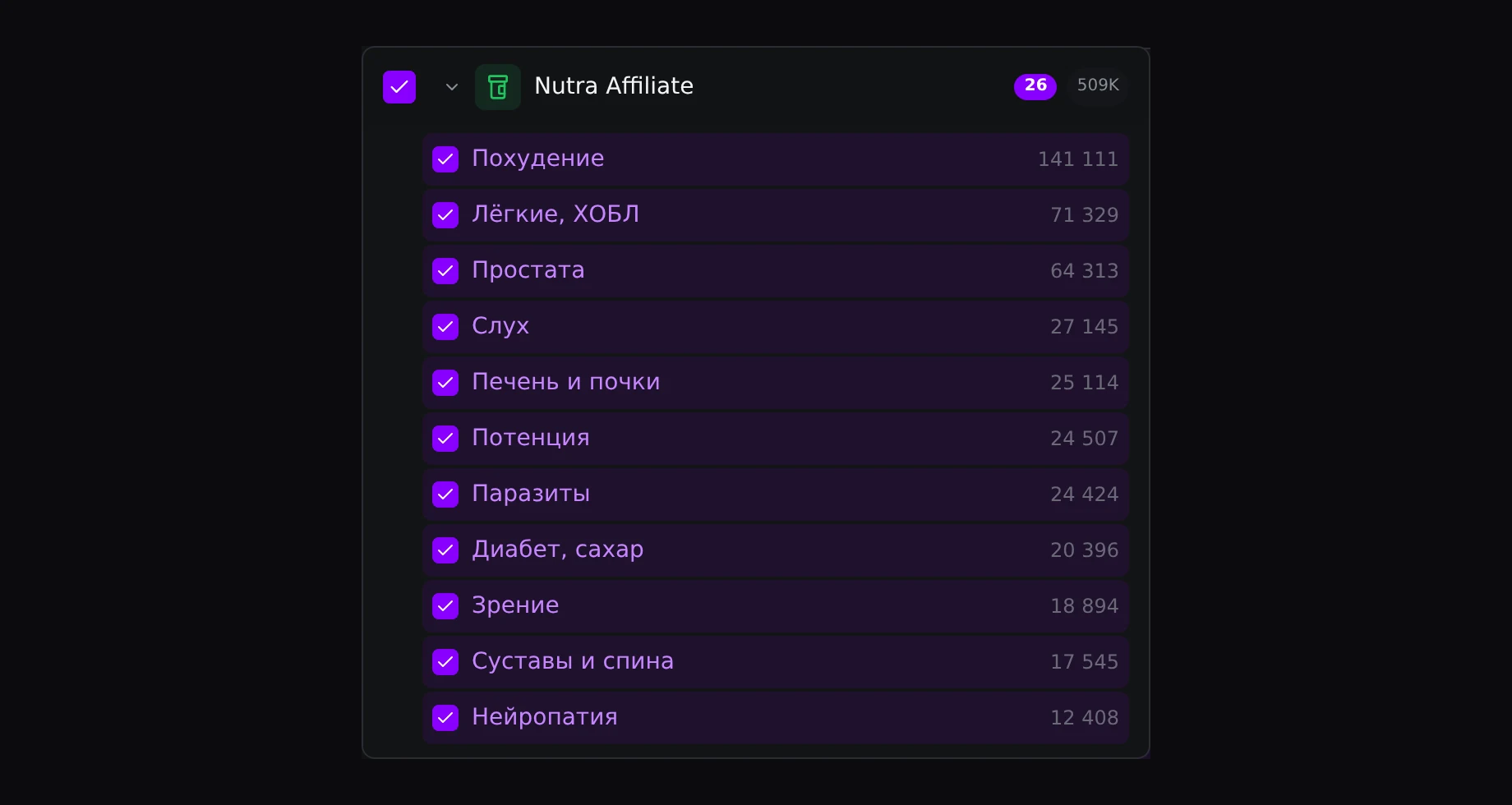
Search within 25 nutra niches plus “Offer Not Shown”. Niches include Weight Loss, Hearing & Tinnitus, Male Potency, Parasites & Detox, Diabetes & Blood Sugar, Vision, and Liver & Kidney. Country, platform and date filters help you narrow the selection to match your traffic and compare ads running under similar conditions.
Fresh material keeps the search moving: nutra ads are added daily. Return to your niche regularly to see which creatives and landing pages have appeared since your last review.
Use cases
3 use cases shorten the path from finding a funnel to running traffic
The creative, its activity, the landing page and the redirect chain help you build a test hypothesis faster. Here are three ways to turn that research into launch preparation.
Repeated creative → adaptation → your own test
A buyer finds repeat launches of the same image and checks how long the ads have run to narrow the shortlist. They then study the real creative and the landing page from the target country to see how the angle carries through. The page archive becomes a starting point for adapting the landing page to their offer. The benefit is less manual searching and copying before launching their own funnel; performance still needs to be tested with their own traffic.
Growing niche → specific angle → launch
A team spots niche growth in the trends view and studies common presentation styles in analytics, choosing a direction without searching across all of nutra. They then shortlist ads in their target country, compare creatives and landing pages, and prepare their own version of the angle. The benefit is a more specific hypothesis before producing assets and buying traffic, informed by what advertisers already use in that niche.
Competitor’s funnel → your own setup → test traffic
A buyer studies “Path to offer”: redirects, prelanders, pixel parameters and sub IDs. This saves time reconstructing the route manually. The landing page and order page show how the creative’s promise continues through the funnel. The buyer can use that structure to prepare their own flow, configure their own tracking tags and send test traffic. The benefit is understanding the funnel’s structure before launch.
Plans
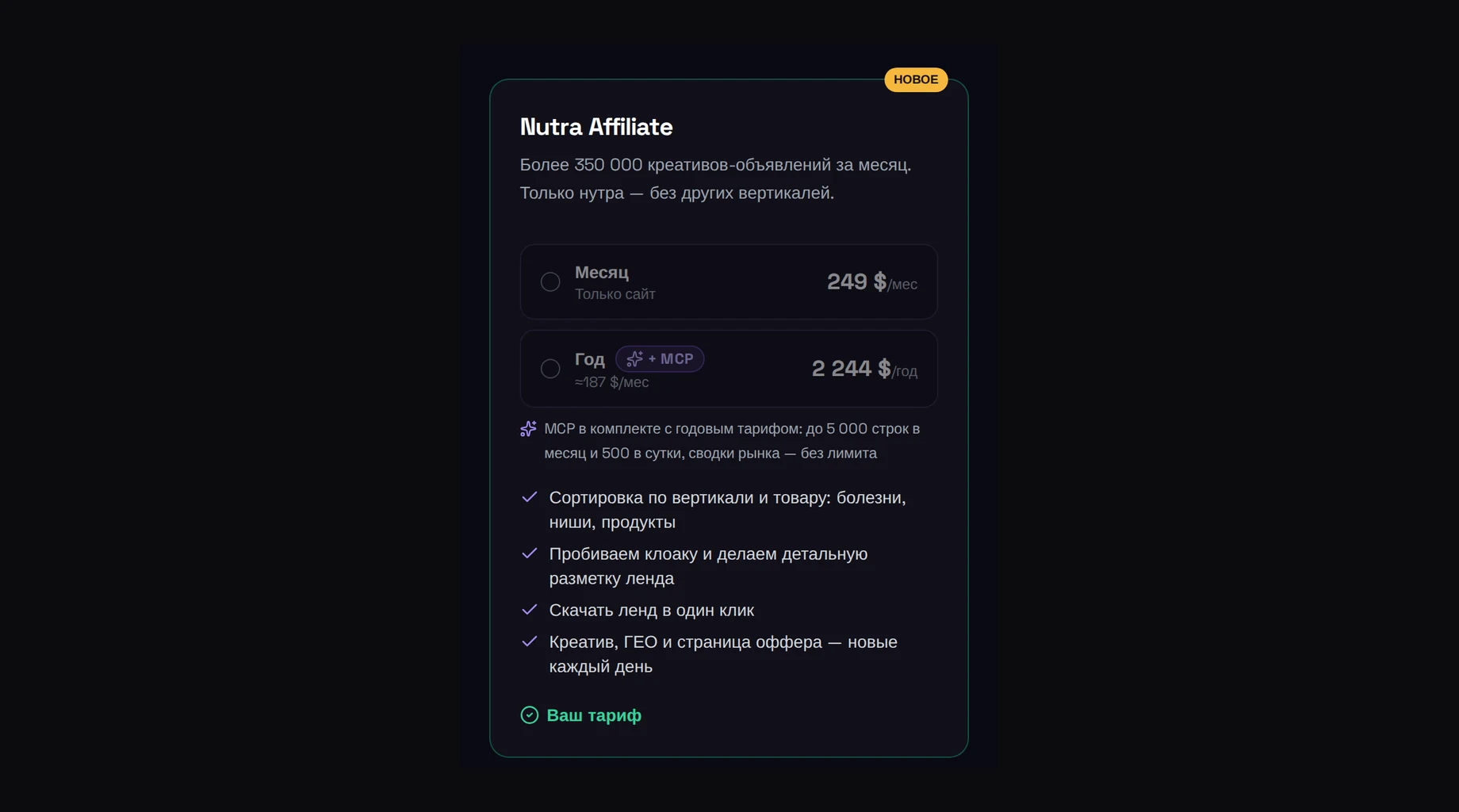
$249/month — nutra works without the main subscription
You do not need to buy “Ad research” to research nutra funnels. Nutra Affiliate is a separate Spytrend subscription that works on its own or alongside the main subscription. Within Nutra, all result pages are available without blurring or archive restrictions; creative media can be downloaded.
| Plan | Price | Best for |
|---|---|---|
| Month — Site only | $249/month | Researching nutra ads and landing pages on the website |
| Year + MCP | $2,244/year, $187/month | Ongoing research and AI agent access to Nutra data |
The annual plan saves 25 % and includes MCP: up to 5,000 rows per month and 500 per day, with unlimited market summaries. This gives AI agents access to Nutra data; tokens and AI generation are not included in the subscription.
Nutra Affiliate reduces test preparation: the real creative, landing page from the target country, redirect chain and repeat-launch signals are available to research together. You save time on searching and tools, and choose hypotheses with more data behind them. You still need your own test to establish whether a funnel is profitable.
FAQ
Nutra Affiliate covers 25 niches — your questions answered
How much does the subscription cost, and which plan includes MCP?
“Month — Site only” costs $249/month for research on the website. “Year + MCP” costs $2,244/year — $187/month. MCP is included only in the annual plan: up to 5,000 rows per month and 500 per day, with unlimited market summaries.
Do I need “Ad research”?
A separate Nutra Affiliate subscription is enough to work within Nutra. You can buy it without “Ad research” or alongside it. Other sections of the main subscription are not included in Nutra.
What does a landing page archive include?
You get a ZIP containing the landing page’s main HTML file, its assets (images, styles and scripts) and the original page snapshot. The screenshot is available separately in the funnel analysis. The order page downloads separately as a single HTML file, if it was reached.
Which page will I see in the funnel analysis?
You get a screenshot of the page from the ad’s target country.
Which niches and countries are available?
You can search 25 nutra niches, including Weight Loss, Lungs & COPD, Prostate, Hearing & Tinnitus, Male Potency, and Diabetes & Blood Sugar. There is also an “Offer Not Shown” option. Analytics cover 96 countries; the country filter helps you focus on your target market.
Move from searching to researching funnels
Compare creatives, inspect landing pages and choose hypotheses for your traffic with Nutra Affiliate.
View plans