Search Arbitrage is Spytrend’s spy tool for researching search arbitrage ad setups on Meta before testing them. Each ad card shows keywords, the landing page, the network and the redirect chain to the final page. Compare re-uploaded creatives, check advertiser activity and choose an approach to test with your traffic.
Interface data as of October 23, 2026
At a glance:
- Find recurring creatives for your target country, topic and monetization type. → learn more
- Compare networks, phrases and advertisers within your selection. → learn more
- Trace an ad setup from its keyword to the final page. → learn more
- Shortlist sites by their ads and assess their traffic separately. → learn more
- Spot growing keywords and check who is using them. → learn more
Creatives
4,521,396 ads to research your next test
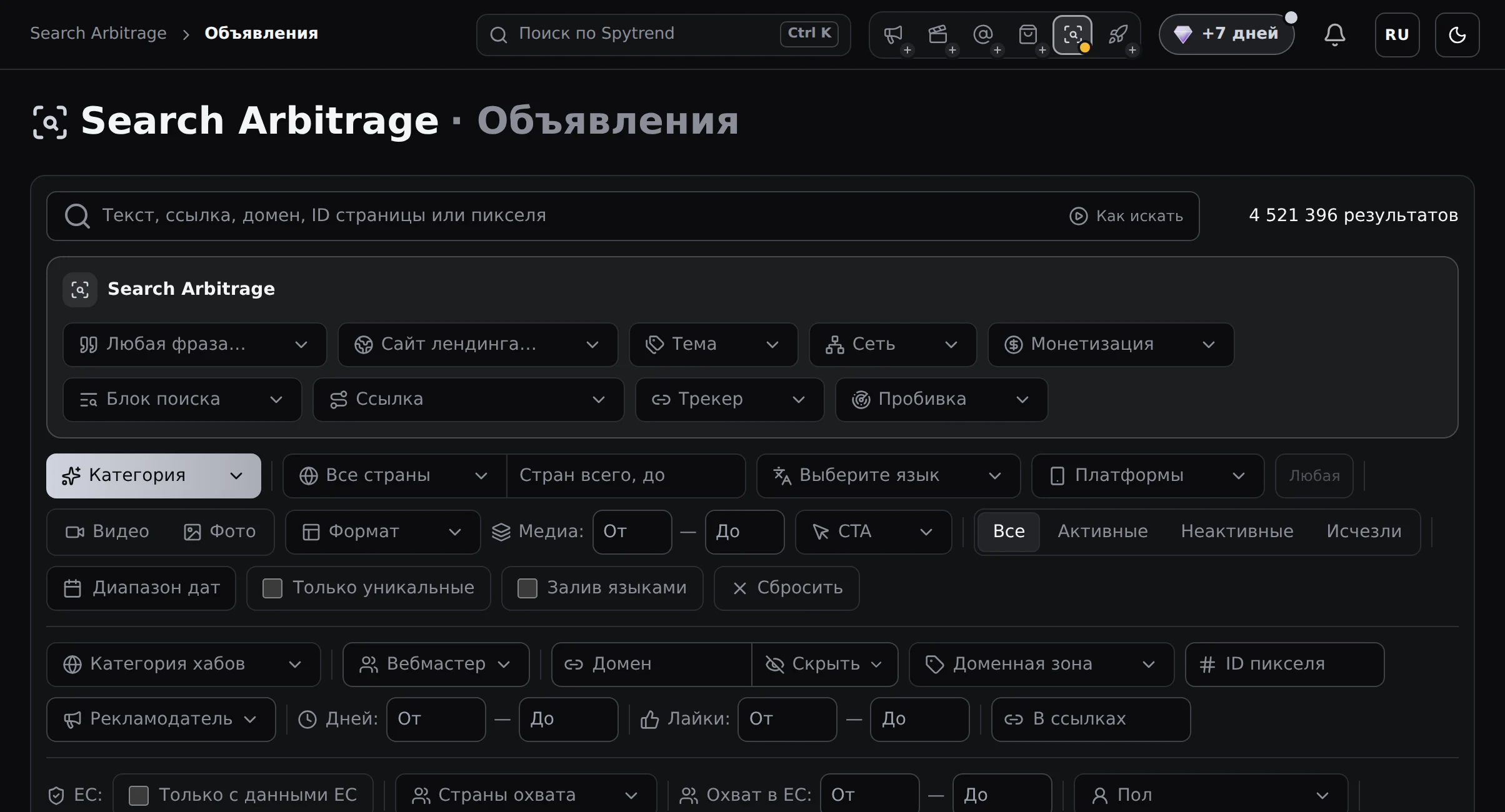
Narrow your search before reviewing individual ads. Search Arbitrage brings together Meta ads leading to articles with related searches and search results pages. The section contains 4,521,396 ads, with filters for keywords, landing sites, topics, networks and monetization.
Compare similar setups by country, language, format, status and period. You can separate direct links from ads using a tracker and filter by the presence of a search block. This helps you find creatives with a relevant redirect path and monetization type.
The menu includes Creatives, Webmasters and Advertisers. The Probing filter offers Probed, In queue and Error statuses.
Recurring creatives provide another signal for your shortlist. For Last 30 days · Sep 23–Oct 22, sorting by Most re-uploaded shows 917 ads with the same creative for Funny bananaz and 808 for SwiftResults Discover within the selection. These counts give you a reason to investigate the setups further; they show how widely each creative is used.
This sort order enables Only Unique. You compare distinct creatives while seeing how many copies each has. Ad status lets you isolate active versions, while the keywords and landing page show what sits behind the image or video.

For more on researching Meta ads, see “Facebook Ad Library: 5 things it doesn’t offer”.
What you gain: Narrow 4,521,396 ads by topic, monetization and landing page to shortlist creatives relevant to your next test.
Analytics
3,188,833 ads reveal how the selection is distributed
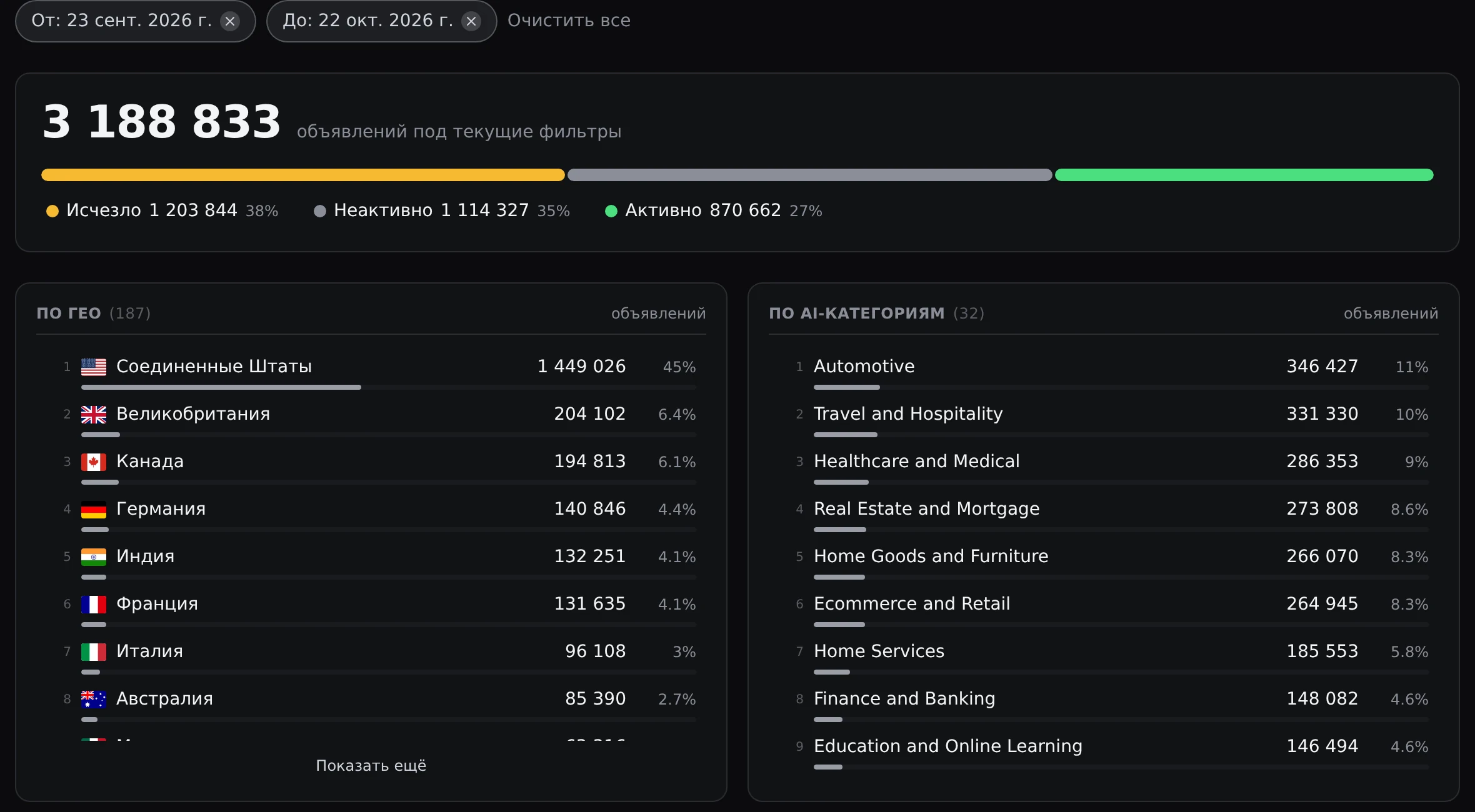
Seeing where ad activity is concentrated helps you choose a direction for your test. For Last 30 days · Sep 23–Oct 22, analytics covers 3,188,833 ads. Of these, 870,662 are active — 27%. Statuses let you separate current ads from inactive and vanished ads.
The country breakdown shows the scale of your selected market: the US accounts for 1,449,026 ads, or 45% of the selection. An ad can target several countries, so country counts add up to more than the total number of ads.
Categories let you compare niches over the same period. Automotive accounts for 346,427 ads — 11%; Travel and Hospitality for 331,330 — 10%; and Healthcare and Medical for 286,353 — 9%.
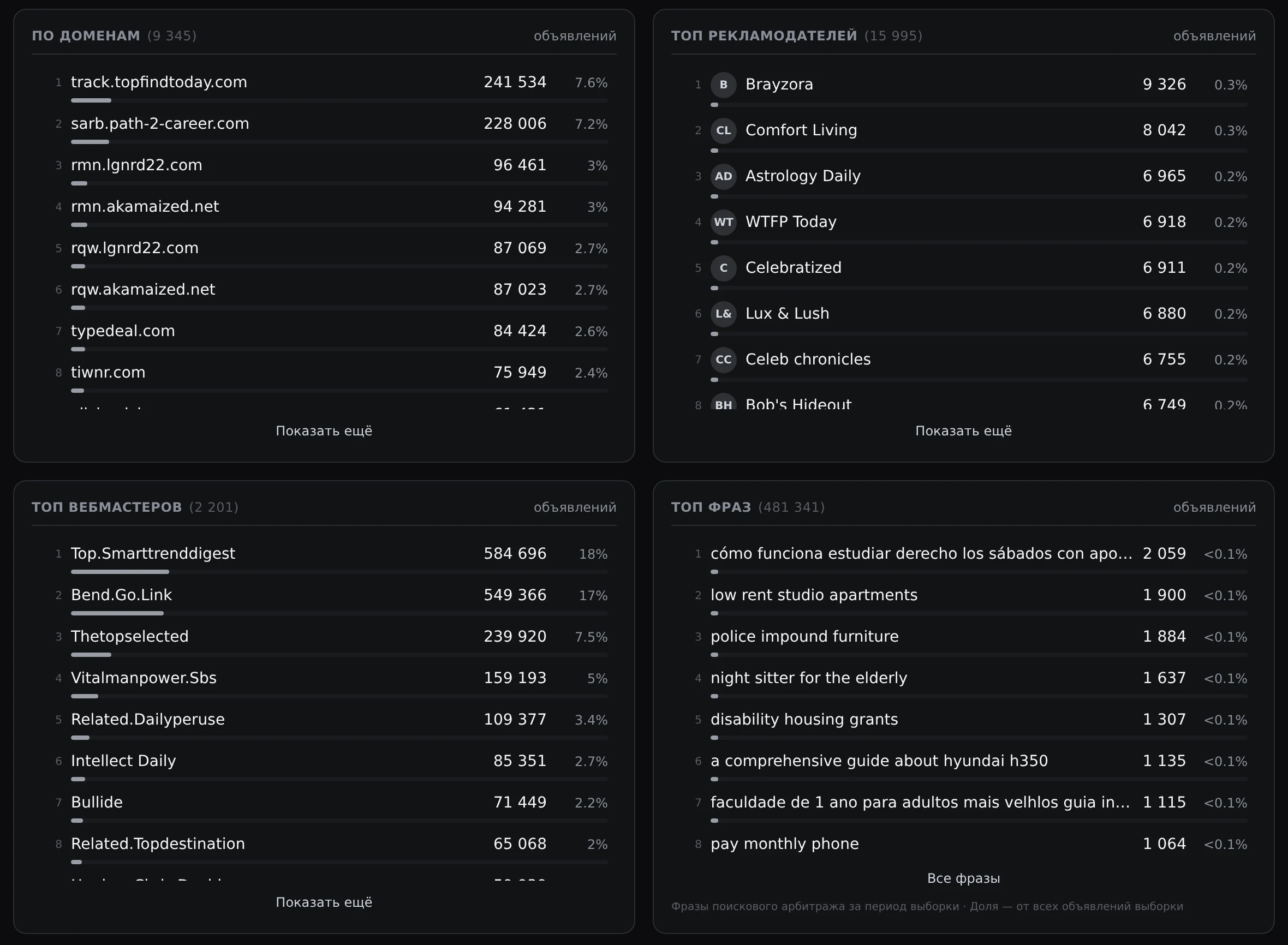
Top phrases provides specific wording to research, with 481,341 phrases for the same period. For example, “low rent studio apartments” appears in 1,900 ads. Cross-reference a phrase with advertisers and webmasters to decide whose ads to examine next.
Top advertisers lists 15,995 advertisers. Brayzora leads with 9,326 ads. These counts show ad volume over the selected period: use the list to choose an advertiser and explore its creatives, keywords and landing pages.
By domain contains 9,345 domains from ad links. Some are trackers, such as track.topfindtoday.com. To compare destination sites, use landing page data and the Websites directory; otherwise, ads routed through a shared tracker can appear to belong to a single site.
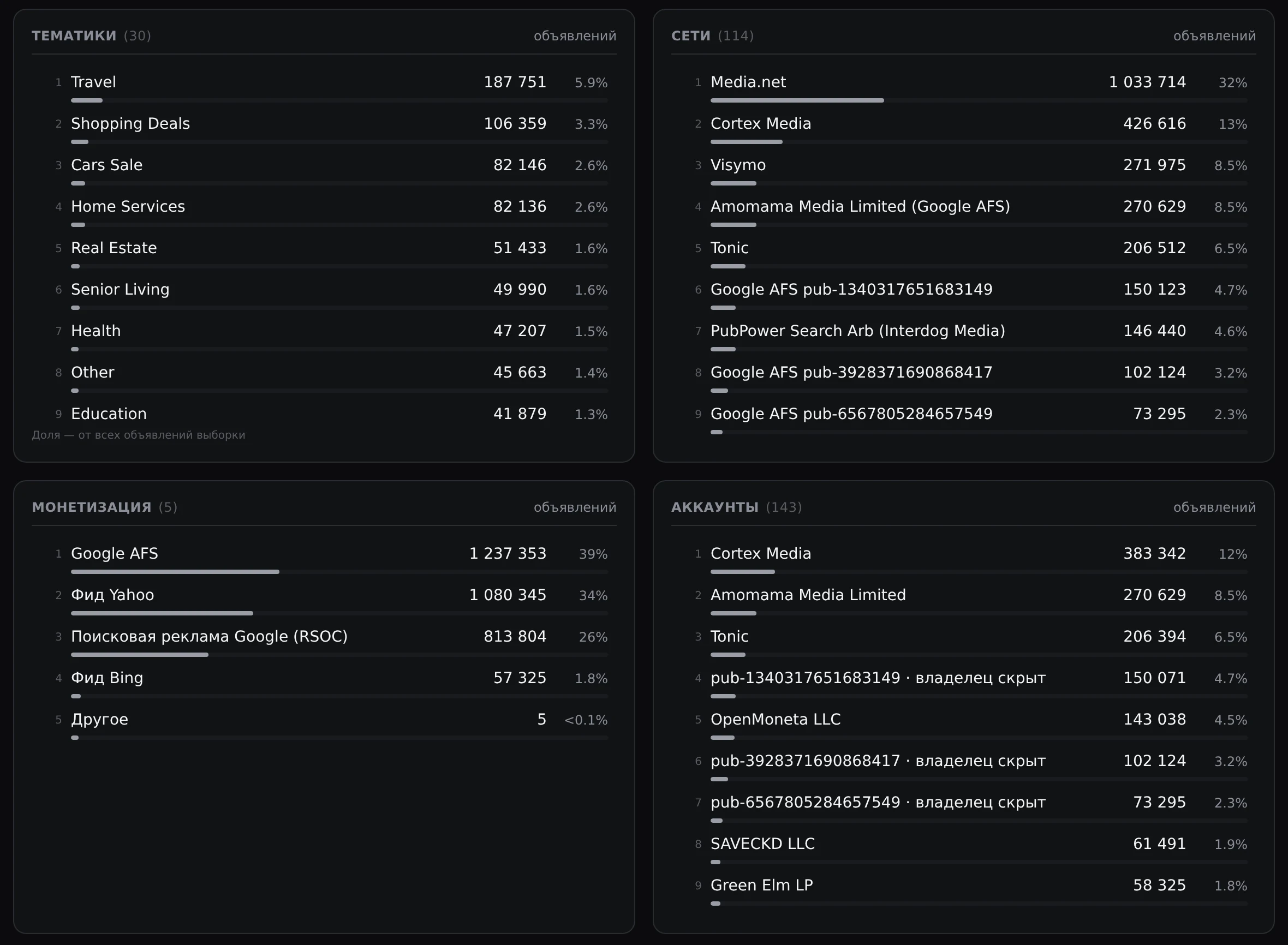
Breakdowns by topic, network and monetization let you compare setups within your chosen niche. Under Topics, Travel has 187,751 ads. Networks includes 114 networks and monetization accounts, including individual Google AFS accounts: Media.net accounts for 32% of the selection and Cortex Media for 13%.
By monetization, Google AFS accounts for 39%, Yahoo feed for 34%, Google search ads (RSOC) for 26% and Bing feed for 1.8%. These shares describe ad volume: use them to choose areas to research.
What you gain: With 870,662 active ads representing 27% of the selection, focus your research on current creatives in your chosen market.
Ad setup breakdowns
3 examples connect creatives, keywords and landing pages
Reviewing the full setup reduces guesswork before a test. For Google AFS, Yahoo feed and RSOC, each example uses the first active ad under Most re-uploaded for the same period that has both a keyword and a landing page screenshot on the same topic. The Arbitrage confirmed label means the ad’s landing page has been identified as search arbitrage.
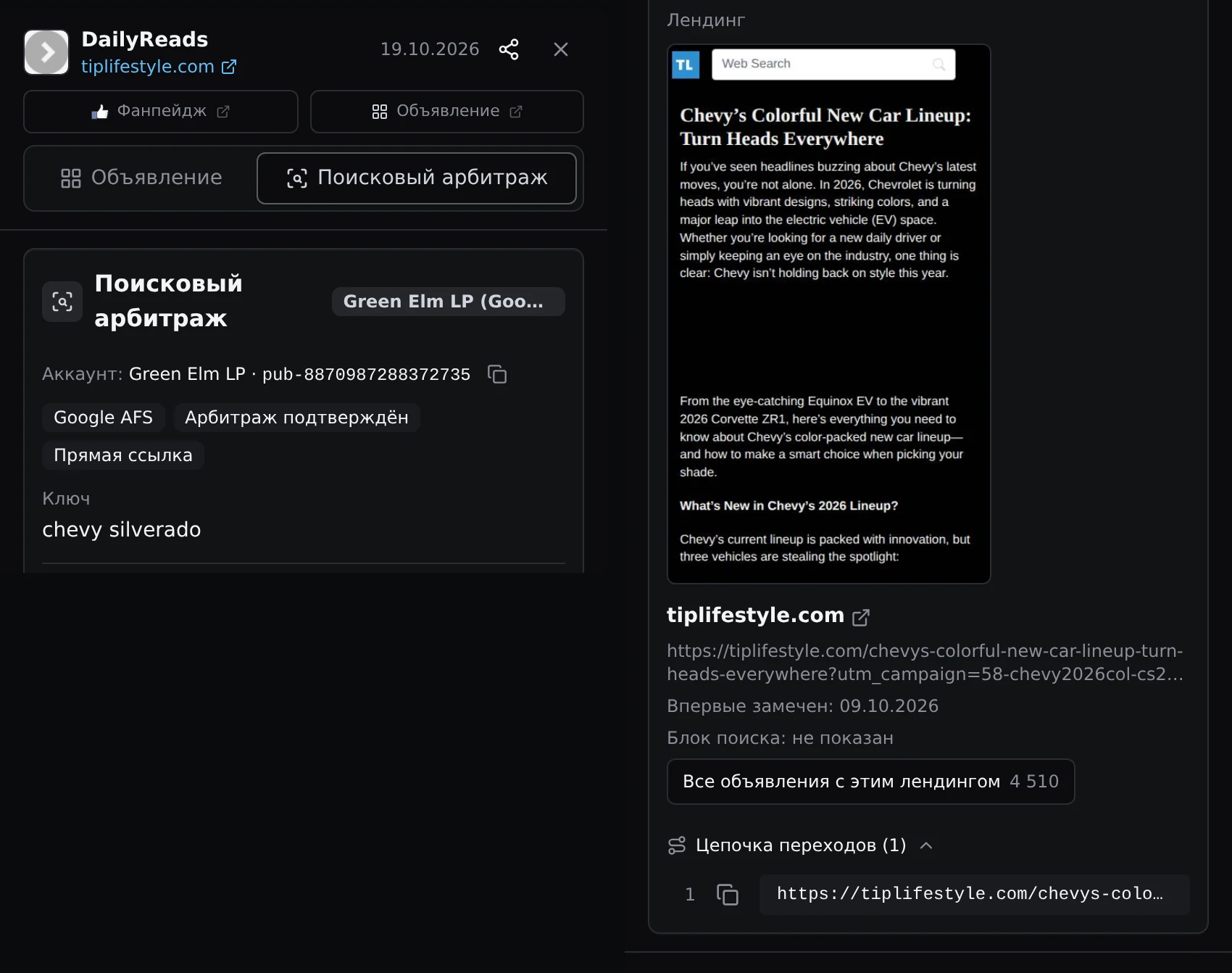
Google AFS: from a Chevrolet keyword to an automotive article
DailyReads uses the keyword “chevy silverado” with Google AFS monetization. Its direct link leads to tiplifestyle.com, where the screenshot shows “Chevy’s Colorful New Car Lineup: Turn Heads Everywhere”, an article about Chevrolet’s 2026 lineup. You can compare the model-related query with the automotive article’s content.
The chain contains 1 step, leading straight to the article. The landing page is marked Search block: not shown. All ads with this landing shows 4,510 ads, indicating the volume of advertising leading to this landing page and giving you other creatives to compare.
Before testing, compare the keyword, creative and article content. This helps you decide which topic and angle to try with your traffic.
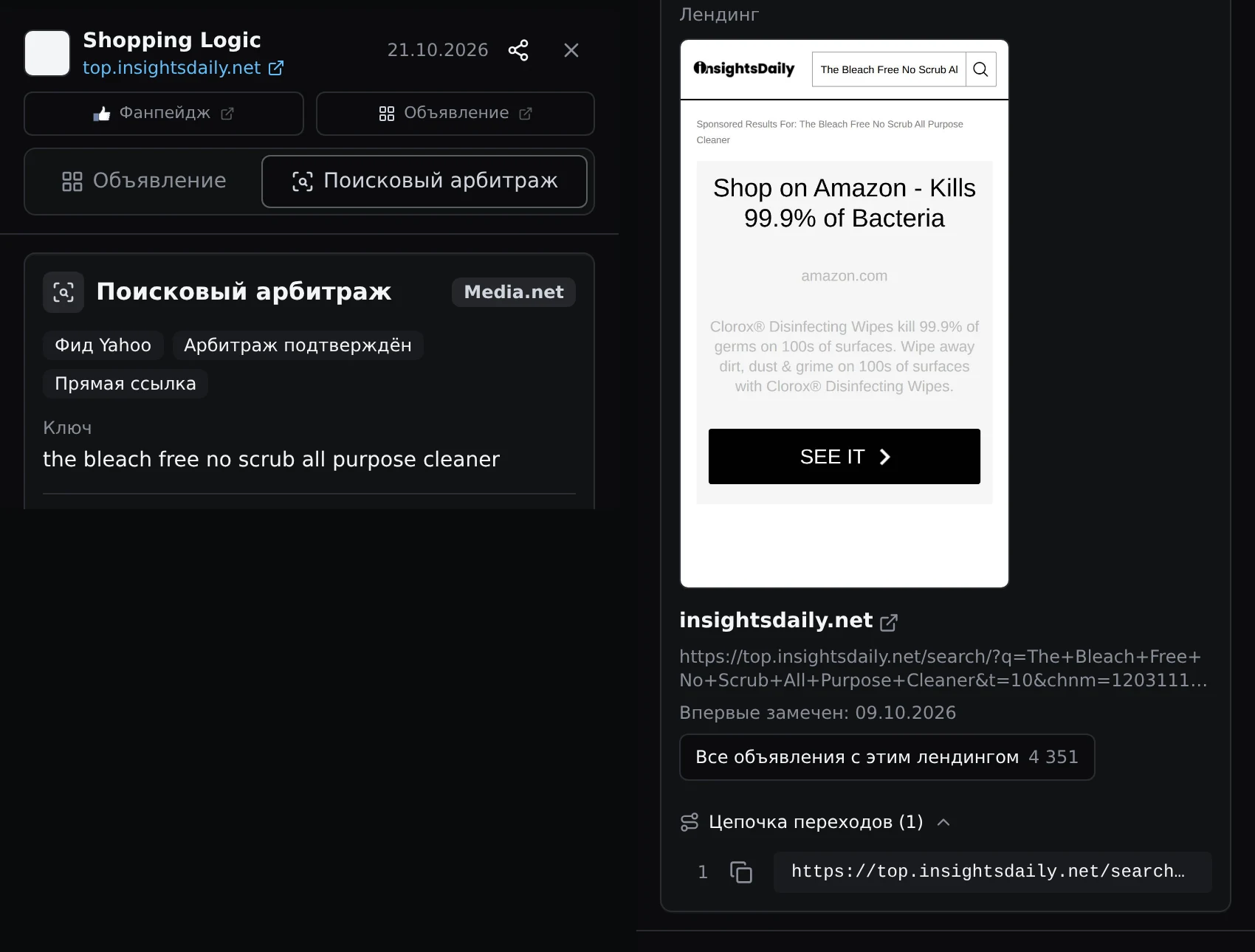
Yahoo feed: from a cleaning product query to a search results page
Shopping Logic uses the keyword “the bleach free no scrub all purpose cleaner”, the Media.net network and Yahoo feed monetization. Its direct link leads to a search results page on insightsdaily.net. The screenshot shows a search for that phrase and an ad block for Clorox wipes. You can compare the query wording with the final page’s content.
The chain contains 1 step. All ads with this landing shows 4,351 ads, helping you assess the landing page’s ad volume and choose other ads to review. Compare their keywords and creatives before preparing your own version.
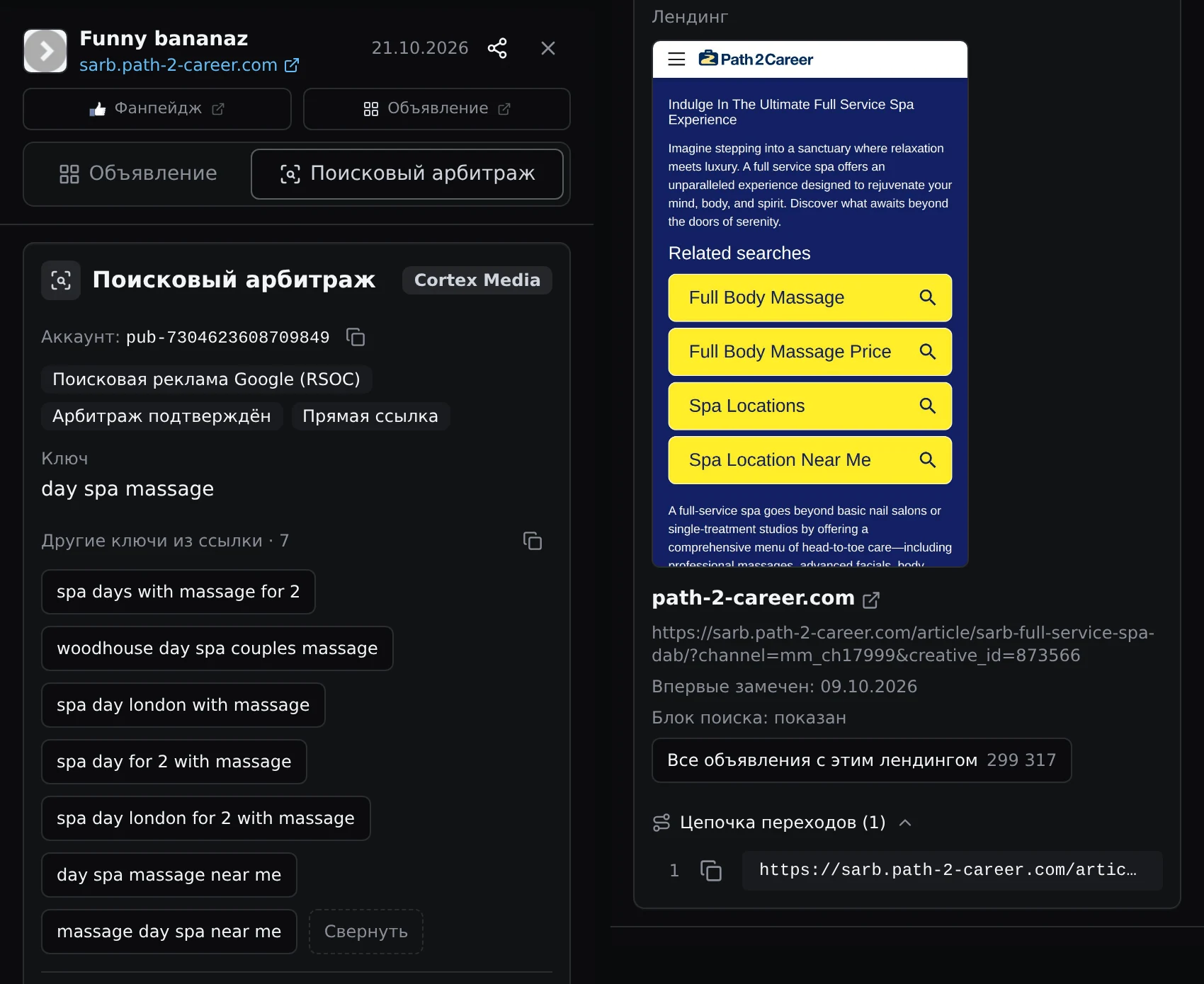
RSOC: from a spa creative to an article with related searches
Funny bananaz uses a direct link and the Cortex Media network. The main keyword is “day spa massage”, with 8 keywords passed in total. They include phrases about nearby massages, a spa day in London and couples massages. You can treat these as separate angles when planning your tests.
On path-2-career.com, the screenshot shows “Indulge In The Ultimate Full Service Spa Experience”, an article with a Related searches block. The chain contains 1 step, and All ads with this landing shows 299,317 ads. Compare the creative, phrases and article, then explore other ads using this landing page to assess different angles.
What you gain: Compare 3 examples to decide which combinations of creative, keyword and landing page to investigate before preparing your test.
Find a starting point for your test
Choose Search Arbitrage access to compare creatives, keywords, networks and final pages in one section.
View pricingWebsites
Shortlist sites with at least 500 ads
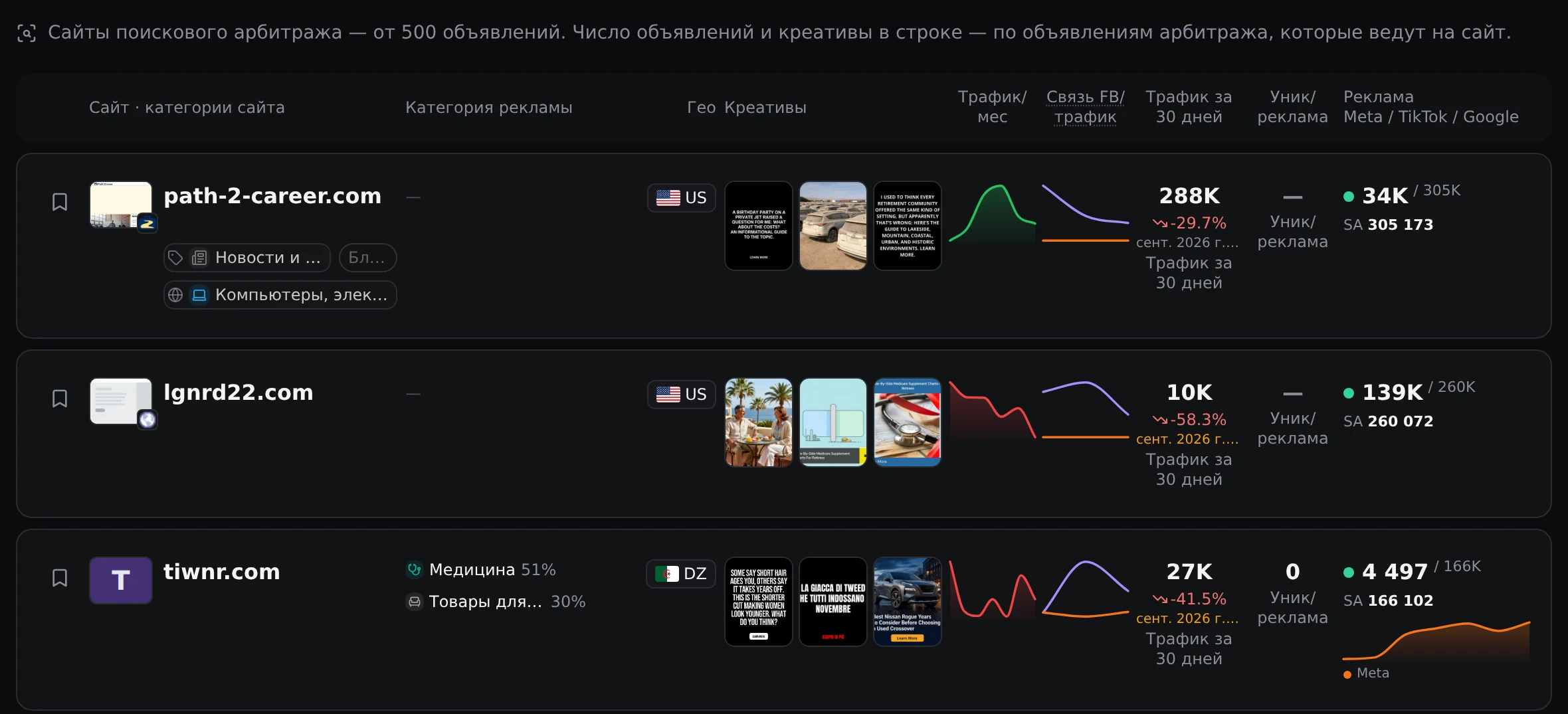
Assess a site as a potential direction for your test in the Websites directory. It lists search arbitrage sites with at least 500 ads. Categories, countries and creatives help you find relevant examples, while traffic figures add context to ad volume.
The RSOC example’s site, path-2-career.com, appears first in the directory. It has 305,173 Search Arbitrage ads and traffic of 288K for September 2026. These are separate metrics: the ad count includes all copies across all time, while traffic refers to the stated month. You cannot compare them as ads and the visitors those ads brought in.
For your test, choose a site with relevant topics and countries, then examine the ads leading to it. The ad count shows advertising volume; the site’s revenue needs a separate assessment.
What you gain: Shortlist sites with at least 500 ads, then check their topics and countries to choose relevant landing pages for your test.
Dynamics
855 more ads for “latest devices” suggest an angle to investigate
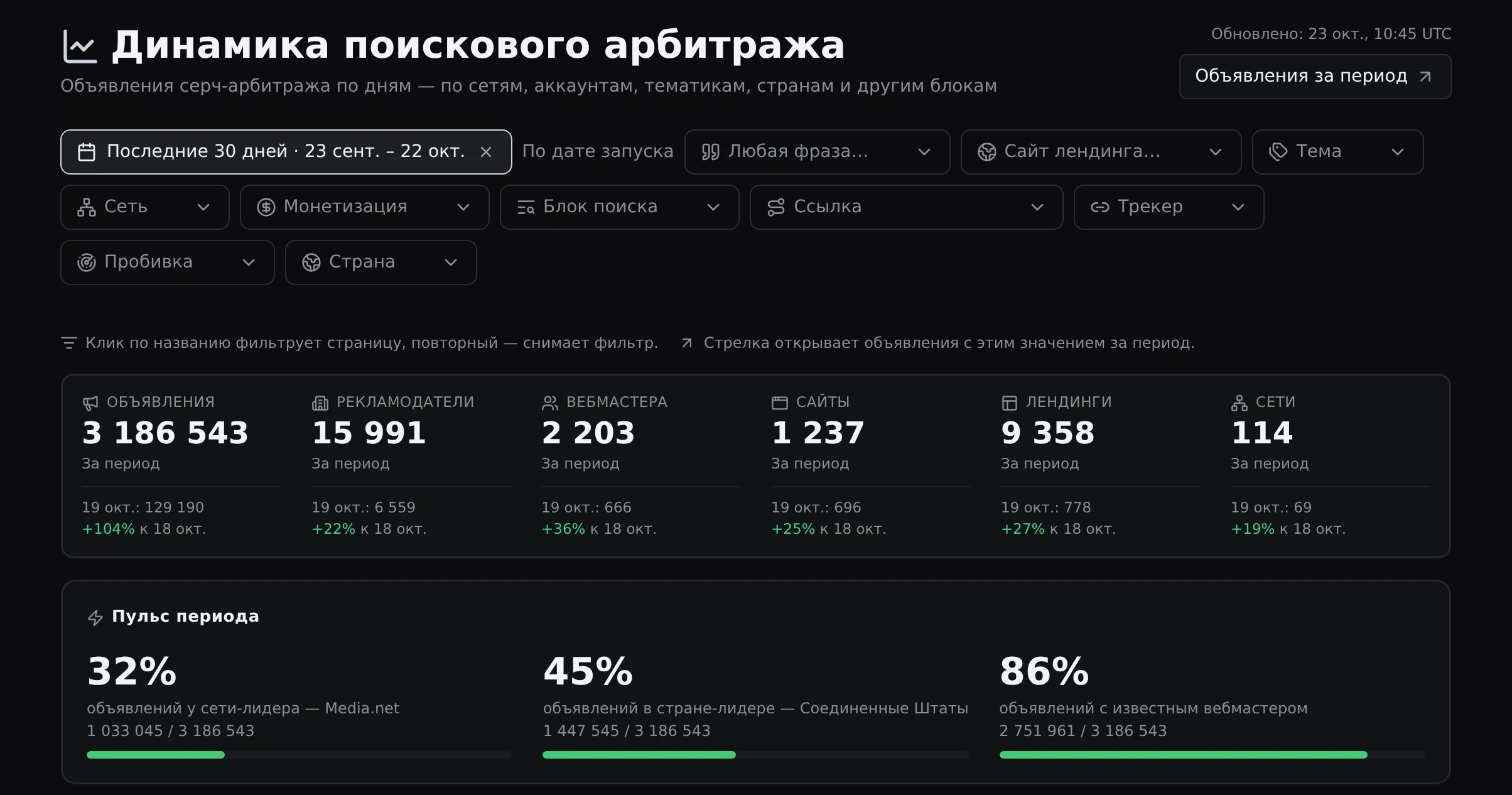
Search Arbitrage dynamics tracks changes in ad activity by day. For Last 30 days · Sep 23–Oct 22, the By launch date view lets you compare networks, monetization, topics, phrases and sites. The period includes 15,991 advertisers, 1,237 sites and 9,358 landings.
Period pulse provides context: 32% of ads are on the leading network, Media.net; 45% are in the leading country, the US; and 86% have a known webmaster. From a selected value, you can explore the corresponding ads and see which setups account for that activity.
Use Keyword trends to find new ideas to test. For Last 7 days · Oct 13–Oct 19, “latest devices” grew from 19 to 874 ads — an increase of 855. The comparison period is Oct 6–Oct 12, and 10 advertisers used the phrase.
Among the leading phrases, growth is concentrated on a single day: for “latest devices”, that day accounts for 574 of 874 ads. Use View ads for the phrase, then examine the sites and networks behind those ads. Check whether growth continues and which creatives account for the spike.
Country, network and topic filters help narrow your research. Then choose what to test based on the specific creatives and landing pages behind the change in ad count.
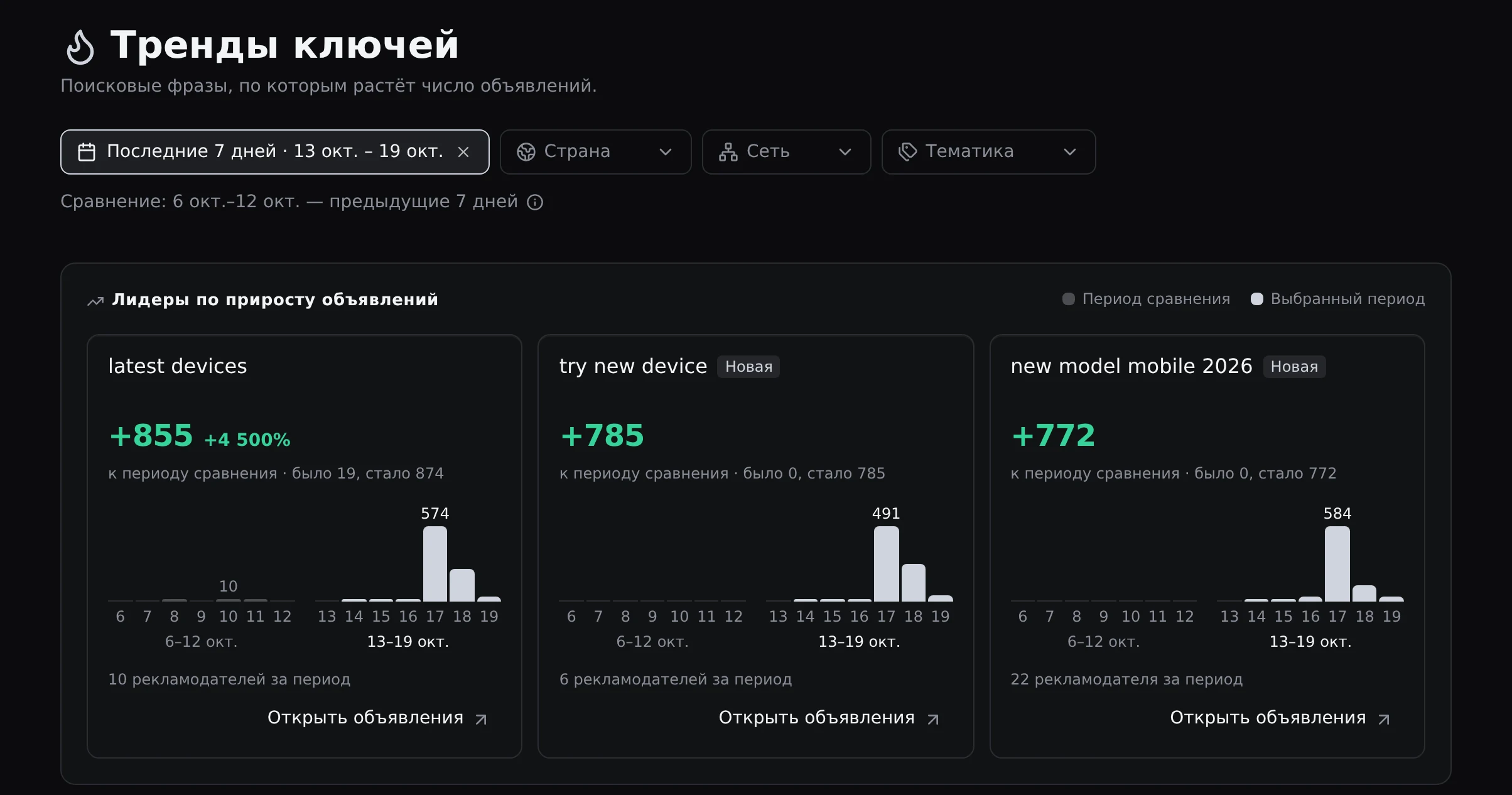
What you gain: Investigate the rise from 19 to 874 ads for “latest devices” by checking which creatives, sites and networks account for it.
Data scope
4,521,396 ads and setups; no revenue, RPC, budgets or Google results
Ad data includes dates, statuses, copy counts, keywords and final pages. The section does not show revenue, RPC, budgets or actual Google search results. Reach is also available for EU countries. Assess the economics of your own test separately.
Keywords in the ad card are phrases passed in the ad’s link. A landing page screenshot may show a visitor verification page; in that case, check the address in the redirect chain.
For more on workflows and metrics, see “Media buyer: workflow, metrics and tools”.
What you gain: Assess creatives and landing pages across 4,521,396 ads, then evaluate your test’s revenue and budgets separately.
Subscription
Full section access starts at $249 per month
Pay for the access you need: Search Arbitrage is a separate subscription that works with any Spytrend plan. You do not need to buy another plan. Every option includes the full section, with data updated daily.
| Plan | Price | Included |
|---|---|---|
| Section | $249 per month | Full section |
| Section + MCP | $499 per month | Full section and MCP |
| Year with MCP | $4,500 per year | Full section and MCP |
Choose Section to work on the website. For data access through MCP for AI agents, choose Section + MCP or Year with MCP. Year with MCP saves $1,488 — 25% off monthly billing. Cancel anytime; access stays until the end of your paid period.
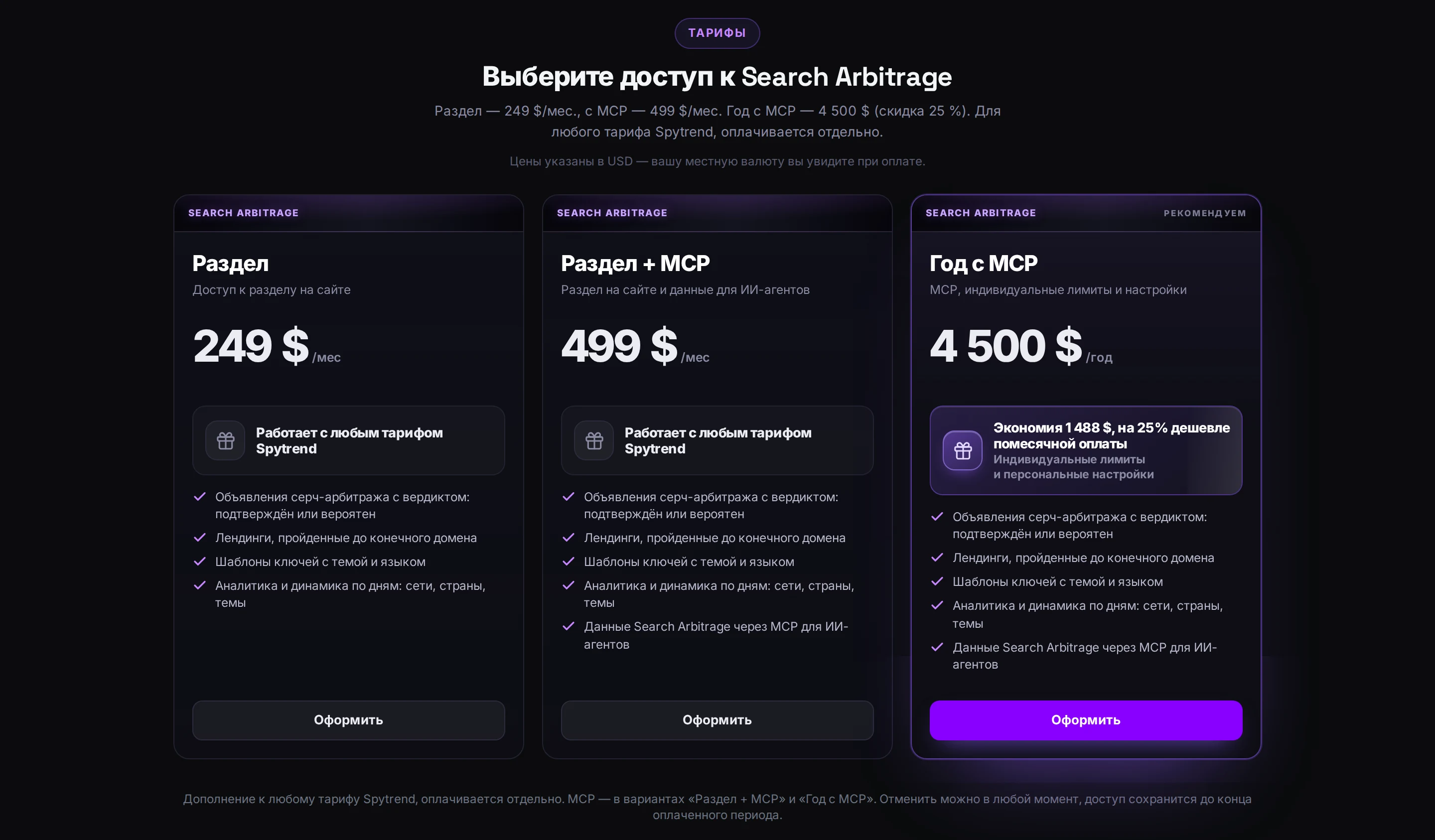
What you gain: Choose Section at $249 per month for website research, or Section + MCP at $499 per month for access through AI agents.
Search Arbitrage gives you a starting point for choosing ad setups to test: compare creatives, keywords, monetization, networks and landing pages, then check advertiser activity and keyword trends. Use that research to choose an approach and identify which details to validate with your traffic.
FAQ
How much does the subscription cost, and which options include MCP?
Section costs $249 per month, Section + MCP costs $499 per month, and Year with MCP costs $4,500 per year. Every option includes the full section. MCP data access for AI agents is included in Section + MCP and Year with MCP.
Do I need to buy another Spytrend plan?
No other plan is required. Search Arbitrage is billed separately and works with any Spytrend plan. Choose your subscription option based on your billing period and whether you need MCP access.
Which networks and monetization types can I compare?
The section includes Media.net, Cortex Media, Visymo, Tonic and Predicto, among others. The Monetization filter lets you select Google AFS, Google search ads (RSOC), Yahoo feed, Bing feed and Other.
Can I see revenue and RPC for other advertisers’ setups?
Revenue, RPC and ad budgets are not shown. You can research ad activity, copy counts, keywords, landing pages and other details of each setup. Reach is available for EU countries; assess the economics of your own test separately.
How often is the data updated?
Data is updated daily. To compare activity, choose a period and review ad statuses, daily dynamics and growth in ad counts for keywords against the previous period of the same length.
Can I cancel my subscription?
Yes, you can cancel anytime. Access to the section stays until the end of your paid period.
Choose access for your workflow
Compare website access with options that include MCP for AI agents.
Choose your subscription